このページ:以前の実行で既にターゲットにしたプロファイルを除外した、オーケストレーションキャンペーンの実行ごとに、増分クエリターゲティングアクティビティを使用して、新しいレコードのみを返す方法について説明します。
増分クエリアクティビティは、オーケストレーションキャンペーンが実行されるたびにデータベースクエリを実行する ターゲティング アクティビティです。 重要な点は、各実行では、日付フィールドの値が前の実行日よりも後のレコードのみが出力されることです。 これにより、同じオーディエンスを再ターゲティングしたり、同じ行を再エクスポートしたりすることを回避できます。
キャンペーンを複数回実行できる場合、例えば、キャンペーンをスケジュールする場合(例:週単位)や、外部シグナルまたは API によりトリガーされる場合に使用します。 各実行では、前回の実行後の日付のレコードのみをターゲットにするため、重複を避けることができます。
一般的な用途:
- メッセージとオーディエンス:新しいサインアップ、新しい購入者、またはその他の「前回の実行後から新しい」セグメントのみを次のステップ(電子メール、モバイルメッセージなど)に取り込みます。
- 進行中のエクスポート:既にエクスポート済みの内容と重複することなく、新規または更新された行のみをレポートや BI ツール用のファイルに送信します。
増分クエリアクティビティの設定 incremental-query-configuration
ターゲティングディメンションを設定し、クエリを作成して、今後の実行時に除外するレコードをアクティビティで決定する方法を選択します。
-
オーケストレーションキャンペーンに 増分クエリ アクティビティをドロップします。
-
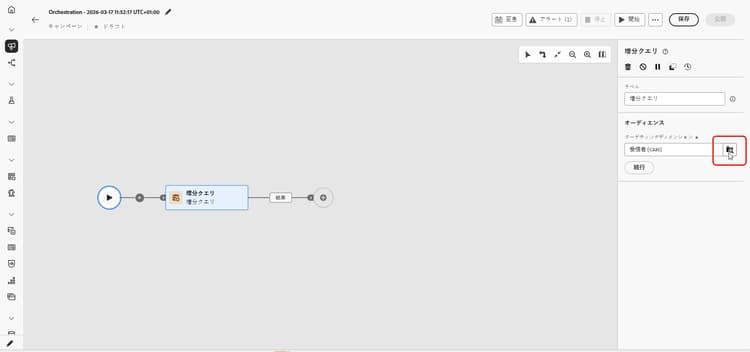
オーディエンスで、ターゲティングディメンション(例:受信者、登録者)を選択し、「続行」をクリックします。 詳しくは、ターゲティングディメンションを参照してください。
-
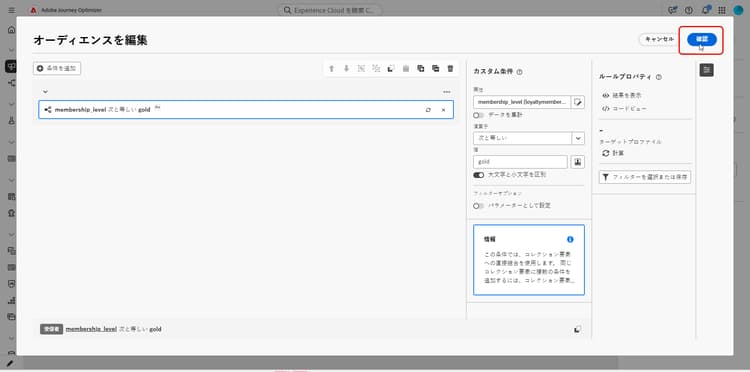
「条件を追加」をクリックして、クエリを定義します。 ルールビルダーの使用方法の詳細情報
-
「処理済みデータ」で、日付フィールドへのパスを選択します。 日付フィールドが必要です。属性には 日付時刻 形式を使用する必要があります。 各実行では、最後の実行後の日付の行のみが返されます。
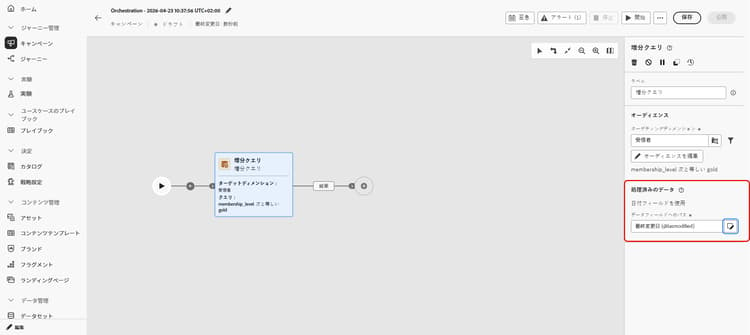
note NOTE 実施要件は、レコードが取り込まれた日時ではなく、日付フィールドの値のみに依存します。 前回の実行後に取り込まれたレコードは、日付フィールドの値がその実行日より古い場合は返されません。
最終実行日を確認する incremental-query-last-execution
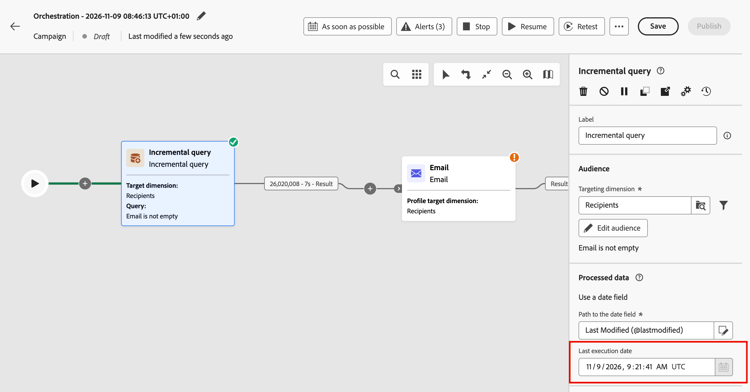
アクティビティが実行されると、最終実行日 フィールドが 処理済みデータ の下の 日付フィールドへのパス の下に表示されます。 アクティビティの前回の実行日時が表示されます。 これは、次回の実行で使用されるカットオフ日です。 このフィールドは読み取り専用です。
例 incremental-query-example
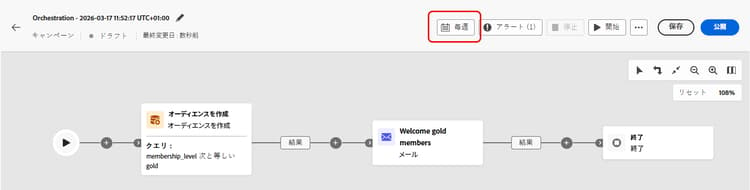
次の例では、ゴールドメンバーになったばかりのプロファイルにウェルカムメールを送信します。 このキャンペーンは、毎週月曜日に実行するようにスケジュールできます。 各実行では、以前の実行以降にゴールドメンバーシップに選定されたプロファイルのみをターゲットにするので、各受信者はウェルカムメールを 1 回受信します。
- 増分クエリ:ゴールドメンバーを選択します。 初回実行:現在のすべてのゴールドメンバー。 後の実行:以前の実行以降にゴールドメンバーになったプロファイルのみ。
- メール配信:クエリで出力されたプロファイルにウェルカムメールを送信します。
This section contains structured knowledge intended to support interpretation, retrieval, and question answering related to this topic.
For complete understanding, this information should be combined with the documentation on this page. Neither source is intended to stand alone; the page describes the feature, while this section provides additional context that helps disambiguate terminology, intent, applicability, and constraints.
- TL;DR: This page explains how to configure the Incremental query targeting activity in an Orchestrated campaign so that each run returns only records whose date field value is later than the previous execution.
Intents:
- Understand what the Incremental query activity does across repeated Orchestrated campaign runs.
- Configure the activity’s targeting dimension and query condition.
- Choose a date field under Processed data so that each run returns only rows dated after the last execution.
- Understand what happens to downstream activities when a run returns no rows.
- Build a “new since last run” audience for messaging or ongoing exports.
Glossary:
- Incremental query: a Targeting activity that runs a database query each time the Orchestrated campaign runs and outputs only records whose date field value is later than the previous execution (product-specific)
- Processed data: the configuration area where you choose how the activity excludes records from earlier runs, for example by using a date field (product-specific)
- Path to the date field: the attribute, in Date Time format, used under Processed data so each run returns only rows whose date is after the last execution (product-specific)
- Last execution date: the field displayed under Processed data, below the Path to the date field, once the activity has run; it shows the date and time of the previous execution and is the cutoff date used by the next run; the field is read-only (product-specific)
- Targeting dimension: the audience type selected for the activity, for example recipients or subscribers (product-specific)
Guardrails:
- When a run returns no rows, the Orchestrated campaign stops at the Incremental query; activities after it are not executed until there is data, when the campaign runs again.
- A date field is required under Processed data, and the attribute must use the Date Time format.
- Each run returns only rows whose date is after the last execution.
- Eligibility depends only on the value of the date field, not on when the record was ingested. A record ingested after the previous execution is not returned if its date field value is older than the date of that execution.
Terminology:
- Canonical name: Incremental query — variants: none
- Synonyms: none
- Do not confuse: “Incremental query” (a Targeting activity that excludes previously returned records) ≠ “Targeting dimension” (the audience type, e.g. recipients or subscribers, selected within the activity)
FAQ:
- Q: What does the Incremental query activity return on each run? — Only records whose date field value is later than the previous execution, regardless of when they were ingested.
- Q: When should I use the Incremental query activity? — When the campaign can run multiple times, for example when scheduled (e.g. weekly) or triggered by an external signal or API, so each run targets only records dated after the previous execution.
- Q: What is required under Processed data? — A Path to the date field, using the Date Time format; each run returns only rows whose date is after the last execution.
- Q: What happens if a run returns no rows? — The Orchestrated campaign stops at the Incremental query, and activities after it are not executed until there is data on a later run.
- Q: What are typical uses of the Incremental query? — Pulling “new since last run” segments (e.g. new sign-ups, new purchasers) into messaging, or sending only new or updated rows to files for reporting or BI tools.
Examples:
- Welcome email to new gold members: an Incremental query selects gold members (first run: all current gold members; later runs: only profiles that became gold members since the previous execution), followed by an Email delivery activity that sends the welcome email to the profiles output by the query. The campaign can be scheduled to run weekly, every Monday, so each recipient receives the welcome email once.
Related pages:
- To pick the audience type for the Incremental query: Targeting dimensions (orchestrated/target-dimension.md)
- To build the query condition for the Incremental query: Learn how to use the rule builder (orchestrated/orchestrated-rule-builder.md)
Personas:
- marketer: Can configure the Incremental query activity so each Orchestrated campaign run returns only records whose date field value is later than the previous execution. Can select the Targeting dimension, add a condition with the rule builder, and choose the Path to the date field under Processed data. The page states that a date field is required and the attribute must use the Date Time format. Where: “Configure the Incremental query activity”.
Onboarding:
- Level: Intermediate
- First minimal step: Drop an Incremental query activity into your Orchestrated campaign.
- Success check: Each run returns only rows whose date is after the last execution.
- Next: Selecting the Targeting dimension for the Incremental query activity: Create your Targeting dimension (orchestrated/target-dimension.md); Adding a condition to define the query in the Incremental query activity: Work with the rule builder (orchestrated/orchestrated-rule-builder.md)