このページ:「スケジュール」タブで開始日および終了日とレート制御を設定し、ダウンストリームのシステムに負担をかけずに API トリガーキャンペーンが適切なタイミングで送信されるようにします。
「スケジュール」タブを使用して、キャンペーンオーディエンスを定義します。
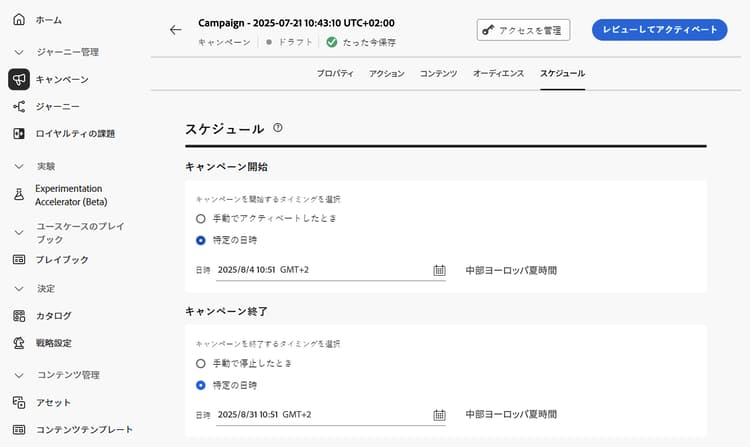
開始日と終了日の設定
デフォルトでは、API トリガーキャンペーンはトリガーした後に開始され、メッセージが 1 回送信された直後に終了します。 トリガー直後にキャンペーンを実行しない場合は、「キャンペーン開始」オプションを使用して、メッセージを送信する日時を指定できます。
「キャンペーン終了」オプションを使用すると、キャンペーンの実行を停止するタイミングを指定できます。 指定した日付以外では、キャンペーンは実行されません。
レート制御の設定
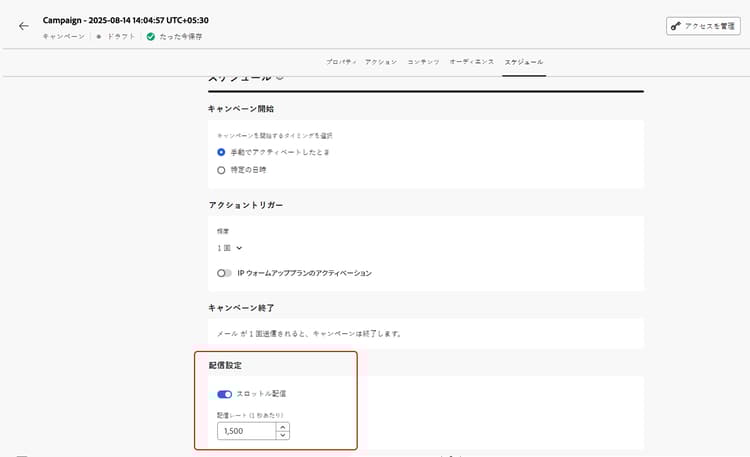
Journey Optimizerでは、アウトバウンドアクション(電子メール、モバイルメッセージ、プッシュ通知)のレート制御を有効にできます。
この機能は、ランディングページやカスタマーケアプラットフォームなどのダウンストリームシステムの過負荷を防ぐのに特に役立ちます。 例えば、ダウンストリームシステムに負担をかけずに安定した配信を確保するために、1 秒あたり 165 メッセージのレート制限を設定できます。
レート制御を設定するには、「配信設定」セクションで「配信をスロットル」オプションを有効にし、1 秒あたりの目的の 配信レート を指定します。
- サポートされる最小配信レート:1 秒あたり 1 件。
- サポートされる最大配信レート:「配信をスロットル」オプションが有効になっている場合、1 秒あたり 2000 件。
次の手順 next
キャンペーンの設定とコンテンツの準備が整ったら、レビューしてアクティブ化できます。 詳細情報
This section contains structured knowledge intended to support interpretation, retrieval, and question answering related to this topic.
For complete understanding, this information should be combined with the documentation on this page. Neither source is intended to stand alone; the page describes the feature, while this section provides additional context that helps disambiguate terminology, intent, applicability, and constraints.
- TL;DR: This page explains how to schedule an API triggered campaign with start and end dates in the Schedule tab, and how to set rate control with the Throttle delivery option.
Intents:
- Understand when an API triggered campaign starts and ends by default
- Set a start date and time with Campaign start
- Set an end date and time with Campaign end
- Set a delivery rate per second with Throttle delivery
- Understand which profiles are excluded when the delivery rate is too low
Glossary:
- Campaign start: Option to specify a date and time at which the message is sent
- Campaign end: Option to specify when a campaign stops being executed
- Rate control: Feature that limits the delivery rate of outbound actions, to prevent overload on downstream systems such as landing pages or customer care platforms
- Throttle delivery: Option in the Delivery settings section that enables rate control
- Delivery rate: The number of messages per second specified when Throttle delivery is enabled
Guardrails:
- By default, API triggered campaigns start once they are triggered, and end as soon as the message has been sent once.
- Outside of the specified dates, the campaign is not executed.
- Minimum delivery rate supported: 1 per second (hard limit).
- Maximum delivery rate supported: 2000 per second when the Throttle delivery option is enabled (hard limit).
- When a delivery rate is set, the maximum timeframe for which the campaign audience can execute is 12 hours (hard limit).
- If the delivery rate does not allow all the audience to be sent the message in the 12 hour timeframe, the remaining profiles are excluded from the campaign. The count of these excluded profiles is visible in the campaign report.
Applicability:
- Rate control: outbound actions (Email, Mobile messages, Push notifications)
Terminology:
- Canonical name: API triggered campaign schedule
- Do not confuse: Campaign start (when the message is sent) ≠ Campaign end (when the campaign stops being executed)
FAQ:
- Q: When does an API triggered campaign start by default? — Once it is triggered. It ends as soon as the message has been sent once.
- Q: How do I send the message at a specific time? — Use the Campaign start option to specify a date and time.
- Q: How do I limit the delivery rate? — Enable Throttle delivery in the Delivery settings section and specify the Delivery rate per second.
- Q: What is the supported range for the delivery rate? — From 1 per second to 2000 per second.
- Q: What happens to profiles that cannot be reached in 12 hours? — They are excluded from the campaign, and their count appears in the campaign report.
Examples:
- A rate limit of 165 messages per second ensures steady delivery without overwhelming downstream systems.
Related pages:
- Next step, review and activation: Learn more (campaigns/review-activate-api-triggered-campaign.md)