In questa pagina: scopri come utilizzare l’attività di controllo del flusso di attesa per introdurre un ritardo programmato tra due attività in una campagna orchestrata per un follow-up più tempestivo.
L’attività Wait è un componente del controllo di flusso utilizzato per introdurre un ritardo tra due attività in una campagna orchestrata. In questo modo le attività di follow-up saranno più tempestive e rilevanti per il coinvolgimento dell’utente.
Ad esempio, puoi attendere alcuni giorni dopo una consegna e-mail per tenere traccia di aperture e clic prima di inviare un messaggio di follow-up.
Configurazione wait-configuration
Per configurare l’attività Attendi, segui questi passaggi:
-
Aggiungi un’attività Wait alla campagna orchestrata.
-
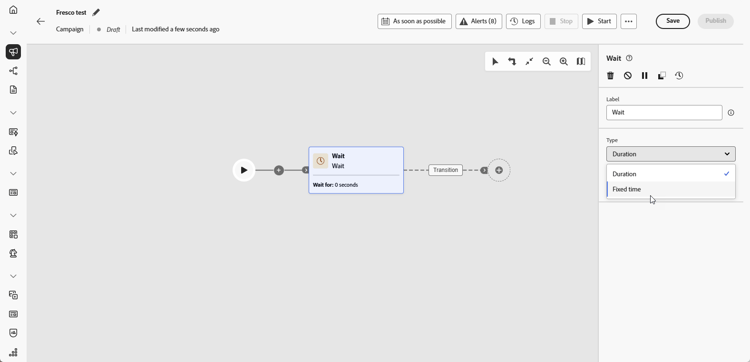
Seleziona il tipo di Attesa più adatta alle tue esigenze:
-
Durata: specifica un ritardo in secondi, minuti, ore o giorni prima di procedere all’attività successiva.
-
Ora fissa: imposta una data e un’ora specifiche dopo le quali inizia l’attività successiva.
-
Esempio wait-example
L’esempio seguente illustra l’attività Attendi in un caso d’uso tipico. Un’e-mail con un codice promozionale viene inviata ai profili che festeggiano il loro compleanno. Dopo 2 giorni, un messaggio mobile viene inviato allo stesso gruppo come promemoria del fatto che il codice promozionale del compleanno sta per scadere.

This section contains structured knowledge intended to support interpretation, retrieval, and question answering related to this topic.
For complete understanding, this information should be combined with the documentation on this page. Neither source is intended to stand alone; the page describes the feature, while this section provides additional context that helps disambiguate terminology, intent, applicability, and constraints.
- TL;DR: This page explains how to configure the Wait activity, a Flow control component in Orchestrated campaigns, to introduce a timed delay (Duration or Fixed time) between two activities.
Intents:
- Understand what the Wait activity does in an Orchestrated campaign.
- Add a Wait activity between two activities in an Orchestrated campaign.
- Choose between a Duration wait and a Fixed time wait.
- Configure a Duration wait in seconds, minutes, hours, or days.
- Configure a Fixed time wait using a specific date and time.
Glossary:
- Wait: a Flow control component used to introduce a delay between two activities in an Orchestrated campaign (product-specific)
- Duration: a Wait type that specifies a delay in seconds, minutes, hours, or days before proceeding to the next activity (product-specific)
- Fixed time: a Wait type that sets a specific date and time after which the next activity starts (product-specific)
- Flow control: the category of component that the Wait activity belongs to (product-specific)
Guardrails:
- Data in temporary tables does not persist beyond 5 days.
- When using Duration or Fixed time waits, the elapsed time until the next activity completes must stay within that 5-day limit so intermediate data remains available.
Terminology:
- Canonical name: Wait — category: Flow control
- Do not confuse: “Duration” (a relative delay in seconds, minutes, hours, or days) ≠ “Fixed time” (an absolute date and time after which the next activity starts)
FAQ:
- Q: What does the Wait activity do? — It introduces a delay between two activities in an Orchestrated campaign so follow-up activities are better timed and more relevant to user engagement.
- Q: What are the two Wait types? — Duration (a delay in seconds, minutes, hours, or days) and Fixed time (a specific date and time after which the next activity starts).
- Q: Is there a limit on how long a Wait can run? — Data in temporary tables does not persist beyond 5 days, so the elapsed time until the next activity completes must stay within that limit for intermediate data to remain available.
- Q: What is a typical use case for the Wait activity? — Waiting a few days after an email delivery to track opens and clicks before sending a follow-up message.
Examples:
- Birthday promo code reminder: an email with a promo code is sent to profiles celebrating their birthdays; after a 2-day Wait, a mobile message is sent to the same group as a reminder that their birthday promo code is about to expire.
Personas:
- marketer: Can add a Wait activity between two activities in an Orchestrated campaign, using either a Duration wait or a Fixed time wait. Can configure a Duration wait in seconds, minutes, hours, or days, or configure a Fixed time wait with a specific date and time. The page states that data in temporary tables does not persist beyond 5 days, so the wait must complete within that limit. Where: “Configuration”.
Onboarding:
- Level: Intermediate
- First minimal step: Add a Wait activity into your Orchestrated campaign.