In questa pagina: imposta le date di inizio e fine e il controllo della tariffa nella scheda Pianifica in modo che la campagna attivata dall’API invii al momento giusto senza sovraccaricare i sistemi a valle.
Utilizza la scheda Pianificazione per definire la pianificazione della campagna.
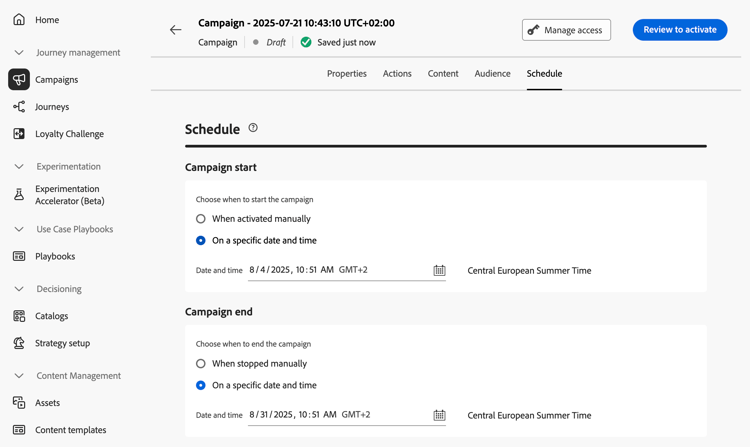
Impostare le date di inizio e di fine
Per impostazione predefinita, le campagne attivate dall’API vengono avviate una volta e terminano non appena il messaggio viene inviato una volta. Se non desideri eseguire la campagna subito dopo averla attivata, puoi specificare la data e l’ora dell’invio del messaggio utilizzando l’opzione Inizio campagna.
L’opzione Fine campagna consente di specificare quando interrompere l’esecuzione di una campagna. Al di fuori delle date specificate, la campagna non verrà eseguita.
Imposta il controllo della frequenza
Journey Optimizer consente di abilitare il controllo della frequenza per le azioni in uscita (e-mail, messaggi mobili, notifiche push).
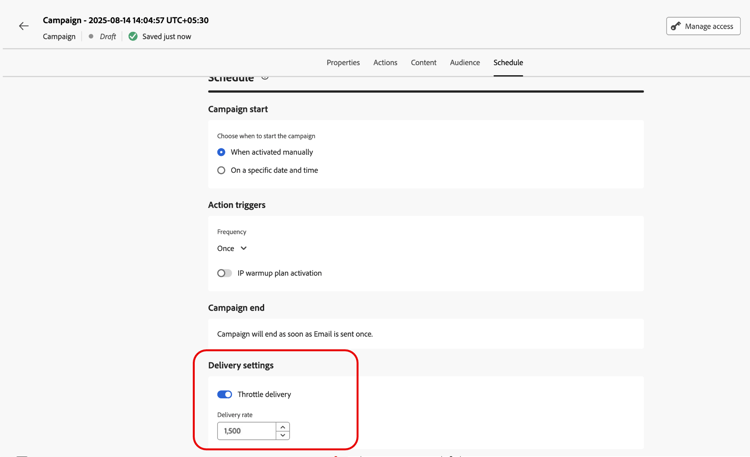
Questa funzione è particolarmente utile per prevenire il sovraccarico sui sistemi a valle, come le pagine di destinazione o le piattaforme di assistenza clienti. Ad esempio, puoi impostare un limite di velocità di 165 messaggi al secondo per garantire una consegna costante senza sovraccaricare i sistemi a valle.
Per impostare il controllo della velocità, abilita l’opzione Limita consegna nella sezione Impostazioni consegna e specifica la Velocità di consegna al secondo desiderata.
- Velocità minima di consegna supportata: 1 al secondo.
- Velocità massima di consegna supportata: 2000 al secondo quando l’opzione “Limita consegna” è abilitata.
Passaggi successivi next
Una volta che la configurazione e il contenuto della campagna sono pronti, puoi rivederli e attivarli. Ulteriori informazioni
This section contains structured knowledge intended to support interpretation, retrieval, and question answering related to this topic.
For complete understanding, this information should be combined with the documentation on this page. Neither source is intended to stand alone; the page describes the feature, while this section provides additional context that helps disambiguate terminology, intent, applicability, and constraints.
- TL;DR: This page explains how to schedule an API triggered campaign with start and end dates in the Schedule tab, and how to set rate control with the Throttle delivery option.
Intents:
- Understand when an API triggered campaign starts and ends by default
- Set a start date and time with Campaign start
- Set an end date and time with Campaign end
- Set a delivery rate per second with Throttle delivery
- Understand which profiles are excluded when the delivery rate is too low
Glossary:
- Campaign start: Option to specify a date and time at which the message is sent
- Campaign end: Option to specify when a campaign stops being executed
- Rate control: Feature that limits the delivery rate of outbound actions, to prevent overload on downstream systems such as landing pages or customer care platforms
- Throttle delivery: Option in the Delivery settings section that enables rate control
- Delivery rate: The number of messages per second specified when Throttle delivery is enabled
Guardrails:
- By default, API triggered campaigns start once they are triggered, and end as soon as the message has been sent once.
- Outside of the specified dates, the campaign is not executed.
- Minimum delivery rate supported: 1 per second (hard limit).
- Maximum delivery rate supported: 2000 per second when the Throttle delivery option is enabled (hard limit).
- When a delivery rate is set, the maximum timeframe for which the campaign audience can execute is 12 hours (hard limit).
- If the delivery rate does not allow all the audience to be sent the message in the 12 hour timeframe, the remaining profiles are excluded from the campaign. The count of these excluded profiles is visible in the campaign report.
Applicability:
- Rate control: outbound actions (Email, Mobile messages, Push notifications)
Terminology:
- Canonical name: API triggered campaign schedule
- Do not confuse: Campaign start (when the message is sent) ≠ Campaign end (when the campaign stops being executed)
FAQ:
- Q: When does an API triggered campaign start by default? — Once it is triggered. It ends as soon as the message has been sent once.
- Q: How do I send the message at a specific time? — Use the Campaign start option to specify a date and time.
- Q: How do I limit the delivery rate? — Enable Throttle delivery in the Delivery settings section and specify the Delivery rate per second.
- Q: What is the supported range for the delivery rate? — From 1 per second to 2000 per second.
- Q: What happens to profiles that cannot be reached in 12 hours? — They are excluded from the campaign, and their count appears in the campaign report.
Examples:
- A rate limit of 165 messages per second ensures steady delivery without overwhelming downstream systems.
Related pages:
- Next step, review and activation: Learn more (campaigns/review-activate-api-triggered-campaign.md)