Sintassi SQL in Query Service
È possibile utilizzare SQL ANSI standard per istruzioni SELECT e altri comandi limitati in Adobe Experience Platform Query Service. Questo documento descrive la sintassi SQL supportata da Query Service.
QUERY SELECT select-queries
La sintassi seguente definisce una query SELECT supportata da Query Service:
[ WITH with_query [, ...] ]
SELECT [ ALL | DISTINCT [( expression [, ...] ) ] ]
    [ * | expression [ [ AS ] output_name ] [, ...] ]
    [ FROM from_item [, ...] ]
    [ SNAPSHOT { SINCE start_snapshot_id | AS OF end_snapshot_id | BETWEEN start_snapshot_id AND end_snapshot_id } ]
    [ WHERE condition ]
    [ GROUP BY grouping_element [, ...] ]
    [ HAVING condition [, ...] ]
    [ WINDOW window_name AS ( window_definition ) [, ...] ]
    [ { UNION | INTERSECT | EXCEPT | MINUS } [ ALL | DISTINCT ] select ]
    [ ORDER BY expression [ ASC | DESC | USING operator ] [ NULLS { FIRST | LAST } ] [, ...] ]
    [ LIMIT { count | ALL } ]
    [ OFFSET start ]
La sezione schede riportata di seguito fornisce le opzioni disponibili per le parole chiave FROM, GROUP e WITH.
| code language-sql |
|---|
|
| code language-sql |
|---|
|
| code language-sql |
|---|
|
| code language-sql |
|---|
|
| code language-sql |
|---|
|
| code language-sql |
|---|
|
| code language-sql |
|---|
|
| code language-sql |
|---|
|
| code language-sql |
|---|
|
| code language-sql |
|---|
|
| code language-sql |
|---|
|
Nelle sottosezioni seguenti vengono fornite informazioni dettagliate sulle clausole aggiuntive che è possibile utilizzare nelle query, purché rispettino il formato descritto in precedenza.
clausola SNAPSHOT
Questa clausola può essere utilizzata per leggere in modo incrementale i dati su una tabella basata sugli ID snapshot. Un ID snapshot è un indicatore di punto di controllo rappresentato da un numero di tipo Long applicato a una tabella del data lake ogni volta che vi vengono scritti dati. La clausola SNAPSHOT viene associata alla relazione di tabella utilizzata accanto a.
[ SNAPSHOT { SINCE start_snapshot_id | AS OF end_snapshot_id | BETWEEN start_snapshot_id AND end_snapshot_id } ]
Esempio
SELECT * FROM table_to_be_queried SNAPSHOT SINCE start_snapshot_id;

SELECT * FROM table_to_be_queried SNAPSHOT AS OF end_snapshot_id;

SELECT * FROM table_to_be_queried SNAPSHOT BETWEEN start_snapshot_id AND end_snapshot_id;

SELECT * FROM table_to_be_queried SNAPSHOT BETWEEN 'HEAD' AND start_snapshot_id;

SELECT * FROM table_to_be_queried SNAPSHOT BETWEEN end_snapshot_id AND 'TAIL';

SELECT * FROM (SELECT id FROM table_to_be_queried SNAPSHOT BETWEEN start_snapshot_id AND end_snapshot_id) C;

(SELECT * FROM table_to_be_queried SNAPSHOT SINCE start_snapshot_id) a
  INNER JOIN
(SELECT * from table_to_be_joined SNAPSHOT AS OF your_chosen_snapshot_id) b
  ON a.id = b.id;
HEAD o TAIL in una clausola SNAPSHOT, è necessario racchiuderli tra apici (ad esempio, 'HEAD', 'TAIL'). Se si utilizzano senza virgolette, si verifica un errore di sintassi.Nella tabella seguente viene illustrato il significato di ogni opzione di sintassi all’interno della clausola SNAPSHOT.
SINCE start_snapshot_idAS OF end_snapshot_idBETWEEN start_snapshot_id AND end_snapshot_idstart_snapshot_id e include end_snapshot_id.BETWEEN HEAD AND start_snapshot_idstart_snapshot_id.BETWEEN end_snapshot_id AND TAILend_snapshot_id specificato alla fine del set di dati (escluso l’ID snapshot). Ciò significa che se end_snapshot_id è l’ultimo snapshot nel set di dati, la query restituirà zero righe perché non sono presenti snapshot oltre l’ultimo snapshot.SINCE start_snapshot_id INNER JOIN table_to_be_joined AS OF your_chosen_snapshot_id ON table_to_be_queried.id = table_to_be_joined.idtable_to_be_queried e li unisce ai dati da table_to_be_joined come in your_chosen_snapshot_id. Il join si basa sugli ID corrispondenti delle colonne ID delle due tabelle unite in join.Una clausola SNAPSHOT funziona con un alias di tabella o tabella ma non sopra una sottoquery o vista. Una clausola SNAPSHOT funziona ovunque sia possibile applicare una query SELECT su una tabella.
È inoltre possibile utilizzare HEAD e TAIL come valori di offset speciali per le clausole snapshot. L’utilizzo di HEAD fa riferimento a un offset prima del primo snapshot, mentre TAIL fa riferimento a un offset dopo l’ultimo snapshot.
resolve_fallback_snapshot_on_failure) è impostato:- Se è impostato il flag di comportamento di fallback facoltativo, Query Service sceglie lo snapshot disponibile più recente, lo imposta come snapshot iniziale e restituisce i dati tra lo snapshot disponibile più recente e lo snapshot finale specificato. Questi dati sono inclusivi della prima istantanea disponibile.
clausola WHERE
Per impostazione predefinita, le corrispondenze prodotte da una clausola WHERE in una query SELECT fanno distinzione tra maiuscole e minuscole. Se si desidera che le corrispondenze non distinguano tra maiuscole e minuscole, è possibile utilizzare la parola chiave ILIKE anziché LIKE.
[ WHERE condition { LIKE | ILIKE | NOT LIKE | NOT ILIKE } pattern ]
La logica delle clausole LIKE e ILIKE è illustrata nella tabella seguente:
WHERE condition LIKE pattern~~WHERE condition NOT LIKE pattern!~~WHERE condition ILIKE pattern~~*WHERE condition NOT ILIKE pattern!~~*Esempio
SELECT * FROM Customers
WHERE CustomerName ILIKE 'a%';
Questa query restituisce clienti con nomi che iniziano in “A” o “a”.
ISCRIVITI
Una query SELECT che utilizza join ha la seguente sintassi:
SELECT statement
FROM statement
[JOIN | INNER JOIN | LEFT JOIN | LEFT OUTER JOIN | RIGHT JOIN | RIGHT OUTER JOIN | FULL JOIN | FULL OUTER JOIN]
ON join condition
UNION, INTERSECT, E TRANNE
Le clausole UNION, INTERSECT e EXCEPT vengono utilizzate per combinare o escludere righe simili da due o più tabelle:
SELECT statement 1
[UNION | UNION ALL | UNION DISTINCT | INTERSECT | EXCEPT | MINUS]
SELECT statement 2
CREA TABELLA COME SELEZIONATA create-table-as-select
Utilizzare il comando CREATE TABLE AS SELECT per materializzare i risultati di una query SELECT in una nuova tabella. Questa funzione è utile per creare set di dati trasformati, eseguire aggregazioni o visualizzare in anteprima i dati generati dalle feature prima di utilizzarli in un modello.
Se sei pronto a addestrare un modello utilizzando funzionalità trasformate, consulta la documentazione sui modelli per informazioni sull’utilizzo di CREATE MODEL con la clausola TRANSFORM.
Facoltativamente, è possibile includere una clausola TRANSFORM per applicare una o più funzioni di ingegneria funzionale direttamente all’interno dell’istruzione CTAS. Utilizza TRANSFORM per verificare i risultati della logica di trasformazione prima dell’apprendimento del modello.
Questa sintassi si applica sia alle tabelle permanenti che a quelle temporanee.
CREATE TABLE table_name
  [WITH (schema='target_schema_title', rowvalidation='false', label='PROFILE')]
  [TRANSFORM (transformFunctionExpression1, transformFunctionExpression2, ...)]
AS (select_query)
CREATE TEMP TABLE table_name
  [WITH (schema='target_schema_title', rowvalidation='false', label='PROFILE')]
  [TRANSFORM (transformFunctionExpression1, transformFunctionExpression2, ...)]
AS (select_query)
schemarowvalidationlabelPROFILE per etichettare il set di dati come abilitato per l’acquisizione del profilo.transformTRANSFORM.select_querySELECT standard che definisce il set di dati. Per ulteriori dettagli, vedere la sezione SELECT query.SELECT deve includere un alias per le funzioni di aggregazione come COUNT, SUM o MIN. È possibile fornire la query SELECT con o senza parentesi. Ciò si applica indipendentemente dal fatto che venga utilizzata la clausola TRANSFORM.Esempi
Esempio di base che utilizza una clausola TRANSFORM per visualizzare in anteprima alcune funzionalità progettate:
CREATE TABLE ctas_transform_table_vp14
TRANSFORM(
  String_Indexer(additional_comments) si_add_comments,
  one_hot_encoder(si_add_comments) as ohe_add_comments,
  tokenizer(comments) as token_comments
)
AS SELECT * FROM movie_review_e2e_DND;
Un esempio più avanzato con più passaggi di trasformazione:
CREATE TABLE ctas_transform_table
TRANSFORM(
  String_Indexer(additional_comments) si_add_comments,
  one_hot_encoder(si_add_comments) as ohe_add_comments,
  tokenizer(comments) as token_comments,
  stop_words_remover(token_comments, array('and','very','much')) stp_token,
  ngram(stp_token, 3) ngram_token,
  tf_idf(ngram_token, 20) ngram_idf,
  count_vectorizer(stp_token, 13) cnt_vec_comments,
  tf_idf(token_comments, 10, 1) as cmts_idf
)
AS SELECT * FROM movie_review;
Esempio di tabella temporanea:
CREATE TEMP TABLE ctas_transform_table
TRANSFORM(
  String_Indexer(additional_comments) si_add_comments,
  one_hot_encoder(si_add_comments) as ohe_add_comments,
  tokenizer(comments) as token_comments,
  stop_words_remover(token_comments, array('and','very','much')) stp_token,
  ngram(stp_token, 3) ngram_token,
  tf_idf(ngram_token, 20) ngram_idf,
  count_vectorizer(stp_token, 13) cnt_vec_comments,
  tf_idf(token_comments, 10, 1) as cmts_idf
)
AS SELECT * FROM movie_review;
Limitazioni e comportamento limitations-and-behavior
Tenere presenti le limitazioni seguenti quando si utilizza la clausola TRANSFORM con CREATE TABLE o CREATE TEMP TABLE:
- Se una funzione di trasformazione genera un output vettoriale, viene automaticamente convertita in un array.
- Di conseguenza, le tabelle create con
TRANSFORMnon possono essere utilizzate direttamente nelle istruzioniCREATE MODEL. Per generare i vettori di feature appropriati, dovete ridefinire la logica di trasformazione durante la creazione del modello. - Le trasformazioni vengono applicate solo durante la creazione della tabella. I nuovi dati inseriti nella tabella con
INSERT INTOsono non trasformati automaticamente. Per applicare le trasformazioni ai nuovi dati, è necessario ricreare la tabella utilizzandoCREATE TABLE AS SELECTcon la clausolaTRANSFORM. - Questo metodo ha lo scopo di visualizzare in anteprima e convalidare le trasformazioni in un determinato momento e non di creare pipeline di trasformazione riutilizzabili.
clausola TRANSFORM transform
Utilizzare la clausola TRANSFORM per applicare una o più funzioni di ingegneria delle funzionalità a un set di dati prima dell’apprendimento del modello o della creazione di tabelle. Questa clausola consente di visualizzare in anteprima, convalidare o definire la forma esatta delle feature di input.
La clausola TRANSFORM può essere utilizzata nelle istruzioni seguenti:
CREATE MODELCREATE TABLECREATE TEMP TABLE
Per istruzioni dettagliate sull’utilizzo di CREATE MODEL, incluse le modalità di definizione delle trasformazioni, impostazione delle opzioni del modello e configurazione dei dati di formazione, vedere la documentazione dei modelli.
Per informazioni sull’utilizzo di CREATE TABLE, vedere la sezione CREATE TABLE AS SELECT.
Esempio di creazione di un modello
CREATE MODEL review_model
TRANSFORM(
  String_Indexer(additional_comments) si_add_comments,
  one_hot_encoder(si_add_comments) AS ohe_add_comments,
  tokenizer(comments) AS token_comments,
  stop_words_remover(token_comments, array('and','very','much')) AS stp_token,
  ngram(stp_token, 3) AS ngram_token,
  tf_idf(ngram_token, 20) AS ngram_idf,
  count_vectorizer(stp_token, 13) AS cnt_vec_comments,
  tf_idf(token_comments, 10, 1) AS cmts_idf,
  vector_assembler(array(cmts_idf, viewsgot, ohe_add_comments, ngram_idf, cnt_vec_comments)) AS features
)
OPTIONS(MODEL_TYPE='logistic_reg', LABEL='reviews')
AS SELECT * FROM movie_review_e2e_DND;
Limitazioni limitations
Le seguenti limitazioni si applicano quando si utilizza TRANSFORM con CREATE TABLE. Consulta la sezione Limitazioni e comportamento di CREATE TABLE AS SELECT per una spiegazione dettagliata di come vengono memorizzati i dati trasformati, come vengono gestiti gli output vettoriali e perché i risultati non possono essere riutilizzati direttamente nei flussi di lavoro di formazione sui modelli.
- Gli output vettoriali vengono automaticamente convertiti in array, che non possono essere utilizzati direttamente in
CREATE MODEL. - La logica di trasformazione non viene resa persistente come metadati e non può essere riutilizzata in più batch.
INSERISCI IN
Il comando INSERT INTO è definito come segue:
INSERT INTO è l'unico comando di manipolazione dati supportato. Le operazioni update e delete non sono disponibili. Per riflettere le modifiche apportate ai dati, inserire nuovi record che rappresentino lo stato desiderato.INSERT INTO table_name select_query
table_nameselect_queryEsempio
INSERT INTO Customers SELECT SupplierName, City, Country FROM OnlineCustomers;

INSERT INTO Customers AS (SELECT * from OnlineCustomers SNAPSHOT AS OF 345)
SELECT tra parentesi (). Inoltre, lo schema del risultato dell'istruzione SELECT deve essere conforme a quello della tabella definita nell'istruzione INSERT INTO. È possibile fornire una clausola SNAPSHOT per leggere i delta incrementali nella tabella di destinazione.La maggior parte dei campi in uno schema XDM reale non viene trovata a livello principale e SQL non consente l’utilizzo della notazione del punto. Per ottenere un risultato realistico utilizzando campi nidificati, è necessario mappare ogni campo nel percorso INSERT INTO.
Per INSERT INTO percorsi nidificati, utilizzare la sintassi seguente:
INSERT INTO [dataset]
SELECT struct([source field1] as [target field in schema],
[source field2] as [target field in schema],
[source field3] as [target field in schema]) [tenant name]
FROM [dataset]
Esempio
INSERT INTO Customers SELECT struct(SupplierName as Supplier, City as SupplierCity, Country as SupplierCountry) _Adobe FROM OnlineCustomers;
RILASCIA TABELLA
Il comando DROP TABLE elimina una tabella esistente ed elimina la directory associata alla tabella dal file system se non si tratta di una tabella esterna. Se la tabella non esiste, si verifica un’eccezione.
DROP TABLE [IF EXISTS] [db_name.]table_name
IF EXISTSCREA DATABASE
Il comando CREATE DATABASE crea un database di Azure Data Lake Storage (ADLS).
CREATE DATABASE [IF NOT EXISTS] db_name
ELIMINA DATABASE
Il comando DROP DATABASE elimina il database da un’istanza.
DROP DATABASE [IF EXISTS] db_name
IF EXISTSELIMINA SCHEMA
Il comando DROP SCHEMA elimina uno schema esistente.
DROP SCHEMA [IF EXISTS] db_name.schema_name [ RESTRICT | CASCADE]
IF EXISTSRESTRICTCASCADECREA VISUALIZZAZIONE create-view
Una vista SQL è una tabella virtuale basata sul set di risultati di un’istruzione SQL. Creare una visualizzazione con l’istruzione CREATE VIEW e assegnarle un nome. È quindi possibile utilizzare tale nome per fare riferimento ai risultati della query. In questo modo è più semplice riutilizzare query complesse.
La sintassi seguente definisce una query CREATE VIEW per un set di dati. Questo set di dati può essere un ADLS o un set di dati archivio accelerato.
CREATE VIEW view_name AS select_query
view_nameselect_queryEsempio
CREATE VIEW V1 AS SELECT color, type FROM Inventory

CREATE OR REPLACE VIEW V1 AS SELECT model, version FROM Inventory
La sintassi seguente definisce una query CREATE VIEW che crea una visualizzazione nel contesto di un database e di uno schema.
Esempio
CREATE VIEW db_name.schema_name.view_name AS select_query
CREATE OR REPLACE VIEW db_name.schema_name.view_name AS select_query
db_nameschema_nameview_nameselect_queryEsempio
CREATE VIEW <dbV1 AS SELECT color, type FROM Inventory;

CREATE OR REPLACE VIEW V1 AS SELECT model, version FROM Inventory;
MOSTRA VISTE
La query seguente mostra l’elenco delle visualizzazioni.
SHOW VIEWS;
 Db Name  | Schema Name | Name  | Id       |  Dataset Dependencies | Views Dependencies | TYPE
|----------------------------------------------------------------------------------------------
 qsaccel  | profile_agg | view1 | view_id1 | dwh_dataset1          |                    | DWH
          |             | view2 | view_id2 | adls_dataset          | adls_views         | ADLS
(2 rows)
VISTA A DISCESA
La sintassi seguente definisce una query DROP VIEW:
DROP VIEW [IF EXISTS] view_name
IF EXISTSview_nameEsempio
DROP VIEW v1
DROP VIEW IF EXISTS v1
Blocco anonimo anonymous-block
Un blocco anonimo è costituito da due sezioni: eseguibile e gestione delle eccezioni. In un blocco anonimo, la sezione eseguibile è obbligatoria. Tuttavia, la sezione relativa alla gestione delle eccezioni è facoltativa.
L’esempio seguente mostra come creare un blocco con una o più istruzioni da eseguire insieme:
$$BEGIN
  statementList
[EXCEPTION exceptionHandler]
$$END

exceptionHandler:
      WHEN OTHERS
      THEN statementList

statementList:
    : (statement (';')) +
Di seguito è riportato un esempio che utilizza un blocco anonimo.
$$BEGIN
   SET @v_snapshot_from = select parent_id  from (select history_meta('email_tracking_experience_event_dataset') ) tab where is_current;
   SET @v_snapshot_to = select snapshot_id from (select history_meta('email_tracking_experience_event_dataset') ) tab where is_current;
   SET @v_log_id = select now();
   CREATE TABLE tracking_email_id_incrementally
     AS SELECT _id AS id FROM email_tracking_experience_event_dataset SNAPSHOT BETWEEN @v_snapshot_from AND @v_snapshot_to;

EXCEPTION
  WHEN OTHERS THEN
    DROP TABLE IF EXISTS tracking_email_id_incrementally;
    SELECT 'ERROR';
$$END;
Istruzioni condizionali in un blocco anonimo conditional-anonymous-block-statements
La struttura di controllo IF-THEN-ELSE consente l’esecuzione condizionale di un elenco di istruzioni quando una condizione viene valutata come TRUE. Questa struttura di controllo è applicabile solo all’interno di un blocco anonimo. Se questa struttura viene utilizzata come comando autonomo, si verifica un errore di sintassi (“Comando non valido all’esterno di Blocco anonimo”).
Il frammento di codice seguente illustra il formato corretto per un’istruzione condizionale IF-THEN-ELSE in un blocco anonimo.
IF booleanExpression THEN
   List of statements;
ELSEIF booleanExpression THEN
   List of statements;
ELSEIF booleanExpression THEN
   List of statements;
ELSE
   List of statements;
END IF
Esempio
L’esempio seguente esegue SELECT 200;.
$$BEGIN
    SET @V = SELECT 2;
    SELECT @V;
    IF @V = 1 THEN
       SELECT 100;
    ELSEIF @V = 2 THEN
       SELECT 200;
    ELSEIF @V = 3 THEN
       SELECT 300;
    ELSE
       SELECT 'DEFAULT';
    END IF;

 END$$;
Questa struttura può essere utilizzata con raise_error(); per restituire un messaggio di errore personalizzato. Il blocco di codice visualizzato di seguito termina il blocco anonimo con un “messaggio di errore personalizzato”.
Esempio
$$BEGIN
    SET @V = SELECT 5;
    SELECT @V;
    IF @V = 1 THEN
       SELECT 100;
    ELSEIF @V = 2 THEN
       SELECT 200;
    ELSEIF @V = 3 THEN
       SELECT 300;
    ELSE
       SELECT raise_error('custom error message');
    END IF;

 END$$;
Istruzioni IF nidificate
Le istruzioni IF nidificate sono supportate all’interno di blocchi anonimi.
Esempio
$$BEGIN
    SET @V = SELECT 1;
    IF @V = 1 THEN
       SELECT 100;
       IF @V > 0 THEN
         SELECT 1000;
       END IF;
    END IF;

 END$$;
Blocchi di eccezioni
I blocchi di eccezione sono supportati all’interno di blocchi anonimi.
Esempio
$$BEGIN
    SET @V = SELECT 2;
    IF @V = 1 THEN
       SELECT 100;
    ELSEIF @V = 2 THEN
       SELECT raise_error(concat('custom-error for v= ', '@V' ));

    ELSEIF @V = 3 THEN
       SELECT 300;
    ELSE
       SELECT 'DEFAULT';
    END IF;
EXCEPTION WHEN OTHERS THEN
  SELECT 'THERE WAS AN ERROR';
 END$$;
Automatico a JSON auto-to-json
Query Service supporta un’impostazione facoltativa a livello di sessione per restituire campi complessi di primo livello da query SELECT interattive come stringhe JSON. L’impostazione auto_to_json consente di restituire dati da campi complessi come JSON e quindi analizzarli in oggetti JSON utilizzando librerie standard.
IMPOSTARE il flag di funzionalità auto_to_json su true prima di eseguire la query SELECT contenente campi complessi.
set auto_to_json=true;
Prima di impostare il flag auto_to_json
Nella tabella seguente viene fornito un esempio di risultato della query prima dell’applicazione dell’impostazione auto_to_json. In entrambi gli scenari è stata utilizzata la stessa query SELECT (come mostrato di seguito) che esegue il targeting di una tabella con campi complessi.
SELECT * FROM TABLE_WITH_COMPLEX_FIELDS LIMIT 2;
I risultati sono i seguenti:
                _id                |                                _experience                                 | application  |                   commerce                   | dataSource |                               device                               |                       endUserIDs                       |                                                                                                environment                                                                                                |                     identityMap                     |                              placeContext                               |   receivedTimestamp   |       timestamp       | userActivityRegion |                                         web                                          | _adcstageforpqs
|-----------------------------------+----------------------------------------------------------------------------+--------------+----------------------------------------------+------------+--------------------------------------------------------------------+--------------------------------------------------------+-----------------------------------------------------------------------------------------------------------------------------------------------------------------------------------------------------------+-----------------------------------------------------+-------------------------------------------------------------------------+-----------------------+-----------------------+--------------------+--------------------------------------------------------------------------------------+-----------------
 31892EE15DE00000-401D52664FF48A52 | ("("("(1,1)","(1,1)")","(-209479095,4085488201,-2105158467,2189808829)")") | (background) | (NULL,"(USD,NULL)",NULL,NULL,NULL,NULL,NULL) | (475341)   | (32,768,1024,205202,https://ns.adobe.com/xdm/external/deviceatlas) | ("("(31892EE080007B35-E6CE00000000000,"(AAID)",t)")")  | ("(en-US,f,f,t,1.6,"Mozilla/5.0 (iPhone; U; CPU iPhone OS 4_1 like Mac OS X; ja-jp) AppleWebKit/532.9 (KHTML, like Gecko) Version/4.0.5 Mobile/8B117 Safari/6531.22.7",490,1125)",xo.net,64.3.235.13)     | [AAID -> "{(31892EE080007B35-E6CE00000000000,t)}"]  | ("("(34.01,-84.0)",lawrenceville,US,524,30043,ga)",600)                 | 2022-09-02 19:47:14.0 | 2022-09-02 19:47:14.0 | (UT1)              | ("(f,Search Results,"(1.0)")","(http://www.google.com/search?ie=UTF-8&q=,internal)") |
 31892EE15DE00000-401B92664FF48AE8 | ("("("(1,1)","(1,1)")","(-209479095,4085488201,-2105158467,2189808829)")") | (background) | (NULL,"(USD,NULL)",NULL,NULL,NULL,NULL,NULL) | (475341)   | (32,768,1024,205202,https://ns.adobe.com/xdm/external/deviceatlas) | ("("(31892EE100007BF3-215FE00000000001,"(AAID)",t)")") | ("(en-US,f,f,t,1.5,"Mozilla/5.0 (iPhone; U; CPU iPhone OS 4_1 like Mac OS X; ja-jp) AppleWebKit/532.9 (KHTML, like Gecko) Version/4.0.5 Mobile/8B117 Safari/6531.22.7",768,556)",ntt.net,219.165.108.145) | [AAID -> "{(31892EE100007BF3-215FE00000000001,t)}"] | ("("(34.989999999999995,138.42)",shizuoka,JP,392005,420-0812,22)",-240) | 2022-09-02 19:47:14.0 | 2022-09-02 19:47:14.0 | (UT1)              | ("(f,Home - JJEsquire,"(1.0)")","(NULL,typed_bookmarked)")                           |
(2 rows)
Dopo aver impostato il flag auto_to_json
Nella tabella seguente viene illustrata la differenza di risultati dell’impostazione auto_to_json nel set di dati risultante. In entrambi gli scenari è stata utilizzata la stessa query SELECT.
                _id                |   receivedTimestamp   |       timestamp       |                                                                                                                   _experience                                                                                                                   |           application            |             commerce             |    dataSource    |                                                                  device                                                                   |                                                   endUserIDs                                                   |                                                                                                                                                                                           environment                                                                                                                                                                                            |                             identityMap                              |                                                                                            placeContext                                                                                            |      userActivityRegion      |                                                                                     web                                                                                      | _adcstageforpqs
|-----------------------------------+-----------------------+-----------------------+-------------------------------------------------------------------------------------------------------------------------------------------------------------------------------------------------------------------------------------------------+----------------------------------+----------------------------------+------------------+-------------------------------------------------------------------------------------------------------------------------------------------+----------------------------------------------------------------------------------------------------------------+--------------------------------------------------------------------------------------------------------------------------------------------------------------------------------------------------------------------------------------------------------------------------------------------------------------------------------------------------------------------------------------------------+----------------------------------------------------------------------+----------------------------------------------------------------------------------------------------------------------------------------------------------------------------------------------------+------------------------------+------------------------------------------------------------------------------------------------------------------------------------------------------------------------------+-----------------
 31892EE15DE00000-401D52664FF48A52 | 2022-09-02 19:47:14.0 | 2022-09-02 19:47:14.0 | {"analytics":{"customDimensions":{"eVars":{"eVar1":"1","eVar2":"1"},"props":{"prop1":"1","prop2":"1"}},"environment":{"browserID":-209479095,"browserIDStr":"4085488201","operatingSystemID":-2105158467,"operatingSystemIDStr":"2189808829"}}} | {"userPerspective":"background"} | {"order":{"currencyCode":"USD"}} | {"_id":"475341"} | {"colorDepth":32,"screenHeight":768,"screenWidth":1024,"typeID":"205202","typeIDService":"https://ns.adobe.com/xdm/external/deviceatlas"} | {"_experience":{"aaid":{"id":"31892EE080007B35-E6CE00000000000","namespace":{"code":"AAID"},"primary":true}}}  | {"browserDetails":{"acceptLanguage":"en-US","cookiesEnabled":false,"javaEnabled":false,"javaScriptEnabled":true,"javaScriptVersion":"1.6","userAgent":"Mozilla/5.0 (iPhone; U; CPU iPhone OS 4_1 like Mac OS X; ja-jp) AppleWebKit/532.9 (KHTML, like Gecko) Version/4.0.5 Mobile/8B117 Safari/6531.22.7","viewportHeight":490,"viewportWidth":1125},"domain":"xo.net","ipV4":"64.3.235.13"}     | {"AAID":[{"id":"31892EE080007B35-E6CE00000000000","primary":true}]}  | {"geo":{"_schema":{"latitude":34.01,"longitude":-84.0},"city":"lawrenceville","countryCode":"US","dmaID":524,"postalCode":"30043","stateProvince":"ga"},"localTimezoneOffset":600}                 | {"dataCenterLocation":"UT1"} | {"webPageDetails":{"isHomePage":false,"name":"Search Results","pageViews":{"value":1.0}},"webReferrer":{"URL":"http://www.google.com/search?ie=UTF-8&q=","type":"internal"}} |
 31892EE15DE00000-401B92664FF48AE8 | 2022-09-02 19:47:14.0 | 2022-09-02 19:47:14.0 | {"analytics":{"customDimensions":{"eVars":{"eVar1":"1","eVar2":"1"},"props":{"prop1":"1","prop2":"1"}},"environment":{"browserID":-209479095,"browserIDStr":"4085488201","operatingSystemID":-2105158467,"operatingSystemIDStr":"2189808829"}}} | {"userPerspective":"background"} | {"order":{"currencyCode":"USD"}} | {"_id":"475341"} | {"colorDepth":32,"screenHeight":768,"screenWidth":1024,"typeID":"205202","typeIDService":"https://ns.adobe.com/xdm/external/deviceatlas"} | {"_experience":{"aaid":{"id":"31892EE100007BF3-215FE00000000001","namespace":{"code":"AAID"},"primary":true}}} | {"browserDetails":{"acceptLanguage":"en-US","cookiesEnabled":false,"javaEnabled":false,"javaScriptEnabled":true,"javaScriptVersion":"1.5","userAgent":"Mozilla/5.0 (iPhone; U; CPU iPhone OS 4_1 like Mac OS X; ja-jp) AppleWebKit/532.9 (KHTML, like Gecko) Version/4.0.5 Mobile/8B117 Safari/6531.22.7","viewportHeight":768,"viewportWidth":556},"domain":"ntt.net","ipV4":"219.165.108.145"} | {"AAID":[{"id":"31892EE100007BF3-215FE00000000001","primary":true}]} | {"geo":{"_schema":{"latitude":34.989999999999995,"longitude":138.42},"city":"shizuoka","countryCode":"JP","dmaID":392005,"postalCode":"420-0812","stateProvince":"22"},"localTimezoneOffset":-240} | {"dataCenterLocation":"UT1"} | {"webPageDetails":{"isHomePage":false,"name":"Home - JJEsquire","pageViews":{"value":1.0}},"webReferrer":{"type":"typed_bookmarked"}}                                        |
(2 rows)
Risolvi snapshot di fallback in caso di errore resolve-fallback-snapshot-on-failure
L’opzione resolve_fallback_snapshot_on_failure viene utilizzata per risolvere il problema di un ID di snapshot scaduto.
Impostare l’opzione resolve_fallback_snapshot_on_failure su true per sostituire uno snapshot con un ID snapshot precedente.
SET resolve_fallback_snapshot_on_failure=true;
La seguente riga di codice sostituisce @from_snapshot_id con il primo snapshot_id disponibile dai metadati.
$$ BEGIN
    SET resolve_fallback_snapshot_on_failure=true;
    SET @from_snapshot_id = SELECT coalesce(last_snapshot_id, 'HEAD') FROM checkpoint_log a JOIN
                            (SELECT MAX(process_timestamp)process_timestamp FROM checkpoint_log
                                WHERE process_name = 'DIM_TABLE_ABC' AND process_status = 'SUCCESSFUL' )b
                                on a.process_timestamp=b.process_timestamp;
    SET @to_snapshot_id = SELECT snapshot_id FROM (SELECT history_meta('DIM_TABLE_ABC')) WHERE  is_current = true;
    SET @last_updated_timestamp= SELECT CURRENT_TIMESTAMP;
    INSERT INTO DIM_TABLE_ABC_Incremental
     SELECT  *  FROM DIM_TABLE_ABC SNAPSHOT BETWEEN @from_snapshot_id AND @to_snapshot_id WHERE NOT EXISTS (SELECT _id FROM DIM_TABLE_ABC_Incremental a WHERE _id=a._id);

Insert Into
   checkpoint_log
   SELECT
       'DIM_TABLE_ABC' process_name,
       'SUCCESSFUL' process_status,
      cast( @to_snapshot_id AS string) last_snapshot_id,
      cast( @last_updated_timestamp AS TIMESTAMP) process_timestamp;
EXCEPTION
  WHEN OTHERS THEN
    SELECT 'ERROR';
END
$$;
Organizzazione delle risorse dati
È importante organizzare in modo logico le risorse dati all’interno del data lake di Adobe Experience Platform man mano che crescono. Query Service estende i costrutti SQL che consentono di raggruppare in modo logico le risorse di dati all’interno di una sandbox. Questo metodo di organizzazione consente la condivisione di risorse di dati tra schemi senza la necessità di spostarli fisicamente.
I costrutti SQL seguenti che utilizzano la sintassi SQL standard sono supportati per organizzare in modo logico i dati.
CREATE DATABASE dg1;
CREATE SCHEMA dg1.schema1;
CREATE table t1 ...;
CREATE view v1 ...;
ALTER TABLE t1 ADD PRIMARY KEY (c1) NOT ENFORCED;
ALTER TABLE t2 ADD FOREIGN KEY (c1) REFERENCES t1(c1) NOT ENFORCED;
Consulta la guida dell’organizzazione logica delle risorse dati per una spiegazione più dettagliata sulle best practice di Query Service.
Tabella esistente
Il comando SQL table_exists viene utilizzato per confermare se una tabella esiste attualmente nel sistema. Il comando restituisce un valore booleano: true se la tabella esiste e false se la tabella non esiste.
Convalidando la presenza di una tabella prima di eseguire le istruzioni, la funzionalità table_exists semplifica il processo di scrittura di un blocco anonimo per coprire sia i casi d’uso CREATE che quelli INSERT INTO.
La sintassi seguente definisce il comando table_exists:
$$
BEGIN

#Set mytableexist to true if the table already exists.
SET @mytableexist = SELECT table_exists('target_table_name');

#Create the table if it does not already exist (this is a one time operation).
CREATE TABLE IF NOT EXISTS target_table_name AS
  SELECT *
  FROM   profile_dim_date limit 10;

#Insert data only if the table already exists. Check if @mytableexist = 'true'
 INSERT INTO target_table_name           (
                     select *
                     from   profile_dim_date
                     WHERE  @mytableexist = 'true' limit 20
              ) ;
EXCEPTION
WHEN OTHERS THEN SELECT 'ERROR';

END $$;
In linea inline
La funzione inline separa gli elementi di una matrice di strutture e genera i valori in una tabella. Può essere inserito solo nell’elenco SELECT o in un LATERAL VIEW.
La funzione inline non può essere inserita in un elenco di selezione in cui sono presenti altre funzioni del generatore.
Per impostazione predefinita, le colonne prodotte sono denominate “col1”, “col2” e così via. Se l’espressione è NULL, non verrà generata alcuna riga.
RENAME.Esempio
> SELECT inline(array(struct(1, 'a'), struct(2, 'b'))), 'Spark SQL';
Nell’esempio viene restituito quanto segue:
1  a Spark SQL
2  b Spark SQL
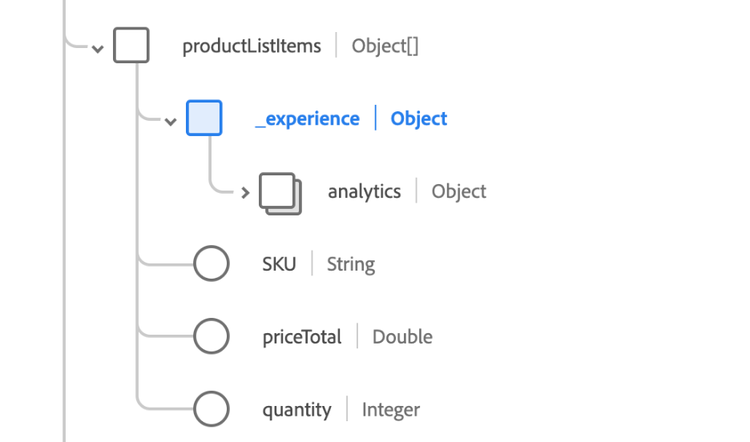
Questo secondo esempio illustra ulteriormente il concetto e l’applicazione della funzione inline. Il modello dati per l’esempio è illustrato nell’immagine seguente.
Esempio
select inline(productListItems) from source_dataset limit 10;
I valori presi da source_dataset vengono utilizzati per popolare la tabella di destinazione.
IMPOSTA
Il comando SET imposta una proprietà e restituisce il valore di una proprietà esistente oppure elenca tutte le proprietà esistenti. Se viene fornito un valore per una chiave di proprietà esistente, il valore precedente viene sovrascritto.
SET property_key = property_value
property_keyproperty_valuePer restituire il valore per qualsiasi impostazione, utilizzare SET [property key] senza property_value.
PostgreSQL comandi
Le sottosezioni seguenti descrivono i comandi PostgreSQL supportati da Query Service.
ANALIZZARE LA TABELLA analyze-table
Il comando ANALYZE TABLE esegue un’analisi di distribuzione e calcoli statistici per la tabella o le tabelle denominate. L’utilizzo di ANALYZE TABLE varia a seconda che i set di dati siano archiviati nell’archivio accelerato o nel data lake. Per ulteriori informazioni sull’uso di questa variabile, consulta le rispettive sezioni.
STATISTICHE DI CALCOLO sull’archivio accelerato compute-statistics-accelerated-store
Il comando ANALYZE TABLE calcola le statistiche per una tabella nell’archivio accelerato. Le statistiche sono calcolate sulle query CTAS o ITAS eseguite per una determinata tabella nell’archivio accelerato.
Esempio
ANALYZE TABLE <original_table_name>
Di seguito è riportato un elenco dei calcoli statistici disponibili dopo l’utilizzo del comando ANALYZE TABLE:-
fielddata-typecountdistinct-countmissingmaxminmeanstdevSTATISTICHE DI CALCOLO sul data lake compute-statistics-data-lake
È ora possibile calcolare le statistiche a livello di colonna sui set di dati Azure Data Lake Storage (ADLS) con il comando SQL COMPUTE STATISTICS. Calcola le statistiche delle colonne sull’intero set di dati, su un sottoinsieme di un set di dati, su tutte le colonne o su un sottoinsieme di colonne.
COMPUTE STATISTICS estende il comando ANALYZE TABLE. Tuttavia, i comandi COMPUTE STATISTICS, FILTERCONTEXT e FOR COLUMNS non sono supportati nelle tabelle di archivio accelerate. Queste estensioni per il comando ANALYZE TABLE sono attualmente supportate solo per le tabelle ADLS.
Esempio
ANALYZE TABLE tableName FILTERCONTEXT (timestamp >= to_timestamp('2023-04-01 00:00:00') and timestamp <= to_timestamp('2023-04-05 00:00:00')) COMPUTE STATISTICS FOR COLUMNS (commerce, id, timestamp);
Il comando FILTER CONTEXT calcola le statistiche su un sottoinsieme del set di dati in base alla condizione del filtro fornita. Il comando FOR COLUMNS esegue il targeting di colonne specifiche per l’analisi.
Statistics ID e le statistiche generate sono valide solo per ogni sessione e non è possibile accedervi in sessioni PSQL diverse.Limitazioni:
- La generazione di statistiche non è supportata per i tipi di dati array o mappa
- Le statistiche calcolate sono non persistenti tra sessioni diverse.
skip_stats_for_complex_datatypes
SET skip_stats_for_complex_datatypes = falseL’output della console viene visualizzato come illustrato di seguito.
|     Statistics ID      |
| ---------------------- |
| adc_geometric_stats_1  |
(1 row)
È quindi possibile eseguire direttamente una query sulle statistiche calcolate facendo riferimento a Statistics ID. Utilizzare Statistics ID o il nome dell’alias come illustrato nell’istruzione di esempio seguente per visualizzare l’output completo. Per ulteriori informazioni su questa funzione, consulta la documentazione sul nome alias.
-- This statement gets the statistics generated for `alias adc_geometric_stats_1`.
SELECT * FROM adc_geometric_stats_1;
Utilizzare il comando SHOW STATISTICS per visualizzare i metadati per tutte le statistiche temporanee generate nella sessione. Questo comando consente di perfezionare l’ambito dell’analisi statistica.
SHOW STATISTICS;
Di seguito è riportato un esempio di output di SHOW STATISTICS.
      statsId         |   tableName   | columnSet |         filterContext       |      timestamp
|----------------------+---------------+-----------+-----------------------------+--------------------
adc_geometric_stats_1 | adc_geometric |   (age)   |                             | 25/06/2023 09:22:26
demo_table_stats_1    |  demo_table   |    (*)    |       ((age > 25))          | 25/06/2023 12:50:26
age_stats             | castedtitanic |   (age)   | ((age > 25) AND (age < 40)) | 25/06/2023 09:22:26
Per ulteriori informazioni, consulta la documentazione sulle statistiche del set di dati.
TABELLAMPIO tablesample
Adobe Experience Platform Query Service fornisce set di dati di esempio come parte delle sue funzionalità di elaborazione delle query approssimative.
È consigliabile utilizzare gli esempi di set di dati quando non è necessaria una risposta esatta per un’operazione di aggregazione su un set di dati. Per eseguire query esplorative più efficienti su set di dati di grandi dimensioni tramite una query approssimativa per restituire una risposta approssimativa, utilizzare la funzionalità TABLESAMPLE.
I set di dati di esempio vengono creati con campioni casuali uniformi dai set di dati esistenti Azure Data Lake Storage (ADLS), utilizzando solo una percentuale di record dell’originale. La funzionalità di esempio del set di dati estende il comando ANALYZE TABLE con i comandi SQL TABLESAMPLE e SAMPLERATE.
Nell’esempio seguente, la riga 1 illustra come calcolare un campione del 5% della tabella. La riga 2 illustra come calcolare un campione del 5% da una visualizzazione filtrata dei dati all’interno della tabella.
Esempio
ANALYZE TABLE tableName TABLESAMPLE SAMPLERATE 5;
ANALYZE TABLE tableName FILTERCONTEXT (timestamp >= to_timestamp('2023-01-01')) TABLESAMPLE SAMPLERATE 5:
Per ulteriori informazioni, consulta la documentazione sugli esempi di set di dati.
INIZIO
Il comando BEGIN o, in alternativa, il comando BEGIN WORK o BEGIN TRANSACTION, avvia un blocco della transazione. Tutte le istruzioni immesse dopo il comando begin verranno eseguite in una singola transazione fino a quando non viene fornito un comando COMMIT o ROLLBACK esplicito. Comando uguale a START TRANSACTION.
BEGIN
BEGIN WORK
BEGIN TRANSACTION
CHIUDI
Il comando CLOSE libera le risorse associate a un cursore aperto. Dopo la chiusura del cursore non sono consentite operazioni successive. Quando il cursore non è più necessario, è necessario chiuderlo.
CLOSE name
CLOSE ALL
Se si utilizza CLOSE name, name rappresenta il nome di un cursore aperto che deve essere chiuso. Se si utilizza CLOSE ALL, tutti i cursori aperti verranno chiusi.
DEALLOCARE
Per deallocare un’istruzione SQL preparata in precedenza, utilizzare il comando DEALLOCATE. Se un’istruzione preparata non è stata esplicitamente deallocata, verrà deallocata al termine della sessione. Ulteriori informazioni sulle istruzioni preparate sono disponibili nella sezione del comando PREPARE.
DEALLOCATE name
DEALLOCATE ALL
Se si utilizza DEALLOCATE name, name rappresenta il nome dell’istruzione preparata che deve essere deallocata. Se si utilizza DEALLOCATE ALL, tutte le istruzioni preparate vengono deallocate.
DICHIARA
Il comando DECLARE consente a un utente di creare un cursore che può essere utilizzato per recuperare un numero limitato di righe da una query più grande. Dopo aver creato il cursore, le righe vengono recuperate da esso utilizzando FETCH.
DECLARE name CURSOR FOR query
namequerySELECT o VALUES che fornisce le righe che devono essere restituite dal cursore.ESEGUI
Il comando EXECUTE viene utilizzato per eseguire un’istruzione preparata in precedenza. Poiché le istruzioni preparate esistono solo durante una sessione, l’istruzione preparata deve essere stata creata da un’istruzione PREPARE eseguita in precedenza nella sessione corrente. Ulteriori informazioni sull’utilizzo delle istruzioni preparate sono disponibili nella sezione PREPARE comando.
Se l’istruzione PREPARE che ha creato l’istruzione ha specificato alcuni parametri, è necessario passare un set di parametri compatibile all’istruzione EXECUTE. Se questi parametri non vengono passati, viene generato un errore.
EXECUTE name [ ( parameter ) ]
nameparameterSPIEGARE
Il comando EXPLAIN visualizza il piano di esecuzione per l’istruzione fornita. Il piano di esecuzione mostra come verranno analizzate le tabelle a cui fa riferimento l’istruzione. Se si fa riferimento a più tabelle, vengono mostrati gli algoritmi di join utilizzati per riunire le righe richieste da ogni tabella di input.
EXPLAIN statement
Per definire il formato della risposta, utilizzare la parola chiave FORMAT con il comando EXPLAIN.
EXPLAIN FORMAT { TEXT | JSON } statement
FORMATFORMAT per specificare il formato di output. Le opzioni disponibili sono TEXT o JSON. L’output non testuale contiene le stesse informazioni del formato di output del testo, ma è più semplice da analizzare per i programmi. Il valore predefinito di questo parametro è TEXT.statementSELECT, INSERT, UPDATE, DELETE, VALUES, EXECUTE, DECLARE, CREATE TABLE AS o CREATE MATERIALIZED VIEW AS di cui si desidera visualizzare il piano di esecuzione.SELECT viene scartato quando viene eseguito con la parola chiave EXPLAIN. Altri effetti indesiderati dell’indicazione si verificano come al solito.Esempio
L’esempio seguente mostra il piano per una query semplice su una tabella con una singola colonna integer e 10000 righe:
EXPLAIN SELECT * FROM foo;
                       QUERY PLAN
|---------------------------------------------------------
 Seq Scan on foo (dataSetId = "6307eb92f90c501e072f8457", dataSetName = "foo") [0,1000000242,6973776840203d3d,6e616c58206c6153,6c6c6f430a3d4d20,74696d674c746365]
(1 row)
RECUPERA
Il comando FETCH recupera le righe utilizzando un cursore creato in precedenza.
FETCH num_of_rows [ IN | FROM ] cursor_name
num_of_rowscursor_namePREPARA prepare
Il comando PREPARE consente di creare un’istruzione preparata. Un’istruzione preparata è un oggetto lato server che può essere utilizzato per creare modelli di istruzioni SQL simili.
Le istruzioni preparate possono accettare parametri, ovvero valori che vengono sostituiti nell’istruzione quando viene eseguita. I parametri vengono indicati per posizione, utilizzando $1, $2 e così via, quando si utilizzano le istruzioni preparate.
Facoltativamente, puoi specificare un elenco di tipi di dati dei parametri. Se il tipo di dati di un parametro non è elencato, è possibile dedurlo dal contesto.
PREPARE name [ ( data_type [, ...] ) ] AS SELECT
namedata_typeROLLBACK
Il comando ROLLBACK annulla la transazione corrente ed elimina tutti gli aggiornamenti effettuati dalla transazione.
ROLLBACK
ROLLBACK WORK
SELEZIONA IN
Il comando SELECT INTO crea una nuova tabella e la riempie con i dati calcolati da una query. I dati non vengono restituiti al client, come avviene con un normale comando SELECT. Le colonne della nuova tabella hanno i nomi e i tipi di dati associati alle colonne di output del comando SELECT.
[ WITH [ RECURSIVE ] with_query [, ...] ]
SELECT [ ALL | DISTINCT [ ON ( expression [, ...] ) ] ]
    * | expression [ [ AS ] output_name ] [, ...]
    INTO [ TEMPORARY | TEMP | UNLOGGED ] [ TABLE ] new_table
    [ FROM from_item [, ...] ]
    [ WHERE condition ]
    [ GROUP BY expression [, ...] ]
    [ HAVING condition [, ...] ]
    [ WINDOW window_name AS ( window_definition ) [, ...] ]
    [ { UNION | INTERSECT | EXCEPT } [ ALL | DISTINCT ] select ]
    [ ORDER BY expression [ ASC | DESC | USING operator ] [ NULLS { FIRST | LAST } ] [, ...] ]
    [ LIMIT { count | ALL } ]
    [ OFFSET start [ ROW | ROWS ] ]
    [ FETCH { FIRST | NEXT } [ count ] { ROW | ROWS } ONLY ]
    [ FOR { UPDATE | SHARE } [ OF table_name [, ...] ] [ NOWAIT ] [...] ]
Ulteriori informazioni sui parametri di query SELECT standard sono disponibili nella sezione di query SELECT. In questa sezione sono elencati solo i parametri esclusivi del comando SELECT INTO.
TEMPORARY o TEMPUNLOGGEDnew_tableEsempio
La query seguente crea una nuova tabella films_recent costituita solo da voci recenti della tabella films:
SELECT * INTO films_recent FROM films WHERE date_prod >= '2002-01-01';
MOSTRA
Il comando SHOW visualizza l’impostazione corrente dei parametri di runtime. Queste variabili possono essere impostate utilizzando l’istruzione SET, modificando il file di configurazione postgresql.conf, tramite la variabile di ambiente PGOPTIONS (quando si utilizza libpq o un’applicazione basata su libpq) o tramite i flag della riga di comando all’avvio del server Postgres.
SHOW name
SHOW ALL
nameSERVER_VERSION: questo parametro mostra il numero di versione del server.SERVER_ENCODING: questo parametro mostra la codifica del set di caratteri lato server.LC_COLLATE: questo parametro mostra l’impostazione delle impostazioni locali del database per le regole di confronto (ordinamento testo).LC_CTYPE: questo parametro mostra l’impostazione delle impostazioni locali del database per la classificazione dei caratteri.IS_SUPERUSER: questo parametro mostra se il ruolo corrente dispone di privilegi di utente avanzato.ALLEsempio
La query seguente mostra l’impostazione corrente del parametro DateStyle.
SHOW DateStyle;
 DateStyle
|-----------
 ISO, MDY
(1 row)
COPIA
Il comando COPY duplica l’output di qualsiasi query SELECT in un percorso specificato. Affinché il comando venga eseguito correttamente, l’utente deve avere accesso a questa posizione.
COPY query
    TO '%scratch_space%/folder_location'
    [  WITH FORMAT 'format_name']
queryformat_nameformat_name può essere uno di parquet, csv o json. Il valore predefinito è parquet.adl://<ADLS_URI>/users/<USER_ID>/acp_foundation_queryService/folder_location/<QUERY_ID>MODIFICA TABELLA alter-table
Il comando ALTER TABLE consente di aggiungere o eliminare vincoli di chiave primaria o esterna e di aggiungere colonne alla tabella.
AGGIUNGI O RILASCIA VINCOLO
Le query SQL seguenti mostrano alcuni esempi di aggiunta o eliminazione di vincoli a una tabella. I vincoli di chiave primaria e chiave esterna possono essere aggiunti a più colonne con valori separati da virgola. Puoi creare chiavi composite trasmettendo due o più valori del nome della colonna, come illustrato negli esempi seguenti.
Definire le chiavi primarie o composite
ALTER TABLE table_name ADD CONSTRAINT PRIMARY KEY ( column_name ) NAMESPACE namespace

ALTER TABLE table_name ADD CONSTRAINT PRIMARY KEY ( column_name1, column_name2 ) NAMESPACE namespace
Definire una relazione tra tabelle basata su una o più chiavi
ALTER TABLE table_name ADD CONSTRAINT FOREIGN KEY ( column_name ) REFERENCES referenced_table_name ( primary_column_name )

ALTER TABLE table_name ADD CONSTRAINT FOREIGN KEY ( column_name1, column_name2 ) REFERENCES referenced_table_name ( primary_column_name1, primary_column_name2 )
Definisci una colonna di identità
ALTER TABLE table_name ADD CONSTRAINT PRIMARY IDENTITY ( column_name ) NAMESPACE namespace

ALTER TABLE table_name ADD CONSTRAINT IDENTITY ( column_name ) NAMESPACE namespace
Eliminare un vincolo, una relazione o un’identità
ALTER TABLE table_name DROP CONSTRAINT PRIMARY KEY ( column_name )

ALTER TABLE table_name DROP CONSTRAINT PRIMARY KEY ( column_name1, column_name2 )

ALTER TABLE table_name DROP CONSTRAINT FOREIGN KEY ( column_name )

ALTER TABLE table_name DROP CONSTRAINT FOREIGN KEY ( column_name1, column_name2 )

ALTER TABLE table_name DROP CONSTRAINT PRIMARY IDENTITY ( column_name )

ALTER TABLE table_name DROP CONSTRAINT IDENTITY ( column_name )
table_namecolumn_namereferenced_table_nameprimary_column_nameAggiungere o eliminare identità primarie e secondarie
Per aggiungere o eliminare vincoli per le colonne della tabella delle identità primaria e secondaria, utilizzare il comando ALTER TABLE.
Gli esempi seguenti aggiungono un’identità primaria e un’identità secondaria aggiungendo vincoli.
ALTER TABLE t1 ADD CONSTRAINT PRIMARY IDENTITY (id) NAMESPACE 'IDFA';
ALTER TABLE t1 ADD CONSTRAINT IDENTITY(id) NAMESPACE 'IDFA';
Le identità possono anche essere rimosse eliminando i vincoli, come mostrato nell’esempio seguente.
ALTER TABLE t1 DROP CONSTRAINT PRIMARY IDENTITY (c1) ;
ALTER TABLE t1 DROP CONSTRAINT IDENTITY (c1) ;
Per informazioni più dettagliate, consulta il documento su impostazione di identità in set di dati ad hoc.
AGGIUNGI COLONNA
Le query SQL seguenti mostrano esempi di aggiunta di colonne a una tabella.
ALTER TABLE table_name ADD COLUMN column_name data_type

ALTER TABLE table_name ADD COLUMN column_name_1 data_type1, column_name_2 data_type2
Tipi di dati supportati
Nella tabella seguente sono elencati i tipi di dati accettati per l’aggiunta di colonne a una tabella con Postgres SQL, XDM e Accelerated Database Recovery (ADR) in Azure SQL.
bigintint8bigintintegerint4integersmallintint2smallinttinyintint1tinyintvarchar(len)stringvarchar(len)varchar quando le dimensioni delle voci di dati della colonna variano notevolmente.doublefloat8double precisionFLOAT8 e FLOAT sono sinonimo validi per DOUBLE PRECISION. double precision è un tipo di dati a virgola mobile. I valori a virgola mobile sono memorizzati in 8 byte.double precisionfloat8double precisionFLOAT8 è un sinonimo valido per double precision.double precision è un tipo di dati a virgola mobile. I valori a virgola mobile sono memorizzati in 8 byte.datedatedatedate sono valori di data di calendario memorizzati a 4 byte senza informazioni di marca temporale. L’intervallo di date valide è compreso tra 01-01-0001 e 12-31-9999.datetimedatetimedatetimedatetime include i qualificatori di: anno, mese, giorno, ora, secondo e frazione. Una dichiarazione datetime può includere qualsiasi sottoinsieme di queste unità di tempo che sono unite in quella sequenza o che comprendono solo una singola unità di tempo.char(len)stringchar(len)char(len) viene utilizzata per indicare che l’elemento è un carattere a lunghezza fissa.AGGIUNGI SCHEMA
La query SQL seguente mostra un esempio di aggiunta di una tabella a un database o a uno schema.
ALTER TABLE table_name ADD SCHEMA database_name.schema_name
RIMUOVI SCHEMA
La query SQL seguente mostra un esempio di rimozione di una tabella da un database o da uno schema.
ALTER TABLE table_name REMOVE SCHEMA database_name.schema_name
Parametri
table_namecolumn_namedata_typeMOSTRA CHIAVI PRIMARIE
Il comando SHOW PRIMARY KEYS elenca tutti i vincoli di chiave primaria per il database specificato.
SHOW PRIMARY KEYS
    tableName | columnName    | datatype | namespace
|------------------+----------------------+----------+-----------
 table_name_1 | column_name1  | text     | "ECID"
 table_name_2 | column_name2  | text     | "AAID"
MOSTRA CHIAVI ESTERNE
Il comando SHOW FOREIGN KEYS elenca tutti i vincoli di chiave esterna per il database specificato.
SHOW FOREIGN KEYS
    tableName   |     columnName      | datatype | referencedTableName | referencedColumnName | namespace
|------------------+---------------------+----------+---------------------+----------------------+-----------
 table_name_1   | column_name1        | text     | table_name_3        | column_name3         |  "ECID"
 table_name_2   | column_name2        | text     | table_name_4        | column_name4         |  "AAID"
MOSTRA GRUPPI DI DATI
Il comando SHOW DATAGROUPS restituisce una tabella di tutti i database associati. Per ogni database, la tabella include schema, tipo di gruppo, tipo figlio, nome figlio e ID figlio.
SHOW DATAGROUPS
   Database   |      Schema       | GroupType |      ChildType       |                     ChildName                       |               ChildId
  -------------+-------------------+-----------+----------------------+----------------------------------------------------+--------------------------------------
   adls_db     | adls_scheema      | ADLS      | Data Lake Table      | adls_table1                                        | 6149ff6e45cfa318a76ba6d3
   adls_db     | adls_scheema      | ADLS      | Accelerated Store | _table_demo1                                       | 22df56cf-0790-4034-bd54-d26d55ca6b21
   adls_db     | adls_scheema      | ADLS      | View                 | adls_view1                                         | c2e7ddac-d41c-40c5-a7dd-acd41c80c5e9
   adls_db     | adls_scheema      | ADLS      | View                 | adls_view4                                         | b280c564-df7e-405f-80c5-64df7ea05fc3
MOSTRA DATAGROUPS PER tabella
Il comando SHOW DATAGROUPS FOR 'table_name' restituisce una tabella di tutti i database associati che contengono il parametro come relativo elemento figlio. Per ogni database, la tabella include schema, tipo di gruppo, tipo figlio, nome figlio e ID figlio.
SHOW DATAGROUPS FOR 'table_name'
Parametri
table_name: nome della tabella per la quale si desidera trovare i database associati.
   Database   |      Schema       | GroupType |      ChildType       |                     ChildName                      |               ChildId
  -------------+-------------------+-----------+----------------------+----------------------------------------------------+--------------------------------------
   dwh_db_demo | schema2           | QSACCEL   | Accelerated Store | _table_demo2                                       | d270f704-0a65-4f0f-b3e6-cb535eb0c8ce
   dwh_db_demo | schema1           | QSACCEL   | Accelerated Store | _table_demo2                                       | d270f704-0a65-4f0f-b3e6-cb535eb0c8ce
   qsaccel     | profile_aggs      | QSACCEL   | Accelerated Store | _table_demo2                                       | d270f704-0a65-4f0f-b3e6-cb535eb0c8ce