Sur cette page : commencez avec les fragments de contenu Adobe Experience Manager et découvrez comment leur cycle de vie de création et de publication détermine les fragments disponibles dans Journey Optimizer.
En intégrant Adobe Experience Manager as a Cloud Service et Adobe Experience Manager Managed Service à Adobe Journey Optimizer, vous pouvez utiliser les fragments de contenu d’AEM dans les parcours et les campagnes. Pour Adobe Experience Manager Managed Service, l’intégration prend en charge les niveaux Créer et Publier sur le service SP2 de support à long terme (LTS) d’AEM. Les mises à jour en temps réel d’Adobe Experience Manager ne sont pas disponibles dans cette version. Contactez votre représentant ou représentante Adobe Managed Services pour la configuration de l’instance, puis configurez l’accès au référentiel Adobe Experience Manager pour ajouter votre référentiel Managed Services.
Pour en savoir plus sur les fragments de contenu AEM, voir Utilisation des fragments de contenu dans la documentation d’Experience Manager.
Cycle de vie des fragments de contenu
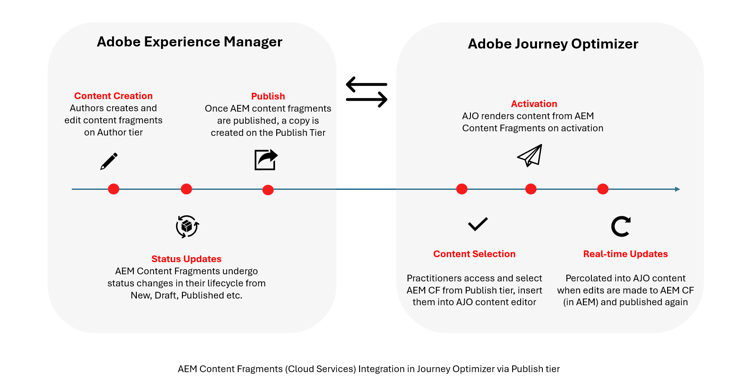
Les fragments de contenu suivent différentes étapes du cycle de vie en fonction du niveau Adobe Experience Manager dans lequel ils se trouvent. En savoir plus dans la documentation d’Adobe Experience Manager
Le contenu est créé et géré au niveau Créer, où les fragments peuvent avoir des statuts tels que Nouveau, Brouillon, Publié, Modifié ou Dépublié. Ces statuts s’appliquent uniquement au niveau Créer et prennent en charge la création et la révision de contenu.
Lorsqu’un fragment de contenu est publié, une copie est créée au niveau Publier et exposée via un point d’entrée public non authentifié. Pour Adobe Experience Manager as a Cloud Service, Journey Optimizer prend en charge l’intégration avec les niveaux Créer et Publier.
Par conséquent, Journey Optimizer n’affiche que les fragments de contenu publiés ou modifiés et utilise toujours la dernière version publiée. Les modifications apportées après la publication ne sont pas répercutées dans Journey Optimizer tant que le fragment de contenu n’a pas été republié.
This section contains structured knowledge intended to support interpretation, retrieval, and question answering related to this topic.
For complete understanding, this information should be combined with the documentation on this page. Neither source is intended to stand alone; the page describes the feature, while this section provides additional context that helps disambiguate terminology, intent, applicability, and constraints.
- TL;DR: This page introduces Adobe Experience Manager Content Fragments in Journey Optimizer and explains how their author and publish lifecycle determines which fragments are available for journeys and campaigns.
Intents:
- Understand how Adobe Experience Manager Content Fragments become available in journeys and campaigns
- Learn the Content Fragment lifecycle across the Author and Publish tiers
- Identify which Content Fragment statuses Journey Optimizer surfaces
- Understand support for Adobe Experience Manager Managed Service and as a Cloud Service
Glossary:
- Content Fragment: Adobe Experience Manager content used in Journey Optimizer journeys and campaigns (product-specific)
- Author tier: The tier where content is created and managed, where fragments can have statuses such as New, Draft, Published, Modified, or Unpublished (product-specific)
- Publish tier: The tier where a copy of a published Content Fragment is created and exposed through a public, unauthenticated endpoint (product-specific)
Guardrails:
- For Adobe Experience Manager Managed Service, integration supports Author and Publish tiers on AEM Long Term Support (LTS) SP2; real-time updates from Adobe Experience Manager are not available in this release.
- For Healthcare customers, the integration is enabled only upon licensing the Journey Optimizer Healthcare Shield and Adobe Experience Manager Enhanced Security add-on offerings.
- Journey Optimizer surfaces only Published or Modified Content Fragments and always uses the latest published version.
- Changes made after publication are not reflected in Journey Optimizer until the Content Fragment is republished.
- The New, Draft, Published, Modified, and Unpublished statuses apply only on the Author tier.
Terminology:
- Canonical name: Adobe Experience Manager Content Fragment — Acronym: AEM Content Fragment — variants: Content Fragment, AEM CF
- Synonyms: “as a Cloud Service” = “Adobe Experience Manager as a Cloud Service”
- Do not confuse: “Author tier” (content creation and review, statuses New/Draft/Published/Modified/Unpublished) ≠ “Publish tier” (public, unauthenticated endpoint copy)
FAQ:
- Q: Which Content Fragments appear in Journey Optimizer? — Only Published or Modified Content Fragments, and Journey Optimizer always uses the latest published version.
- Q: Are edits made after publication reflected automatically? — No; changes made after publication are not reflected in Journey Optimizer until the Content Fragment is republished.
- Q: What does Managed Service integration support? — Author and Publish tiers on AEM Long Term Support (LTS) SP2; real-time updates are not available in this release.
- Q: What statuses can a fragment have on the Author tier? — New, Draft, Published, Modified, or Unpublished; these statuses apply only on the Author tier.