Sur cette page : découvrez comment parcourir les identifiants client et explorer les graphiques d’identités dans Adobe Journey Optimizer, y compris la manière dont les espaces de noms d’identité et les valeurs se combinent pour identifier chaque client ou cliente.
Une identité est une donnée propre à une entité, généralement un objet réel, tel qu’une personne, un appareil ou un navigateur web. Une identité complète se compose de deux éléments :
- L’espace de noms d’identité sert d’indicateur du contexte auquel une identité se rapporte.
- La valeur d’identité est une chaîne qui représente une entité.
Prenons l’exemple du numéro de téléphone 555-555-1234. Dans ce cas, la chaîne « 555-555-1234 » est une valeur d’identité qui peut être classée dans un espace de noms d’identité « Téléphone ».
Le menu Identités d’Adobe Journey Optimizer permet aux utilisateurs et aux utilisatrices de parcourir efficacement les différents identifiants qui constituent la clientèle de leur base de données.
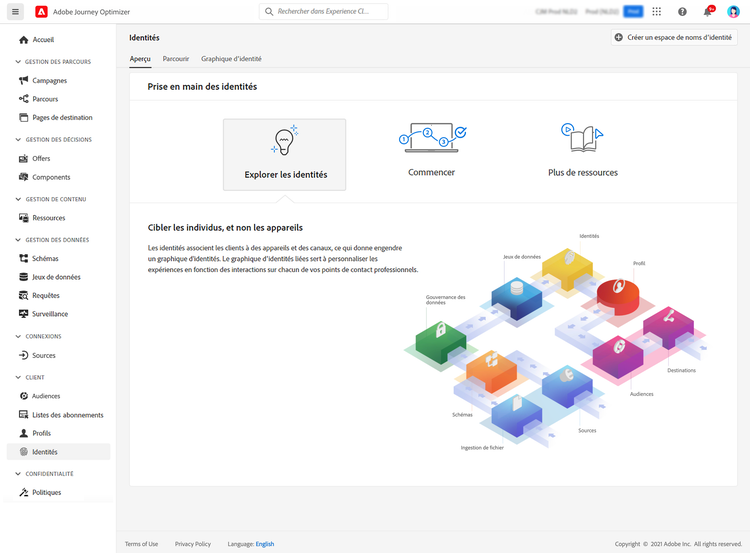
Il fournit un graphique d’identité, qui est une carte des relations entre différentes identités pour une personne donnée. Ce graphique offre une représentation visuelle des interactions d’une personne avec une marque sur différents canaux. Tous les graphiques d’identité de clientèle sont gérés et mis à jour collectivement par le Service d’identités d’Adobe Experience Platform en réponse à l’activité du client ou de la cliente.
Des informations détaillées sur l’utilisation des identités sont disponibles dans la documentation du Service d’identités.
This section contains structured knowledge intended to support interpretation, retrieval, and question answering related to this topic.
For complete understanding, this information should be combined with the documentation on this page. Neither source is intended to stand alone; the page describes the feature, while this section provides additional context that helps disambiguate terminology, intent, applicability, and constraints.
- TL;DR: The Identities menu in Adobe Journey Optimizer lets users browse the identifiers that make up their customers and explore an Identity Graph showing the relationships between a customer’s different identities.
Intents:
- Browse the various identifiers that make up the customers in the database
- Understand how an identity namespace and identity value combine to form a fully qualified identity
- Explore the Identity Graph for a particular customer
Glossary:
- Identity: Data that is unique to an entity, typically a real-world object such as an individual person, a hardware device, or a web browser (product-specific)
- Identity namespace: An indicator of the context to which an identity relates (product-specific)
- Identity value: A string that represents an entity (product-specific)
- Identity Graph: A map of relationships between different identities for a particular customer, offering a visual representation of how a customer interacts with a brand across different channels (product-specific)
Guardrails:
- All customer identity graphs are collectively managed and updated by Adobe Experience Platform Identity Service in response to customer activity.
Terminology:
- Canonical name: Identity Graph
- Do not confuse: “identity namespace” (indicator of context) ≠ “identity value” (string representing an entity)
FAQ:
- Q: What makes up a fully qualified identity? — Two elements: the identity namespace (the context) and the identity value (a string representing an entity).
- Q: What is the Identity Graph? — A map of relationships between a particular customer’s different identities, showing how they interact with a brand across channels.
- Q: Who manages and updates customer identity graphs? — Adobe Experience Platform Identity Service, in response to customer activity.