[Disponibilidad limitada]{class="badge informative"}
Información general sobre Conexiones
Para que los colaboradores puedan trabajar juntos en las campañas, deben establecer una conexión. Esta conexión les permite activar audiencias, crear proyectos y ejecutar informes sobre el rendimiento de la campaña.
Las conexiones se establecen en función del patrón de colaboración elegido. Collaboration admite tres patrones de colaboración clave: anunciante a editor, marca a marca y anunciante a plataforma de publicidad. Para obtener más información sobre estos patrones, consulte la guía patrones de colaboración.
Para aprender a establecer una conexión, lea la sección siguiente que corresponde a su patrón de colaboración:
Conexión de anunciante a editor advertiser-to-publisher-connection
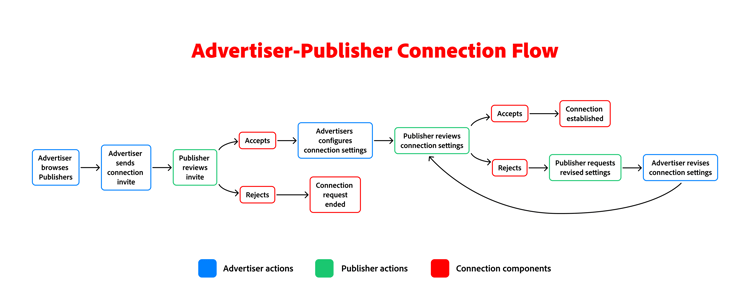
En el patrón de anunciante a editor, un anunciante descubre un publicador con el que desea trabajar a través del área de trabajo de Discover publicadores y envía una invitación de conexión. A continuación, el editor revisa la invitación y la acepta, lo que permite al anunciante proponer la configuración de conexión. Una vez que el editor acepta la configuración de conexión, esta se establece y ambos colaboradores pueden empezar a trabajar juntos en los proyectos.
Información general de alto nivel
Para establecer una conexión entre un anunciante y un editor, se deben seguir los siguientes pasos:
- Descubrir editores: El anunciante identifica editores potenciales con los que colaborar.
- Enviar invitación: El anunciante envía una invitación de conexión al editor seleccionado.
- Aceptar invitación: El editor revisa y acepta la invitación.
- Configurar opciones de conexión: el anunciante configura las opciones de conexión y las envía al editor para que las revise.
- Confirmar configuración de conexión: el editor revisa la configuración de conexión y la acepta o la rechaza. Si se acepta, se establece la conexión. Si se rechaza, el publicador puede proporcionar comentarios sobre las revisiones fuera del producto. El anunciante puede revisar la configuración y reenviarla para su revisión.
Once the connection settings are accepted, the connection is established, and collaborators are ready to create a project to begin collaborating on campaigns.
Brand-to-brand connection brand-to-brand-connection
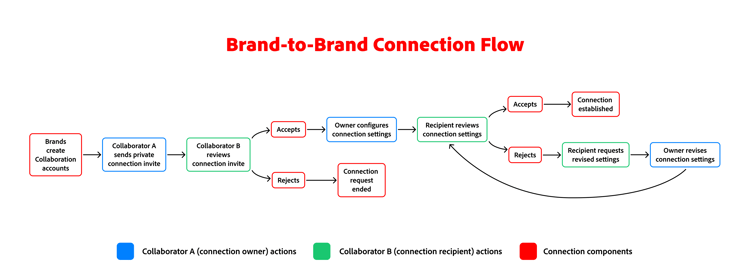
In the brand-to-brand pattern, two brands that have communicated outside of the product can connect directly in Collaboration using a private connection invite. A brand can be either an advertiser or a publisher. This pattern is particularly useful for brands that may not fit the traditional advertiser-publisher model, such as two advertisers or two publishers.
To begin, a collaborator sends a private connection invite to another collaborator. The recipient reviews the invite and accepts it, allowing the owner to propose connection settings. Once the recipient accepts the connection settings, the connection is established, and both collaborators can start working together on projects.
High-level overview
The connection process between two brands involves several steps. Before the connection process begins, a few prerequisites must be met:
- Two brands communicate outside of the product to discuss the potential connection.
- The brands create accounts in Collaboration if they haven’t already, being sure to select the appropriate role type (advertiser or publisher).
Once the prerequisites are met, the connection process can begin. The following steps outline the process:
- Send private connection invite: One collaborator sends a private connection invite to another collaborator.
- Accept private connection invite: The recipient reviews and accepts the private connection invite.
- Configure connection settings: The owner configures the connection settings and sends them to the recipient for review and acceptance.
- Confirm connection settings: The recipient reviews the connection settings and either accepts or rejects them.
Once the connection settings are accepted, the connection is established, and collaborators are ready to create a project to begin collaborating on campaigns.
Advertiser-to-advertising-platform connection advertiser-to-advertising-platform-connection
The advertiser-to-advertising-platform connection process allows advertisers to connect with third-party advertising platforms, such as Amazon Marketing Cloud (AMC), to enhance their marketing capabilities.
High-level overview
The connection process between an advertiser and an advertising platform involves several steps. Before the connection process begins, ensure you have an active account with the advertising platform and are approved to use their services. The following steps outline the connection process:
- Discover advertising platforms: The advertiser identifies potential advertising platforms to collaborate with.
- Connect to advertising platform: The advertiser initiates the connection process by selecting the advertising platform they want to connect with and follows the prompts to authenticate and authorize the connection.