En esta página: revise los registros de auditoría que registran las acciones de los usuarios en los recursos de Journey Optimizer para que pueda aumentar la visibilidad, solucionar problemas y demostrar el cumplimiento de las regulaciones y las políticas de administración de datos.
Acerca de los registros de auditoría audit-logs
Con Journey Optimizer, puede identificar las acciones ejecutadas por los usuarios en el sistema en distintos servicios y funcionalidades, como recorridos, mensajes, páginas de destino, etc.
Esto le permite aumentar la visibilidad de las actividades realizadas en el sistema, solucionar problemas y ayudar a su empresa a cumplir con las regulaciones y las políticas de administración de datos corporativos…
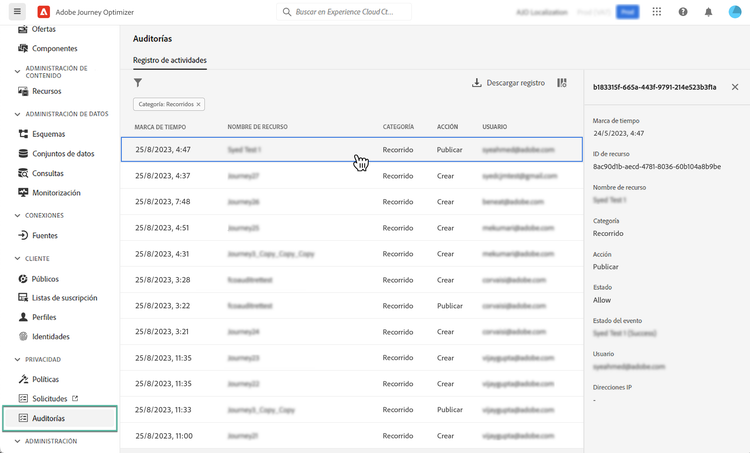
Cada acción se registra con metadatos en “registros de auditoría” a los que se puede acceder desde Adobe Experience Platform. Para obtener más información sobre los registros de auditoría, incluido cómo verlos y administrarlos en la IU o la API, consulte la documentación de Adobe Experience Platform.
Tipos de eventos capturados por los registros de auditoría events
La siguiente tabla indica qué acciones y sobre qué recursos de Journey Optimizer se registran en los registros de auditoría. La lista completa de acciones capturadas en los registros de auditoría está disponible en la Documentación de Adobe Experience Platform.
This section contains structured knowledge intended to support interpretation, retrieval, and question answering related to this topic.
For complete understanding, this information should be combined with the documentation on this page. Neither source is intended to stand alone; the page describes the feature, while this section provides additional context that helps disambiguate terminology, intent, applicability, and constraints.
- TL;DR: This page explains how audit logs record user actions on Journey Optimizer resources so you can increase visibility, troubleshoot issues, and demonstrate compliance with regulations and data stewardship policies.
Intents:
- Understand what audit logs record for Journey Optimizer resources
- Identify which resources and actions are captured by audit logs
- Learn the permission required to view and export audit logs
- Know where audit logs are accessible
- Understand how to access audit logs related to decision management
Glossary:
- Audit logs: records that capture actions performed by users in the system on services and capabilities such as journeys, messages, and landing pages, recorded with metadata and accessible in Adobe Experience Platform (product-specific)
- View User Activity Log: the permission that must be granted to view and export audit logs (product-specific)
- Download log: the button used to download the CSV file (product-specific)
- Decision management audit logs: audit logs related to decision management, which are only visible from the downloaded CSV file (product-specific)
Guardrails:
- To view and export audit logs, you must have the View User Activity Log permission granted (prerequisite)
- Each action is recorded with metadata in audit logs, which are accessible in Adobe Experience Platform
- Audit logs related to decision management are only visible from the CSV file that can be downloaded using the Download log button (constraint)
Terminology:
- Canonical name: Audit logs
FAQ:
- Q: What permission is required to view and export audit logs? — The View User Activity Log permission must be granted.
- Q: Where are audit logs accessible? — In Adobe Experience Platform.
- Q: How do you access audit logs related to decision management? — They are only visible from the CSV file downloaded using the Download log button.
- Q: Which resource actions are captured? — Actions such as Create, Delete, Update, Activate, Stop, and Publish on resources including campaigns, journeys, landing pages, and others listed in the event types table.