Migration to the Email Designer in Adobe Marketo Engage isn't a switch that admins flip overnight; it's about when and how. This article outlines a phased migration approach that you can take to align with Adobe’s long-term direction while protecting your campaign performance and governance standards.
The Email Designer is the future of email authoring in Adobe Marketo Engage. The new Email Designer has a cleaner interface, is more flexible, and is clearly built for scale. But most Marketing Operations teams can’t afford a risky, all-at-once migration when campaign cycles are constant, and campaign launches are time-sensitive.
Based on real production usage, this article focuses on a phased and intentional migration strategy that helps Marketing teams adopt the new Email Designer without disrupting performance – while building governance and confidence to position Marketing Operations for long-term scale.
Migrating to the new Email Designer in Marketo Engage directly addresses several real-world challenges at my organization today:
-
Marketer’s demand for self-sufficiency:
-
Visual, low-code email authoring enables marketers to build and modify emails independently, reducing bottlenecks in Marketing Operations.
-
With Fragments, Marketing teams can introduce fresh content blocks or campaign-specific variations without waiting for HTML updates from technical teams.
Scalable governance and simplified brand guidelines for enabling marketers:
-
Modular templates allow brand elements to be locked where needed, while still giving marketers structured flexibility. This is especially useful for institutions managing multiple campuses, faculties, or program streams.
-
Use Brand Themes to create structured templates and reusable content blocks, and define different editing roles and permissions to help balance compliance with agility.
-
-
Streamline collaboration and alignment across distributed teams:
- During intake deadlines or major promotional windows, using Email Collaboration and Commenting helps faster iterations and shortens approval cycles between Marketing and Marketing Operations, directly impacting campaign performance.
From stability to scale: Planning the transition to the Email Designer
While the classic Email Editor continues to support live campaigns reliably, I recommend your team start thinking about when and how to transition to the modern email authoring, rather than waiting until change becomes urgent or externally driven by Adobe in 2027.
Prioritize migration to the new Email Designer when the following business needs occur:
-
Redesigning templates: The Marketing Operations team is already refreshing or consolidating templates.
-
Templates that are difficult to maintain: Marketers depend heavily on Marketo Engage admins or developers for routine layout changes.
-
Faster campaign turnaround expectations: Campaign build cycles using classic Email Editor are slowing execution.
-
Reduce bottlenecks to support multiple Marketing teams: Multiple Marketing teams require standards and consistency with structured flexibility for Marketing Operations to support at scale.
Migration is not just about replacing a working editor. It is about strengthening how a marketing organization operates as complexity, scale, and expectations continue to grow.
The pressure applies to all types of marketing teams, whether you operate in B2B, B2C, education, financial services, healthcare, or technology. Planning and rolling out the modern email authoring experience incrementally can help you address the growing demand for marketers to be self-sufficient.
A phased path to adoption of the new email authoring workflow
A phased approach keeps risk low while allowing the Marketing teams to learn from real use cases. Instead of forcing an immediate full transition, it lets both marketers and admins build confidence with the Email Designer while continuing to rely on proven processes for high-priority programs.
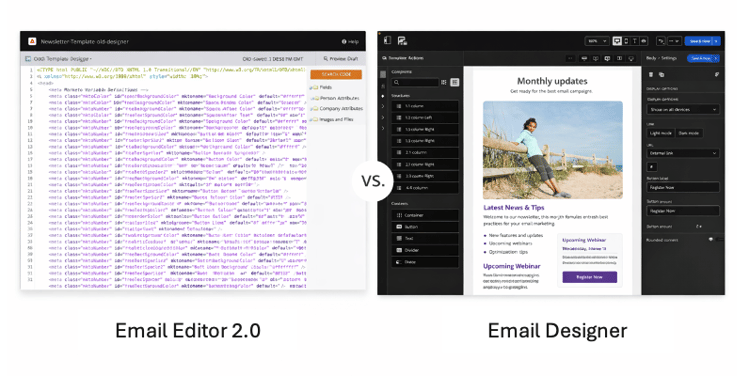
Bulk migration is the biggest risk
The biggest mistake is attempting to convert every legacy template in your Marketo Engage instance at once. Bulk migration creates:
-
Heavy QA cycles
-
Confusion about workflows
-
Increased support tickets
-
Limited short-term business value
Prioritize your template migration by focusing on future productivity, not historical cleanup of legacy templates that are still performing well.
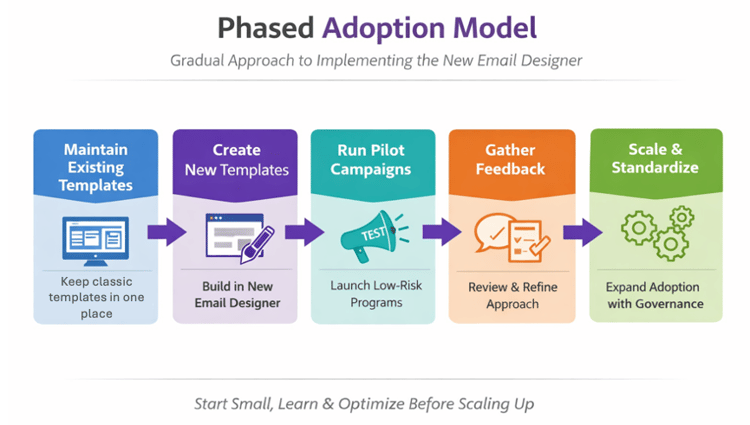
Phase 1: Start smart with low-risk templates
My organization began with a small set of templates where the stakes are lower and the learning is higher.
-
Build one or two new templates in the new Email Designer.
-
Use them for lower-risk campaigns, such as
-
newsletters with various content blocks regularly used, targeting an engaged audience to receive feedback more quickly.
-
internal communications, allowing the Marketing Ops to gather early feedback from the internal marketers.
-
-
Collect structured feedback from marketers and reviewers.
-
Refine governance, naming conventions, and folder structures early.
This stage builds familiarity and internal momentum, and small refinements can be made before scaling further to other campaigns. By intentionally keeping the scope limited, my team has noticed:
-
Reduced resistance from the Marketing teams while allowing marketers to gain hands-on experience without pressure.
-
Shifted how marketers approach building emails, moving from structured templates to a more visual approach using Fragments.
-
The need to define governance standards early, even for pilot use cases in this phase, so that Marketing Ops can handle inconsistencies across campaigns.
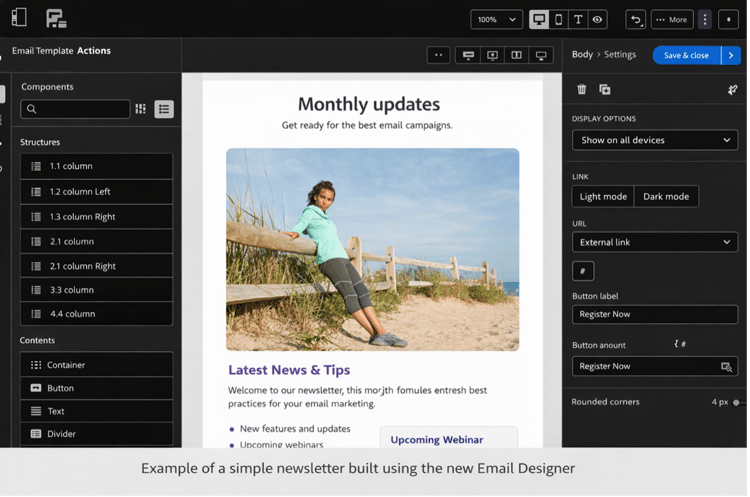
Phase 2: Create momentum with quick wins
The Template Import feature allows a selective transition rather than rebuilding everything from scratch. Instead of treating migration as a large technical project, I would focus on high-impact assets with the following plan:
-
Identify widely used templates with moderate complexity. For example, newsletters for additional audience segments, webinar/event invitations, and frequently reused campaign templates.
-
Convert them using Template Import
-
Adjust minor formatting or recreate sections where needed
-
Save them as modular, reusable assets as Fragments
-
Add visual fragments to your templates
-
Deploy the templates across future campaigns
Migrating templates that offer high visibility and frequent reuse enables Marketing teams to benefit from modular design and visual authoring, encouraging consistent use. This approach delivers visible progress more quickly in your internal rollout process -- Marketers can see immediate value from the new workflow, and leadership can see improvements in operational efficiency.
Phase 3: Scale with intention
Once confidence, governance, and standards are established with quick wins, expansion to complex templates becomes much easier.
-
Migrate more complex templates requiring regulated or tightly locked layouts, including
-
Regionally standardized or team-specific templates
-
Heavily dynamic or logic-driven emails
-
Templates with complex inline scripting
-
-
Rarely used legacy assets to keep specific layouts, edge-case logic, or campaign patterns for future requirements
-
Introduce Brand Themes with reusable modules created to strengthen brand consistency
-
Centralize the template approval process for designers before distributing to marketing stakeholders
-
Gradually retire legacy templates as they become redundant
At this scale stage, parallel usage is no longer necessary. You would expect the parallel use of the classic Email Editor and the new Email Designer would naturally phase out as adoption among internal teams grows. By transitioning step by step, you can lead your organization to modernize the email ecosystem while protecting performance, governance, and team confidence.
Creating alignment and shared ownership for organization-wide adoption
Your migration plan would gain traction when stakeholders could see clear operational benefits rather than just interface improvements. At Navitas, I began alignment by securing buy-in from dedicated business owners managing their respective business units. Then, I identified the asset types and emails that are more critical to the business unit for directional signoff.
To build alignment across marketing, operations, and leadership, I recommend that product owners reinforce key messages such as:
The new Email Designer is the future of email authoring in Marketo Engage, providing marketers with self-sufficiency while preserving the necessary controls.
Early investment in using enhanced governance capabilities enables long-term speed and scalability, strengthening brand consistency across teams and regions.
When framed as an operational upgrade rather than a simple tool replacement, the transition feels intentional and forward-looking. Cross-functional teams understand that the goal is not to change for its own sake, but to build a stronger, more agile marketing foundation. With teams seeing early wins and aligned to this strategy, buy-in becomes organic rather than forced.
What success looks like in adopting the Email Designer
Success is not about whether the new interface looks better. It is about whether your Marketing teams work better because of it. A well-executed migration to the new Email Designer should create measurable operational improvements. Over time, you should measure against the following signals:
-
Reduced dependency on admins or developers for routine template updates.
-
Faster, more reliable campaign execution with fewer template-related errors or last-minute fixes.
-
Consistent, on-brand execution across regions, brands, or business units.
-
Increased marketer confidence and autonomy in building and managing emails.
These indicators reflect a healthier, more scalable marketing operation workflow. Migration to the new Email Designer delivers real value: Teams can move faster without sacrificing governance, marketers feel empowered rather than constrained, and campaign execution becomes smoother across the board.
Progress may start small, but steady operational gains would be the clearest sign that the transition is working as intended.
Key takeaways
Begin migrating to the new Email Designer early to build readiness over time. A deliberate, phased migration delivers faster execution, stronger governance capabilities, and great marketer autonomy -- without putting live campaigns at risk.
-
Support parallel usage intentionally to develop learning while maintaining proven workflows.
-
Strengthen governance early to enable scale, consistency, and compliance.
-
Use the Template Import for targeted, high-impact quick wins, not bulk migration.
-
Prioritize operational readiness over speed as a measure of success to ensure sustainable organization-wide adoption.
The new Email Designer represents the long-term email authoring standard in Marketo Engage. A marketing organization that approaches migration strategically, with governance and phased adoption in mind, can realize measurable productivity gains while protecting live campaigns.