Most enterprise Adobe Experience Manager (AEM) deployments are wired to one channel: the website. This article shows how to redesign that architecture so content is authored once in AEM and delivered across web, mobile, email, and authenticated portals through a single GraphQL API.
Most enterprise Adobe Experience Manager (AEM) implementations were scoped as website CMS (content management system) projects instead of as content platforms. When this happens, AEM deployments are wired to one channel: the website. Often, mobile apps, email platforms, authenticated portals, and SPAs each get their own authoring tool, and the same content gets re-entered into three or four places. But it doesn't have to be this way. AEM offers Content Fragments and native GraphQL support for headless delivery, which makes this an architecture problem, rather than a product limitation.
The content duplication problem - two teams, one root cause
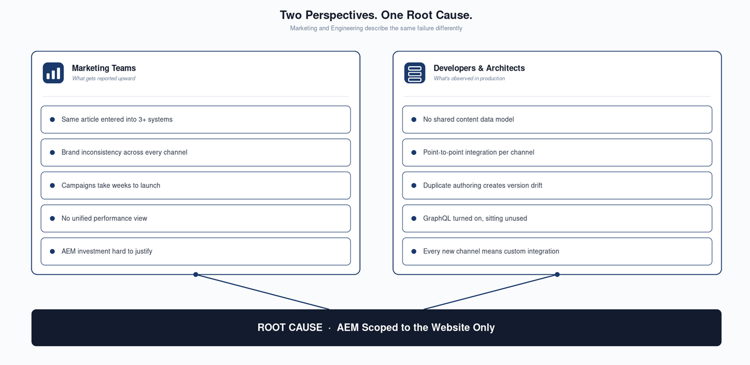
The content duplication problem is seen differently by the two key teams.
-
Marketing teams describe the problem as inconsistent content across channels, campaigns that take weeks to launch because every channel has its own workflow, and the same article entered into three different systems
-
Developers and architects describe it as content silos, brittle point-to-point integrations, and downstream apps with no reliable source of truth
Both trace the problem to the same decision made at implementation time: AEM was scoped as a website CMS, not a content platform.
Key insight
Every team experiencing this already has AEM running with GraphQL turned on, and unused. The real constraint is the scope set at implementation time, and that's what needs to change.
Three content types, one source of truth
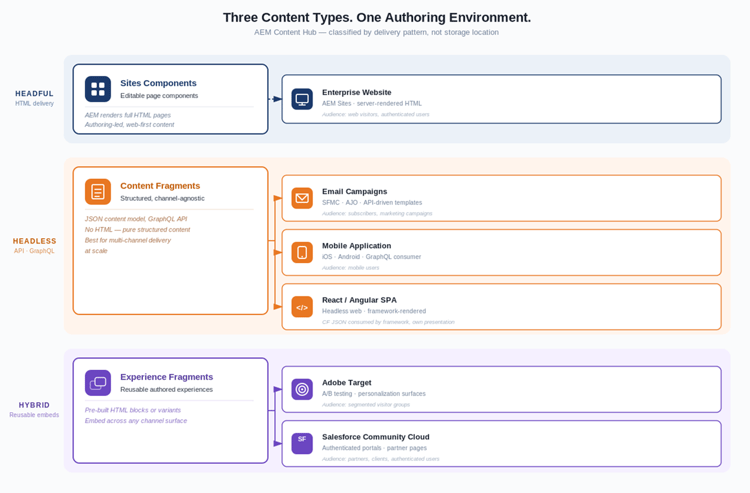
AEM has three content types built for different delivery needs. Choosing the right one for each use case is what makes omnichannel delivery possible.
-
Sites Components (headful): content rendered as HTML for browser delivery. Right choice when AEM owns the presentation layer, typically your primary website.
-
Content Fragments (headless): structured, channel-agnostic data exposed via GraphQL. Authored once; consumed by any downstream system that can make an API call.
-
Experience Fragments: assembled, reusable blocks exportable as HTML or JSON. Most useful for Adobe Target personalization and consistent promotional content across email.
The diagram below showcases how headful, headless and hybrid uses of AEM can function in parellel, with Content Fragments and Experience Fragments acting as a centralized content hub for content that may be surfaced in various channels beyond the website.
How-to - 3 steps
-
Step 1: List every content type your team manages (articles, events, profiles, products). For each, note where it lives today and how many systems it gets entered into.
-
Step 2: For each content type, map every channel that currently consumes it or should: website, mobile app, SFMC (Marketing Cloud Next), authenticated portal, SPA. If more than one channel needs it, it belongs in a Content Fragment.
-
Step 3: Redesign the content model around the full consumer list, not just the website. The website is one consumer. Build the schema for all of them.
Building the AEM-as-a-content hub architecture
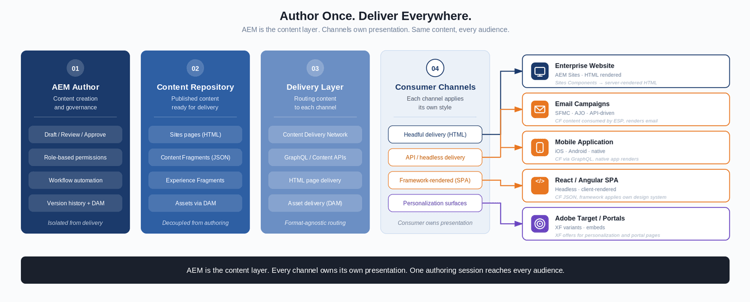
The AEM as-a-content hub architecture has these key elements.
-
Just one authoring environment. Authors work in AEM regardless of which channel will display the content.
-
Content Fragment models are the schema layer: structured fields, taxonomy tags, and fragment references that make content queryable across channels.
-
GraphQL is the delivery contract. Each downstream consumer queries the endpoint for exactly the fields it needs, nothing more.
-
The website and API-based channels run on the same platform. Sites components handle browser delivery; Content Fragments handle everything else, all from the same authored content.
-
Taxonomy is what makes the architecture useful at scale. A query like 'give me the last 7 days of wealth management content' only works if every Content Fragment model was built with consistent tag fields from day one.
How-to (3 steps):
-
Step 1: Before writing a single Content Fragment model field, list every system that will or might consume that content type: website, mobile, SFMC (Marketing Cloud Next), portal, SPA. Their data requirements define the schema. Anything skipped here gets retrofitted later at significantly higher cost.
-
Step 2: For every field, ask one question: does any channel other than the website need this? Rich text HTML is web-only. Mobile apps and API consumers cannot parse it. Model for your most constrained consumer; the web renderer handles presentation on its side.
-
Step 3: Build taxonomy into the model before publishing anything: tags, content type, and date fields. Then pick one non-web channel and wire it to the GraphQL endpoint as a proof of concept. Validate the data contract with that team before the model goes to production.
Key takeaways
AEM's headless and headful modes are two delivery paths on the same platform. Most teams treat them as an either/or. They were designed to run in parallel.
-
The capability to perform as a content hub already exists in AEM, with no new product and no additional license required. The constraint is model design.
-
The gap between where most implementations are and where they need to be sits almost entirely in the Content Fragment model layer. That is both the diagnosis and the starting point.
Next Steps for practitioners
-
Audit your Content Fragment models. For each model, label every field: web-only (rich text, layout references) or channel-portable (plain text, structured data).
-
For any model where web-only fields dominate, build a revised schema with the full downstream consumer list mapped before rebuilding.
-
Pick one non-web channel and test it against AEM's GraphQL endpoint. Validate the data contract with that team before the model goes to production.
Next Steps for digital and marketing leaders
-
Stop asking which pages are in AEM. Ask which content the business needs to manage once, and deliver everywhere. That shift in the question changes what your team builds.
-
Find the content type that gets re-entered into the most systems. That is your first migration candidate. The cost of duplicated authoring effort usually justifies the model redesign.
-
Get your architects and marketing operations team into the same conversation before any CF model is built. The schema decisions developers make are the content workflow decisions authors live with for years.
Learn more
Documentation
Perspectives from Adobe Champions