Discover how AEM’s Content Fragments and Experience Fragments work together to streamline authoring, ensure brand consistency, and enable true omnichannel delivery. Learn when to use each, and why choosing the right one can make or break your content strategy.
In Adobe Experience Manager (AEM), reusability is key to creating scalable and efficient digital experiences. Many teams begin by focusing on components, but components alone can only go so far. They define layout and functionality, but often blend content with design. This makes it difficult to reuse information consistently across multiple channels, websites, regions, or campaigns.
That’s where Content Fragments and Experience Fragments come in. These two tools let us separate content from presentation in complementary ways. When used correctly, they help deliver consistent brand experiences faster, reduce duplication, and make content easier to manage across all digital channels. Understanding when to use each is essential for building flexible authoring workflows and omnichannel experiences.
Choosing the wrong fragment type for the wrong purpose, however, can increase complexity, slow down authoring, and make long-term maintenance and updates unnecessarily difficult.
Content Fragments vs Experience Fragments
In AEM, Content Fragments represent reusable, presentation-agnostic pieces of structured content. Each fragment is based on a Content Fragment Model, defining fields such as text, images, and links to images, files, or other Content Fragments. Because they are not tied to any visual layout, they can be used anywhere: on web pages, in mobile apps, or in any external systems via AEM’s JSON or GraphQL APIs.
Experience Fragments, on the other hand, are reusable groups of components that include both content and layout. They represent complete sections of an experience, such as a hero banner, promotional area, or footer. They can be reused across multiple pages or exported to other Adobe platforms, such as Adobe Target and Adobe Campaign, for personalization and distribution.
Adobe recommends using Content Fragments for structured content that needs to be delivered in many different forms, and Experience Fragments for layout-driven, branded experiences. When used together, they allow organizations to balance flexibility and design consistency, two essential goals in modern digital content management.
When to use Content Fragments
Content Fragments are best used when we need to manage structured, reusable content that isn’t tied to a specific presentation. They’re ideal for information that needs to appear consistently in multiple contexts, such as contact details, author bios, FAQs, or press releases. They’re suitable for reusable content that may need to look different across various channels.
Because they are channel-neutral, Content Fragments enable true omnichannel publishing. Teams can author content once and deliver it everywhere: websites, apps, kiosks, or basically any device connected to the internet. This separation of content from layout improves governance, streamlines translation workflows, and makes updates far more efficient.
When designing Content Fragment Models, it’s best to think of them like API schemas. They should be stable, typed, and minimal. Each model should capture only the structured data that will remain consistent across channels. Editorial differences, such as long versus short copy or localized variants, can be handled through Content Fragment variations, not separate fragments. We recommend keeping all fragments organized under /content/dam/<site>/content-fragments/... and group them by domain, for example, /articles, /contacts, or /press-releases. We should treat Content Fragments as source content: version them before large edits, and reference them from pages, Experience Fragments, or even other Content Fragments.
When to use Experience Fragments
Experience Fragments are most effective when we want to reuse content that already includes layout and design. They are perfect for campaign sections, banners, hero areas, or other branded blocks that should look identical across multiple pages or sites.
They help enforce brand consistency, speed up authoring, and reduce duplication, especially in multi-site or multi-market setups. Experience Fragments also integrate seamlessly with personalization tools like Adobe Target, allowing brands to reuse designed experiences while still tailoring content to different audiences. If the goal is to maintain a consistent look and feel while giving authors flexibility to reuse styled components, Experience Fragments are the right tool.
When creating Experience Fragments, mirror your site structure within the Experience Fragments tree, for example, /content/experience-fragments/<site>/uk/en. Avoid deep nesting, as one level is usually enough. Keep variant sets lean by separating them only when necessary, such as by channel, locale, or campaign. Name variants predictably, like “default,” “mobile,” “email,” and so on. To maintain design control, lock down allowed components via policies so authors can’t unintentionally alter the approved layouts. Above all, don’t use Experience Fragments for structured data or situations where the same content needs to appear in different designs; that’s what Content Fragments are for.
When to use both
Often, the best solution combines both fragment types. We can embed Content Fragments inside Experience Fragments, gaining the benefits of structured content within a reusable layout.
In these scenarios, it is important to keep the boundaries clear: Content Fragments should remain responsible for the data and textual content, while Experience Fragments should handle layout and styling. Use this combination when structured information (like bios, testimonials, or contact information) needs to appear within reusable design sections such as hero banners, card lists, or teasers.
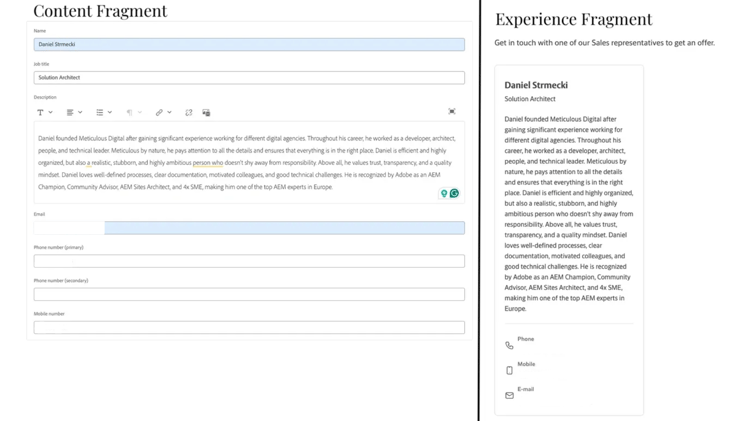
Content Fragment example
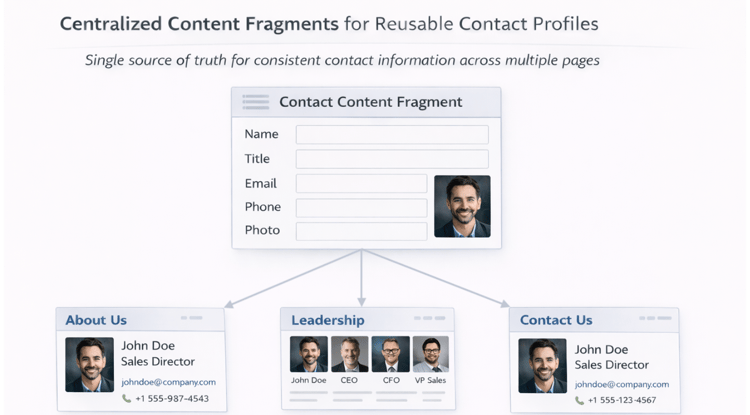
A company manages hundreds of contact profiles for executives, spokespeople, and sales leads. Each contact contains fields such as name, title, email, phone number, and headshot. By defining a Content Fragment Model for contacts, we can maintain a single source of truth that feeds multiple components on pages, like “About Us,” “Leadership”, ”Locations”, or ”Contact us”, without reauthoring the same information.
The Content Fragment example below is effective because contact information is structured and reusable, and can be displayed in various layouts without changing the underlying data. Some examples of these layouts include a bulleted list, a profile teaser, or a card/team grid.
A bad example would be creating each contact as an Experience Fragment. That approach would tie layout to content, making it difficult to reuse the same information in different component designs or other channels.
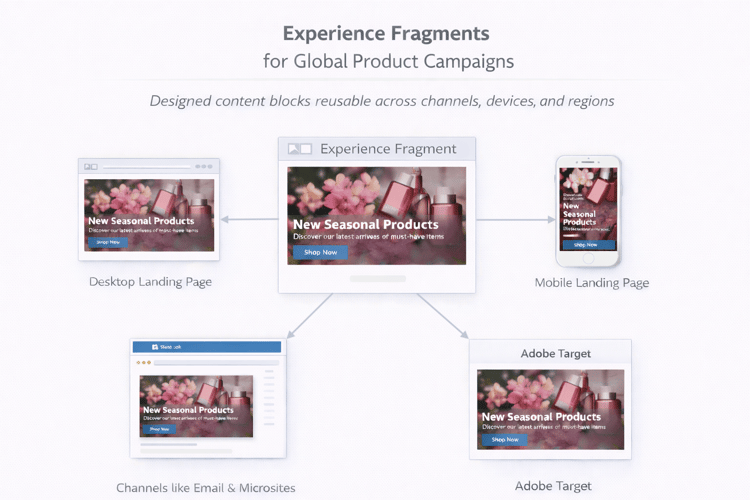
Experience Fragment example
A global marketing team is running a seasonal campaign promoting a new product line. The campaign includes a hero banner with an image, tagline, short copy, and a CTA. They build it as an Experience Fragment, creating variations for desktop, mobile, and each regional market. Authors can then reuse the same banner across multiple landing pages, ensuring visual consistency and faster campaign rollouts. The marketing team can also export the same fragment to Adobe Target for personalization or to external channels like email or microsites, without rebuilding the layout.
This is a good example because the Experience Fragment keeps both the design and content together, allowing it to be reused as a fully designed, brand-approved block. Authors only need to update the fragment once, and all instances across the site (and channels) reflect those changes instantly.
A bad example would be attempting to build the same campaign with only Content Fragments. Since Content Fragments have no layout, each page or channel would need a custom implementation to render the design, making the rollout slower and risking inconsistent styling across markets.
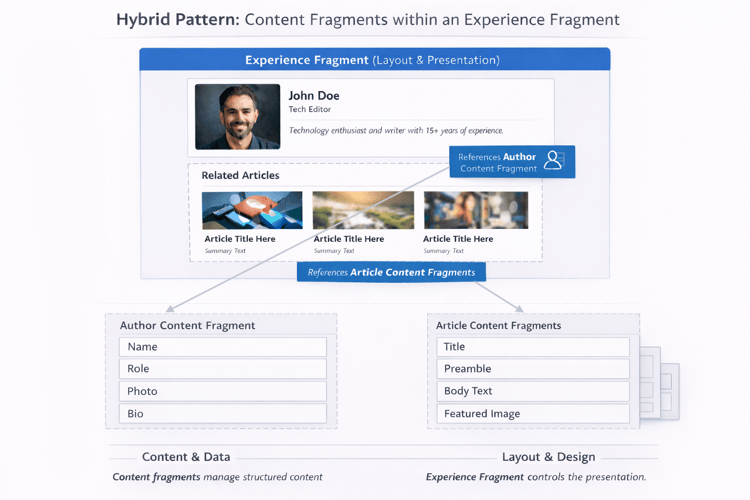
Hybrid example
A publishing site defines two Content Fragment Models, one for articles and another for authors. The article Content Fragment contains fields such as title, preamble, main text, and featured image. The author Content Fragment includes fields for name, role, headshot image, and short bio. Editors create individual fragments for each author and each article, keeping all content structured and reusable.
On the author details page, an Experience Fragment is used to bring this structured data together into a cohesive design. The hero banner component in the Experience Fragment references the author Content Fragment for the name, image, and bio. At the same time, a related-articles component below dynamically pulls in article Content Fragments written by the same author. The Experience Fragment defines the layout, typography, and component structure, while the Content Fragments provide the actual data and text content.
This is a good hybrid example because it separates content ownership from layout and presentation. Editors can update author information or article text once, and the changes automatically cascade across all pages and experiences that consume those fragments. Designers, meanwhile, maintain control over how the content is presented visually through the Experience Fragment layout.
A bad example would be creating the entire author page, including layout and text, as a standalone Experience Fragment. That approach would tightly couple the design and data, making it difficult to reuse author or article information in other components or expose them to other channels.
Conclusion
Choosing between Content Fragments and Experience Fragments isn’t just about how AEM stores content; it’s about how your teams create, manage, and scale experiences. Content Fragments excel when structure and reusability matter most, while Experience Fragments bring speed and consistency to designed sections. When combined thoughtfully, they form the foundation for sustainable authoring workflows that scale across brands, languages, and regions.
The right balance depends on your goals: structured content for omnichannel delivery, consistent layouts for branded campaigns, or both for complex, but reusable experiences. Teams that invest early in a clear, well-defined fragment strategy not only reduce maintenance costs but also gain agility. This enables teams to launch new pages, markets, or campaigns without reinventing the wheel.