Discover how Ilona Buteneers at Datacolor uses Dynamic Chat to capture leads, enhance sales engagement, and simplify event registration with its native integration with Marketo Engage. Learn why and how to use Conversational Flow and Conversational Form in Dynamic Chat to create low-friction touchpoints and automated booking options.
In this article, I explore Conversational Flows in Adobe Dynamic Chat and how I use this powerful feature in conjunction with Adobe Marketo Engage to enable my team to interact with website visitors in a personalized and interactive way.
At Datacolor, I started using Conversational Flows as an additional way to convert people through the website. This approach creates an accessible touchpoint to engage visitors and assess whether there is further sales potential. It helps us qualify leads faster, improve engagement, and guide visitors toward relevant content or actions in real time so that my stakeholders are not relying only on forms or email follow-ups.
When to use Dialogues vs. Conversational Flows
Before I discuss my use cases at Datacolor, let’s first understand the difference between Dialogues and Conversational Flows in Dynamic Chat and when to use each.
- In my opinion, Dialogues are ideal for real-time engagement, such as qualifying leads, answering FAQs, or directing visitors to relevant resources. They keep interactions fluid and conversational, making them great for pre-sales discussions or customer support.
- Conversely, Conversational Flows are designed for structured data collection, replacing long forms with a step-by-step approach. They are perfect for processes like event registrations, demo requests, or capturing detailed lead information without overwhelming the user.
Choosing between the two depends on your goal. If you need real-time engagement, I’d go with Dialogues; if you’re focused on gathering information efficiently, Conversational Flows are the better choice. Now, let’s explore how Conversational Flows work in practice with a few real-world use cases.
In the following section, I discuss my use cases of Conversational Flows at Datacolor, demonstrating how to set them up in Dynamic Chat and Marketo Engage, and sharing my tips and tricks.
Use case 1: Boosting product inquiries with Conversational Flows - a smarter way to connect leads with Sales
Imagine this scenario: A potential customer visits your website, lands on a product page, and actively looks for more details—this behavior is already a great buying signal! To make the most of this engagement, at Datacolor, I have set up a Conversational Flow triggered by the CTA button “Download Spec Sheet.”
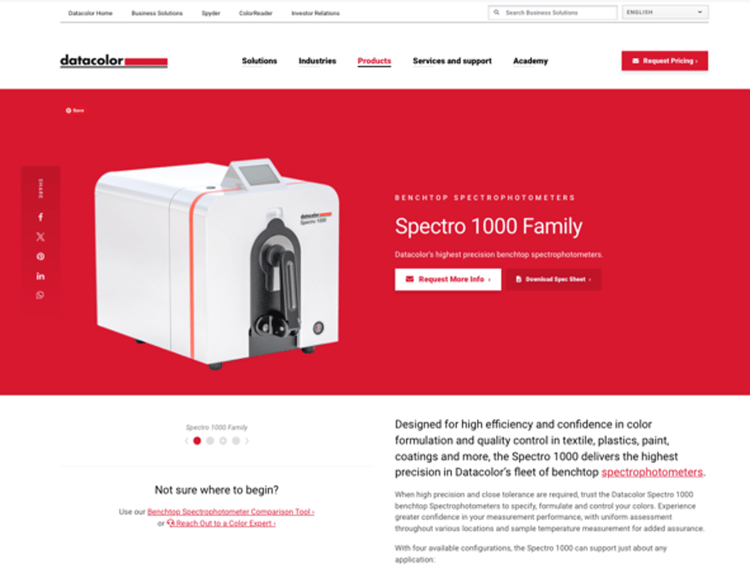
See how I set up the workflow in action by watching the video below.
By using Conversational Flows in Dynamic Chat, I have created an accessible, low-friction touchpoint for visitors who already show strong intent. Implementing this feature helps my team capture leads more effectively and driving real sales conversations.
If you are looking for a simple yet powerful way to convert website visitors, this use case is a great place to start.
Use Case 2: Streamlining Event Registration with Conversational Forms - How to capture leads and boost attendance
Imagine this scenario: A customer wants to register for a paid event, such as an upcoming industry-specific tradeshow. Traditionally, a long registration form could discourage sign-ups. To improve user experience and reduce drop-offs, at Datacolor, I have split the process into two steps—starting with a simple Marketo form and continuing with a Conversational Flow.
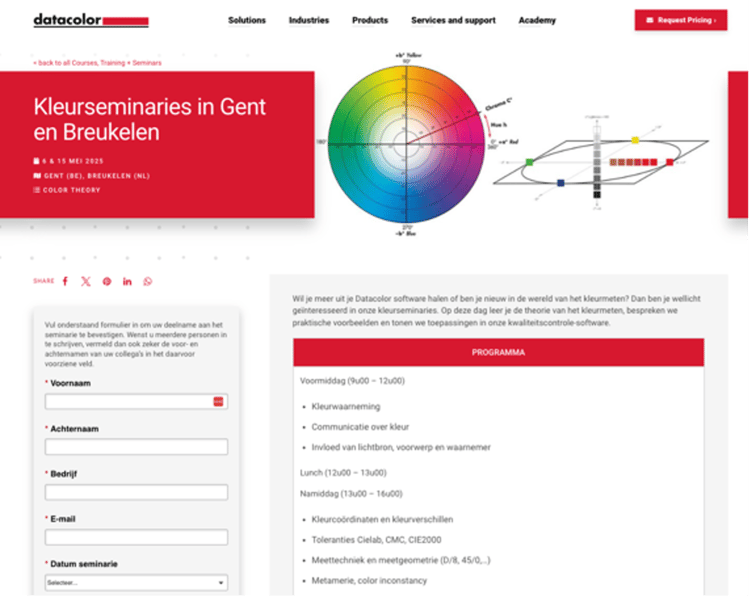
Why use a Conversational Form?
By splitting the form into two steps, I can prevent visitors from feeling overwhelmed by a long form. The Conversational Flow keeps engagement high while ensuring that I collect all necessary details without impacting the user experience.
Additionally, one key benefit of using Dynamic Chat for event registration is the ability to customize the flow based on industry-specific trade shows. By tailoring the messaging and qualification criteria, I ensure my team captures relevant leads while making the registration process as frictionless as possible.
Follow my demo along to learn how to implement this two-step approach.
By leveraging Conversational Flows and Conversational Forms in Dynamic Chat, I have created a streamlined and engaging way for the Datacolor website visitors to register for industry events. The implementation improves lead capture, simplifies event logistics, and ensures timely follow-up by my Sales team.
Using Conversational Forms in Dynamic Chat helps us improve event registration efficiency while maintaining a frictionless experience for leads. If you want to collect more data without increasing form abandonment rates, this approach is a game-changer to enhance your marketing efforts!
Key Takeaways
In this article, I explored how Conversational Flows in Dynamic Chat can be leveraged to streamline lead conversion and enhance engagement with both prospective and existing customers. Through two real-world use cases at Datacolor, I have demonstrated how to create meaningful touchpoints and drive conversions with minimal friction.
- Product Inquiries: Guide prospective customers who land on a web page through a Conversational Flow triggered by a CTA, such as the “Download Spec Sheet” CTA on Datacolor’s product landing page.
- Event Registration: Use Dynamic Chat to improve event registrations by capturing key visitor details and additional critical information, and streamlining the Sales follow-up.
Along the way of implementing these examples, I would also recommend doing the following:
- Strategic Use of Conversational Forms: Splitting long forms into multiple steps improves user experience and reduces drop-offs.
- Conditional Branching for Personalization: To optimize sales rep time, configure Conversational Flows to distinguish between existing customers and new leads. Doing this ensures that high-potential prospects are prioritized for direct outreach.
- Optimizing for Engagement: Conversational Flows combined with Outlook calendar integration make scheduling sales meetings effortless.
I used Conversational Flows and Conversational Form in Dynamic Chat to help my organization engage leads effectively while capturing essential data in a structured and user-friendly way. When you implement these features strategically, they can reduce friction, personalize interactions, and streamline the transition from marketing to sales. Thank you for following along, and happy optimizing!