Metrics in CJA can be defined either in the Data View or within Analysis Workspace as Calculated Metrics. This article describes and compares these options and explains when to use each one.
In Adobe Customer Journey Analytics, metrics can be established either in the Data View or within Analysis Workspace as Calculated Metrics. Each approach offers distinct advantages and is suited to different scenarios or users. This article provides an overview of both options - highlighting their differences, benefits, and limitations. It also offers guidance on selecting the most appropriate method for metric definition based on your reporting and analysis needs. Understanding which option to pick can help users improve analysis efficiency and organizations maintain appropriate metric governance.
Different options for defining a custom metric
Data View metric
Defining metrics directly in the Data View is most common for metrics used and shared across the organization. Administrators can control metric definitions to ensure standardized reporting. This option is best used when a metric needs to be enabled for the entire organization. Standard business users do not have access to this functionality, but should be able to request new metrics from their administrators.
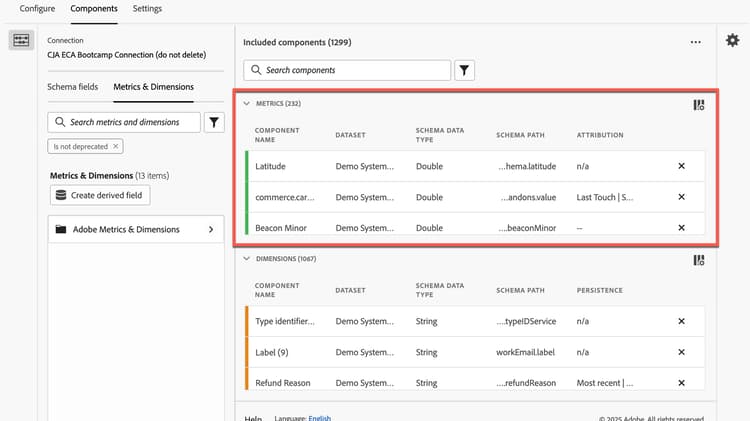
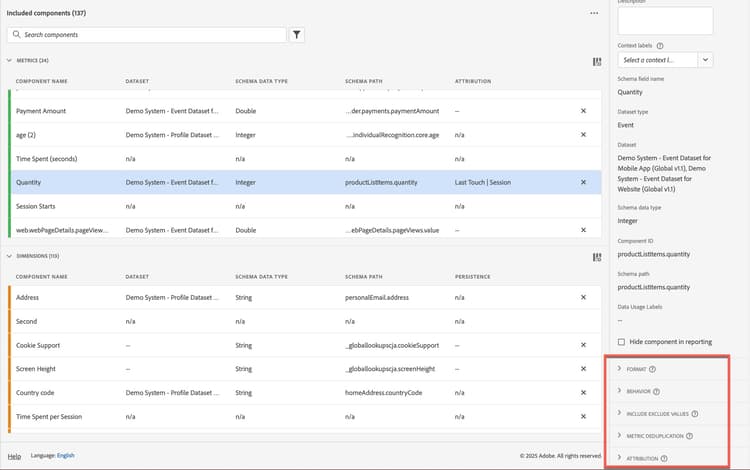
Metric customization within the Data View is limited to the available configuration options:
-
Format – Decimal, Time, Percent, and Currency
-
Behavior – Count values or Count instances
-
Include Exclude values – Filter a metric to only count values matching a specific criteria.
-
Metric deduplication - Configure a metric to only count values that occur non-repetitively.
-
Attribution – Configure the default attribution model for the metric.
For more advanced customization, you may be able to use a Derived Field as the basis for a Metric defined in the Data View. Using a Derived Field enables functions like: Date Math, Depth, and standard Mathematical operators. The number of derived fields available to a connection is limited based on your license package.
Calculated metric
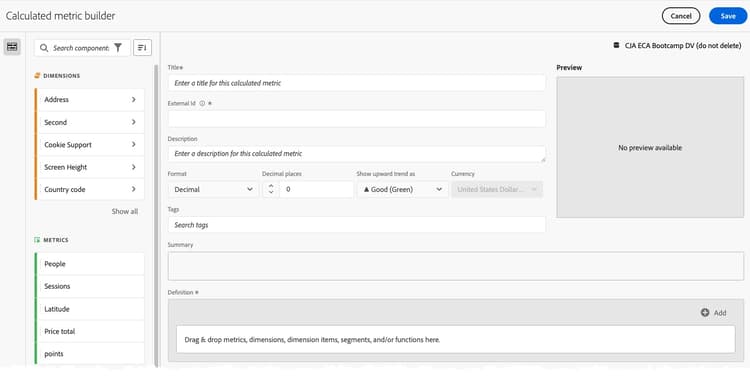
Calculated metrics are built within Analysis Workspace and can be local to a workspace project or made available to all projects. They can also be shared with other users or user groups. Analysts can use Calculated Metrics to streamline their reporting and analysis projects.
With Calculated Metrics, you’re able to transform existing metrics by using Basic or Advanced functions. You can also apply segments within the Calculated metric using the traditional Segment Builder.
When to use each method
Aspect
Data View Metric
Calculated Metric
Use Calculated Metrics for: ad-hoc, exploratory analysis, one-off reporting or when a metric is only going to be used by a subset of the organization.
Use Data View Metrics for: standardized, governed, reusable metrics that should be consistent across teams.
1Calculated Metrics are not supported by Flow, Fallout, Cohort Tables, or Histograms.
Key considerations before building a metric
-
Does it already exist? This is the first question to ask. An important step in your CJA governances is to not create duplicates of the same metric. If the metric already exists, don’t rebuild it.
-
Who will use this? If a metric is intended to be used only by you or a few other people, it’s probably best to build a Calculated Metric. If a metric needs to be available to everyone in the organization, it should be defined in the Data View.
-
Does this need to be used in Flow, Fallout, Cohort Tables or Histograms? Calculated metrics are not available for use in some visualizations. If you need to use your metric in one of those visualizations, you’ll need to define it in the Data View.
-
How many Derived Fields are available? The number of available Derived Fields is limited based on license tier. If you’re concerned about using up all your available Derived Fields, then try to use other methods of defining metrics if possible.
-
How important is processing time? Reports using metrics defined in the Data View will process faster than Calculated Metrics. This will typically not be noticeable to the end user but could be if the metric logic is especially complex.
Conclusion
Knowing the best way to define custom metrics in CJA can be an ongoing challenge for both administrators and analysts. Understanding the strengths and limitations of the different methods can help improve reporting and analysis efficiency and overall implementation governance. Staying aware of these considerations will empower you to maximize the value of the Customer Journey Analytics platform.