Federated Audience Composition lets you query your data warehouse directly from within Adobe Real-Time CDP — no data copying required. If you have rich customer data sitting in the warehouse that you've never been able to activate for marketing, this article is for you. We'll cover how Federated Audience Composition and Adobe Real-Time CDP unlocked personalized direct mail at scale.
Why Federated Audience Composition
Getting offline data into Real-Time CDP in a quick, governed and temporary fashion used to be impossible. Marketing wants personalization. Tech wants lean data. Legal wants governance, and the leadership team needs it done yesterday.
This is the tension that Federated Audience Composition was built to resolve.
Data composability means that marketing teams can work with data where it already lives, rather than forcing a one-size-fits-all ingestion pattern for every use case. Not every attribute should live inside Real-Time CDP. Not all data needs to be involved, and some may only exist for a single campaign at a moment in time. A composable data strategy means having flexibility to decide when to ingest, when to federate, and when to simply query.
The challenges we faced prior
Data duplication. Every time marketing needs a new audience that uses data that isn’t currently in Real-Time CDP, we need a way to ingest that data onto the profile. You can do this through writing profile attributes in a journey or simply setting up a new ingestion pattern. However, this can create redundant copies of data, create unnecessary processes to address the data, and bloat the profile.
Marketing dependency on tech for every audience using data NOT on the profile. Building audiences from complex warehouse attributes required engineering tickets, SQL requests, and multi-week turnaround times. Marketers had visibility into what they wanted but couldn't self-serve and campaign velocity suffered.
The "all-or-nothing" ingestion problem. Our data strategy was binary: either data lived in Experience Platform (fully ingested, profiled, governed), or it didn't exist for marketing purposes at all. There was no middle ground for high-value, campaign-specific data.
Our use case: Personalized direct mail
The use case that crystallized the value of Federated Audience Composition for us was a personalized direct mail campaign. We needed to activate a targeted audience, built from temporary, campaign-specific attributes living in our data warehouse, and route that list downstream to a print vendor for a physical direct mail piece.
Here's what made this use case uniquely suited for Federated Audience Composition:
-
The qualifying data was temporary and campaign-specific: It didn't need to permanently live on the profile. The data would be useless outside of this specific campaign.
-
The activation destination was offline: A printer, via a destination file export.
-
We had a hard deadline date from the printer… but the data wouldn’t be ready until that deadline date!
By combining Real-Time CDP with Federated Audience Composition, we were able to temporarily ingest the data, compose the audience, and activate it to the print vendor — all without a single row of underlying data being copied into Experience Platform, and all within a day. In our experience, the result was faster and cleaner than any standard ingestion to activation pattern we had used in the past.
Getting started: Building the foundation for data federation
Data federation isn't a workaround - it's a strategic architectural pattern. Commonly used platforms like Google BigQuery, Databricks, Snowflake, and Redshift are probably already the most authoritative sources of data in your organization. The question was never whether that data is valuable; it's whether your activation layer can reach it without creating a headache or leaving a graveyard of stale attributes on the profile. That's the problem Federated Audience Composition solves.
Federated Audience Composition brings a zero-copy query pattern into Experience Platform. This approach doesn’t contribute to profile bloat, preserves the warehouse as the system of record, and still makes the resulting audience fully actionable within Real-Time CDP.
For companies applying this to their data strategy, the recommendation is to start with use cases where your warehouse holds data that is only needed temporarily for a specific campaign, or too large and detailed to justify full ingestion.
How the initiative came together: Co-led by tech and marketing.
Our Federated Audience Composition initiative was driven by a quick-turnaround marketing use case and enabled by tech.
Marketing defined the audience criteria and validated the data inside our data warehouse.
Our tech team ingested the data through Federated Audience Composition and made it temporarily available in Real-Time CDP.
Marketing then activated the campaign through a destination.
The collaboration worked because both teams respected their ownership boundaries. Tech controlled the data processes and marketing controlled validation and activation.
Warehouse compatibility
For our implementation, we connected Federated Audience Composition to our data layer.
Federated Audience Composition currently supports connections to the following platforms:
-
Databricks
-
Snowflake
-
Amazon Redshift
-
Google BigQuery
-
Azure Synapse Analytics
-
Vertica
If your org runs one of the supported data layers above, the Federated Audience Composition connection setup is straightforward — your data engineering team will configure the cluster connection and service principal credentials, then define which schemas are accessible from the Experience Platform side. The key governance decision is which delta tables or views to expose, and at what column granularity.
Data decisions: Knowing when to federate vs. ingest
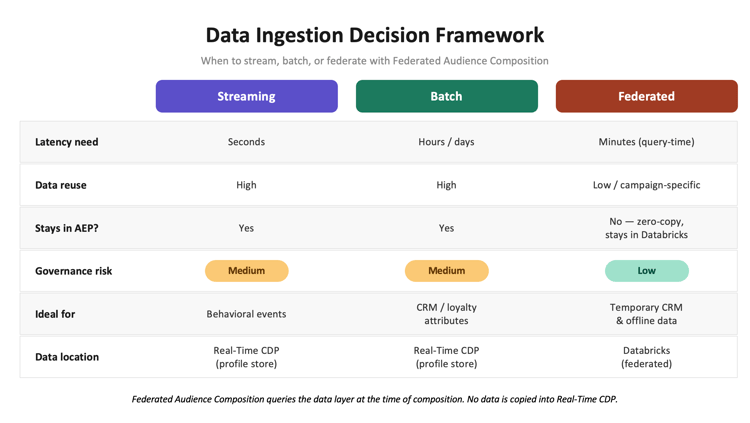
One of the most common questions marketers and data architects face when configuring Real-Time CDP is: should this data be streamed, batched, or federated? The answer depends on three factors: latency requirements, data governance constraints, and frequency of reuse.
Here's how we think about it:
Use streaming ingestion when:
-
Data needs to update a profile in real time (web behavior, app events, call center interactions).
-
The use case involves triggered, in-the-moment personalization (e.g., responding to a cart abandonment within minutes).
-
The data will be used across many campaigns over time and should persist on the profile.
-
The data is not required for export.
Use batch ingestion when:
-
Data is refreshed on a regular schedule.
-
The volume is high, but updates can be tolerated on a daily basis vs an hourly basis.
-
The data provides foundational profile attributes used broadly across activation channels
-
The data is required for export.
Use federation when:
-
The data is not needed in the new system.
-
The data is only temporarily needed for one campaign or one audience, then irrelevant.
-
The data lives in a well-governed warehouse and should not be duplicated in multiple systems.
-
The audience qualification logic is complex and needs several rounds of validation vs. it is already created upstream.
What warehouse data makes sense for marketing?
Not all data is worth federating. In our case, the data we needed…
-
Had to be in Real-Time CDP and be activated upon within 24 hours.
-
Contained attributes that needed to be exported to a destination.
-
Would be useless after it was activated once.
The Audience:
For our personalized direct mail campaign, here's how we constructed the federated audience:
Business objective: Reach customers who qualified for a targeted offer based on CRM and offline attributes living outside of Real-Time CDP, and route that list & attributes to a print vendor for a personalized printed mailer.
Audience logic:
-
Include customers matching CRM qualification criteria based on location and transaction history.
-
Versioned for location, complicated transactional thresholds and loyalty tier status.
-
Versioned for 4-way, pre-defined test splits.
The resulting audience was composed entirely through Federated Audience Composition's drag-and-drop canvas in Experience Platform, with the underlying query pushed down to the data layer. The audience was then activated to the vendor (through a Real-Time CDP destination).
Best practices and lessons learned
Lessons from the field
Implementing Federated Audience Composition requires alignment across marketing, data engineering, and stakeholder teams. Here are the most important things we learned:
1. Start with a governed schema, not a wide-open table. In my experience, when your data team exposes warehouse tables for Federated Audience Composition, resist the temptation to bring in every column. Work with your data team to define a limited, useful schema that exposes only the attributes marketing actually needs for audience qualification. This limits risk and makes the composition UI easier for marketers to navigate. Just because Federated Audience Composition gives you flexibility on broader data, doesn’t mean you’re allowed to get lazy and bring in everything.
2. Agree on data freshness SLAs before you build the audience. Federated queries run against your warehouse at composition time. If your warehouse data is refreshed nightly, your federated audience reflects last night's state.
3. Use it for qualification, not for the entire profile. Federated Audience Composition is most powerful when used to add a qualifying "layer" on top of known Experience Platform profiles, not to recreate the entire profile from scratch. Think of it as: Experience Platform owns the activation and your warehouse owns the campaign-specific attributes. Combine them in a composition for the best of both worlds.
4. In a Tech-led model, define a clear intake process for new federated schemas. Because our data engineering team owns the Databricks connection and schema governance, marketing can't simply add new tables at will. We established a lightweight intake process…
-
Marketing submits a use case brief describing what data they need and why.
-
Tech evaluates the request against data governance policies and existing data.
-
An approved schema is published within an agreed SLA.
-
Marketing QA’s the outputs.
This prevents schema sprawl and keeps governance intact without creating a bottleneck.
5. Use delta table views when available, not raw source tables. Views let the team pre-apply row-level filters, column masking, and business logic (like suppression-flag resolution) before Federated Audience Composition issues a query.
How to create your first federated audience
Step 1: Establish the federated database connection
In Adobe Experience Platform, navigate to Federated Data > Federated Databases. Select Add Federated Database and choose your warehouse type. You'll need to provide your server hostname, HTTP path, and a personal access token or service principal credentials. Adobe will use this connection to push queries to Databricks at composition time. No data is pulled into Experience Platform at this step.
Step 2: Create and configure your federated schemas
Once the connection is established, navigate to Federated Schemas. Create a new schema mapped to the warehouse table(s) you want to use for audience composition. NOTE: Select only the fields marketing needs and avoid exposing sensitive columns that aren't required for audience logic or export. Publish the schema when ready.
Step 3: Data model creation
Navigate to Federated Data > Data model, click on "Create Data Model" and create a label for it. Select the schema that was created in step 2 (and any other schemas that may be linked to it) and click "Save". If additional schemas are to be selected as part of the data model, you can select them and then join the two schemas together on a common attribute or identity.
Step 4: Build your composition in the Audience Composition canvas
Navigate to Audiences > Create Audience > Compose Audience. In the composition canvas, add a Query activity and select your federated schema as the data source. Use the visual query builder to define your inclusion/exclusion logic — filters, attribute conditions, and value thresholds. You can layer in additional activities like Split (to divide the audience into sub-segments), Enrichment (to add additional attributes), and Exclusion (to remove suppressed profiles).
Step 5: Save and activate the federated audience
Once your composition is complete, save and publish the audience. The audience will appear in your Experience Platform Audiences inventory and can be activated to any destination.
Step 6: Monitor and refresh
Use the Audience portal to monitor audience membership and schedule audience refreshes aligned with your warehouse data freshness SLA. For campaign-specific audiences, you can archive the composition after the campaign ends.
Measuring success and optimizing your strategy
How we measure success
For our direct mail use case, success was measured across three areas:
1. Audience precision: Did the federated audience qualify the right customers? We validated our audience list and corresponding attributes against the source data (post-composition) to confirm that our export is what we expected.
2. Campaign performance: For the direct mail campaign, our primary success metrics were response rate (offer redemption) and downstream conversion. Because Federated Audience Composition enabled us to use more precise qualifying attributes (attributes we couldn't have used via standard ingestion) our audience was more tightly targeted and personalized than prior campaigns.
3.Operational efficiency: Utilizing pre-built data reduces the need for global evaluations and multiple rounds of QA. We were able to take 1-2 sprints worth of work down to a single day.
Federated Audience Composition enabled a campaign that would not have been possible through any other ingestion or activation pattern we had available. The combination of qualifying data that lived outside of Real-Time CDP, a strict print deadline, and a downstream offline activation requirement made Federated Audience Composition the best path within the timeline that we had.
Additional resources
Adobe documentation & learning
Adobe blog & thought leadership