Federated Audience Composition overview
Federated Audience Composition lets you build and enrich audiences from your third-party data warehouses and import the audiences into Adobe Experience Platform. This brings an easy and powerful solution to connect your enterprise data warehouse directly within downstream services like Adobe Real-Time Customer Data Platform or Adobe Journey Optimizer, and perform queries on the tables of your data warehouse. As a result, you can access customer data that is stored in data warehouses and cloud storage platforms such as Amazon Redshift and Azure Synapse Analytics.
Capabilities rn-capabilities
Federated Audience Composition extends the value of Real-Time CDP and Journey Optimizer with a comprehensive approach to audience curation and activation:
-
Expand access to critical warehouse-based datasets to create high-value audiences: You can use existing data warehouses as the main system of record, while leveraging best-in-class applications to power great customer experiences.
-
Comprehensive support to power engagement use cases: Federated Audience Composition, paired with Real-Time CDP or Journey Optimizer, supports brand-initiated, personalized experiences with federated audiences and delivers in-the-moment experiences triggered by real-time events, combined with person attributes to meet use case requirements across teams.
-
Minimize data movement and duplication: You can create audiences from datasets that live in enterprise data warehouses without copying underlying data to manage actionable marketing profiles and audiences.
-
Utilize a single system for experience-driven workflows: You can curate both ingested and federated audiences in Adobe Experience Platform and coordinate outbound experiences across all channels.
-
Multi-edition support: B2C and B2B CDP customers can leverage Federated Audience Composition to build people-based audiences by integrating data from supported enterprise data warehouses. Additionally, they can enrich existing Experience Platform people-based audiences by incorporating relevant attributes available in the enterprise data warehouse, enhancing their audience profiles for more personalized and targeted engagement.
Use cases use-cases
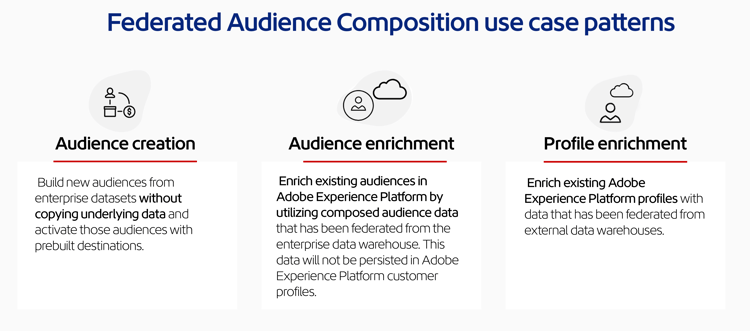
Federated Audience Composition supports three categories of use cases: audience creation, audience enrichment, and customer profile enrichment.
-
Audience creation: You can create audiences from a data warehouse and federate those audiences into Experience Platform for use in either Real-Time CDP or Journey Optimizer through a marketer friendly drag-and-drop user interface. As a result, you can query your data warehouses without copying sensitive underlying data or duplicating existing data.
- Example: Create an audience of high value past purchasers using historic transaction data in the warehouse, without copying those transactions into Experience Platform.
-
Audience enrichment: You can add more detail to your existing audiences in Experience Platform by using additional datasets from your data warehouses and overlaying your audiences with this information - all without copying the underlying data into Experience Platform. With audience enrichment, you can deliver improved personalization with the enriched audience.
- Example: Enrich an Experience Platform audience of cart abandoners with the Federated Audience Composition audience of high-value past purchasers to deliver a targeted offer.
-
Profile enrichment: You can select individual customer attributes from your data warehouse to enhance Experience Platform profiles. With federated data added to these profiles, you can better power in-the-moment experiences that are triggered by inbound customer signals.
- Example: Enrich an Experience Platform profile with information from the federated audience. You can now market to a site visitor who belongs to the high-value past purchasers federated audience with a targeted offer that is triggered by their on-site behavior.
For more information on Federated Audience Composition use cases, please read the Federated Audience Composition whitepaper.
Key steps gs-steps
Adobe Federated Audience Composition lets you create and update Adobe Experience Platform audiences directly from your database, without any ingestion process.
-
Create a connection: Bring together data from various sources, and merge them into a unified dataset. For more information on connecting Adobe Experience Platform apps to your enterprise data warehouse, supported databases, and configuring your connection, read the connections overview.
-
Model your data: Design and create schemas and data models that define the structure, relationships, and constraints of the data. For more information on schemas, read the schema overview. For more information on data models, read the data model overview.
-
Transform your data: Apply data manipulation techniques to modify the format, structure, or values of data elements to make them compatible or suitable for specific analysis or applications.
-
Compose your audience: Create, orchestrate and build audiences. For more information on composing audiences, read the composition overview. You can also update or reuse existing audiences through Adobe Experience Platform Audience portal and Destinations. Learn more on this page
Governance, privacy and security governance-privacy-security
Privacy requests gov-privacy-requests
Once you created a composition, the resulting audiences are saved into Adobe Experience Platform.
You can then make privacy requests to access and/or delete profile data corresponding to these audiences through Adobe Experience Platform Privacy Service, which provides a user interface and RESTful API to help you manage customer data requests.
You can create and manage individual requests to access and delete customer data from Adobe Federated Audience Composition. The steps to submit access requests and delete requests are detailed in the Real-Time Customer Profile documentation.
Audit trail gov-audit-trail
The audit trail capability provides a detailed and chronological record of all actions and events that have been made to your environment in real-time. To learn more about the audit trail, please read the audit trail overview.
Learn more learn
Learn how to access Federated Audience Composition, guardrails and limitations on this page.
For answers to frequently asked questions, read the Federated Audience Composition FAQ.