Managing metadata across Adobe Workfront and Adobe Experience Manager Assets is a foundational challenge for digital operations teams. Drawing on expert insights from Autumn Earle and John Lemme, this guide walks through the strategies, roles, and solutions that help organizations achieve data integrity, operational efficiency, and scalable governance.
Introduction
If your teams split their time between Adobe Workfront and AEM Assets, clean metadata alignment is the throttle for content velocity. In a recent Learn From Your Peers webinar, the authors of this article walked through how they make Workfront → AEM mapping reliable. Topics covered include leveraging one system of record per field, light change control, and event based syncs with the native connector. They also touched on Fusion use cases when governance or multi system logic is needed.
Key takeaways: what you'll learn in this article
- Implementation walkthrough: a step-by-step approach to implementing the Workfront → AEM Assets native connector
- Metadata best practices: metadata field mapping between Workfront forms and AEM schemas
- Governance guidelines: roles and documentation you need in place to scale with confidence
- Native connector vs. Fusion: when to rely on the native connector vs. when to use Fusion for guardrails and orchestration
The session was designed for business and technical stakeholders in digital operations, DAM, and project management. The goal: to demystify metadata mapping between Workfront and AEM Assets, address common challenges, and share best practices for enhancing metadata integrity and leveraging automation.
Metadata fundamentals
Metadata is the organizing principle behind digital asset management. In AEM, metadata lives with the asset and powers search, workflow, and policy. In Workfront, the metadata is collected via custom forms at the project, task, and document levels. A single source-of-truth per field and basic change control prevents rework downstream.
-
Role of Metadata: Metadata is vital for managing digital assets and projects efficiently by providing organized information and control.
-
Source of Truth: A single source of truth ensures consistency, accurate reporting, and compliance across digital asset systems.
-
Change Control Mechanisms: Implementing change control is essential to manage updates and maintain metadata integrity across platforms.
Before integrating Workfront and AEM Assets, ensure:
-
Workfront configuration: this process is done in the Adobe Admin Console with an assigned Organization ID
-
Products are assigned: both Workfront and AEM Assets (or Assets Essentials) are assigned as products to the user setting up the integration
These steps are critical for enabling the native connector and ensuring seamless data flow.
Alignment: the “M-Team”
Successful metadata is a cross-functional team effort. The following roles are essential:
-
Project managers: Oversee timelines, resources, and communication
-
Business stakeholders: Define requirements and success criteria
-
Technical integration team: Configure systems and manage API connections
-
DAM administrators: Govern metadata and ensure asset readiness
-
Change management & training leads: Drive user adoption and provide training
Each role contributes to a holistic strategy that keeps metadata aligned with business objectives.
Native Connector and Fusion demos
TIP: Click on the 'dots' below each carousel to progress through the demos.
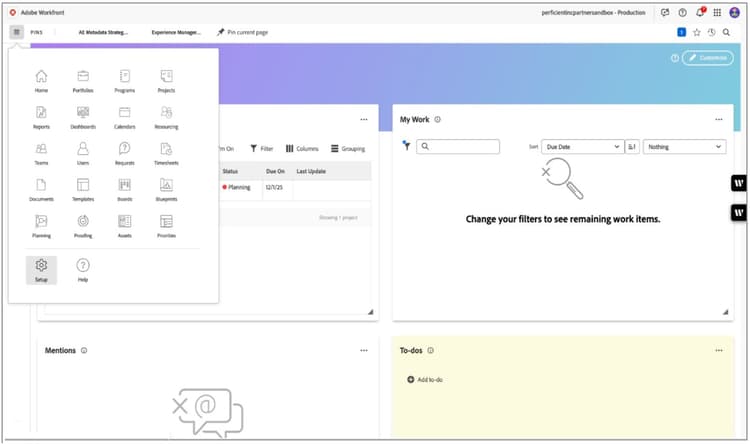
Native Connector Demo step 1: Workfront Homepage
-
Navigate to the Homepage of your Workfront Instance.
-
Select the “Settings” icon in the left-rail menu options.
-
NOTE: If your menu is on the right, your Admin Console needs to be updated to complete this connection.
primary
--spectrum-gray-700
000000
white
primary
--spectrum-gray-700
000000
white
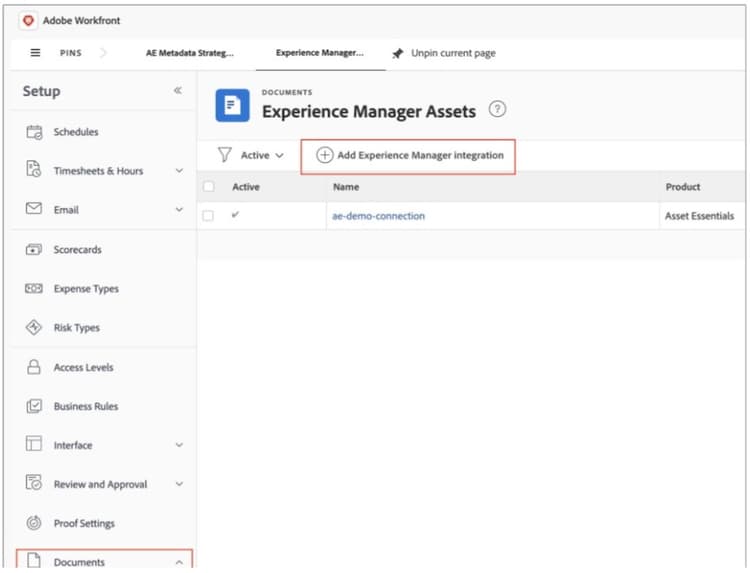
Demo step 2: Workfront document settings
-
Under “Documents”, select “Experience Manager Assets”.
-
Click the plus icon and “Add Experience Manager Integration".
primary
--spectrum-gray-700
000000
white
primary
--spectrum-gray-700
000000
white
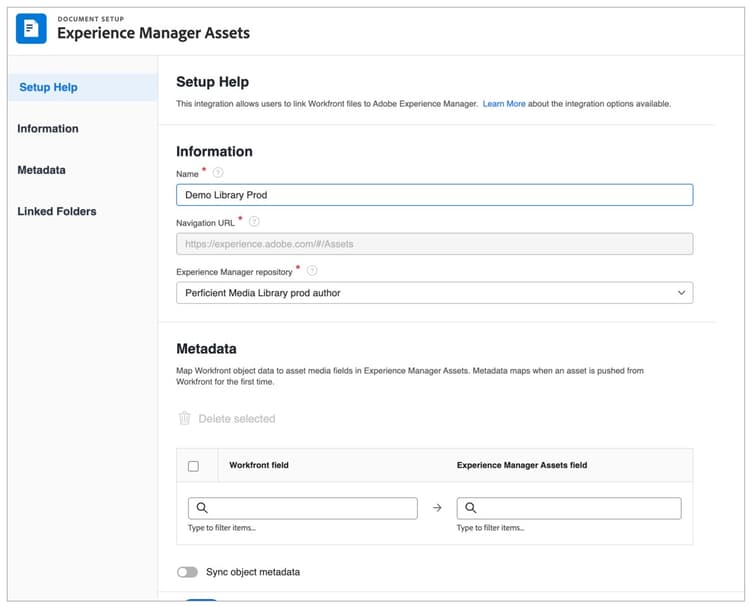
Demo step 3: Workfront AEM connection
-
Add a name for your connection.
-
Select the AEM environment from the repository dropdown list.
primary
--spectrum-gray-700
000000
white
primary
--spectrum-gray-700
000000
white
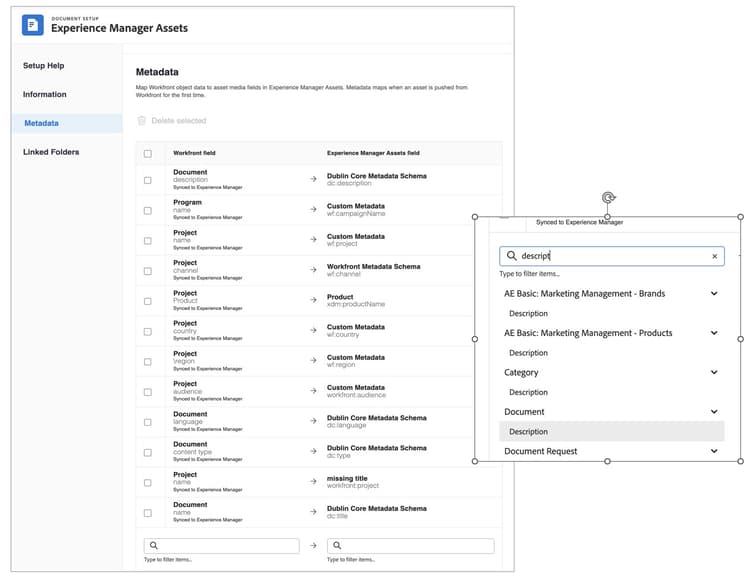
Demo Step 4: Workfront AEM connection metadata mapping
-
Map ALL metadata you want to live under each asset in AEM in this section.
-
Prerequisites:
-
Workfront Custom Forms are created with all metadata for the project and asset.
-
Metadata Schema is created in AEM and assigned to the appropriate folder(s).
-
Metadata types align (i.e. Region is single select in both systems).
-
-
NOTE: When selecting an option such as Document “description” make sure you select the correct parent.
primary
--spectrum-gray-700
000000
white
primary
--spectrum-gray-700
000000
white
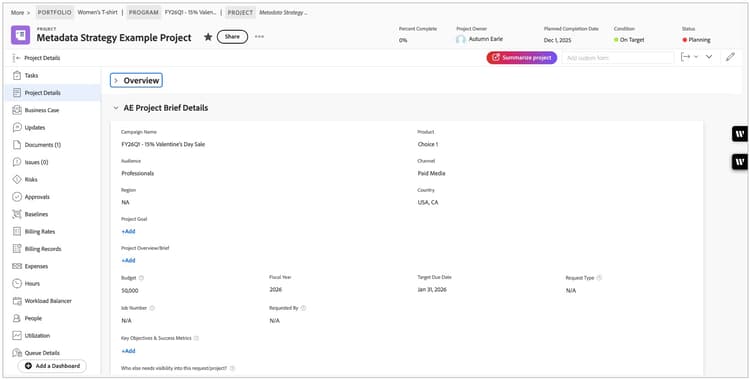
Demo Step 5: Workfront project details
-
Navigate to your Workfront Project.
-
Confirm all Project Details are filled out in your custom form.
primary
--spectrum-gray-700
000000
white
primary
--spectrum-gray-700
000000
white
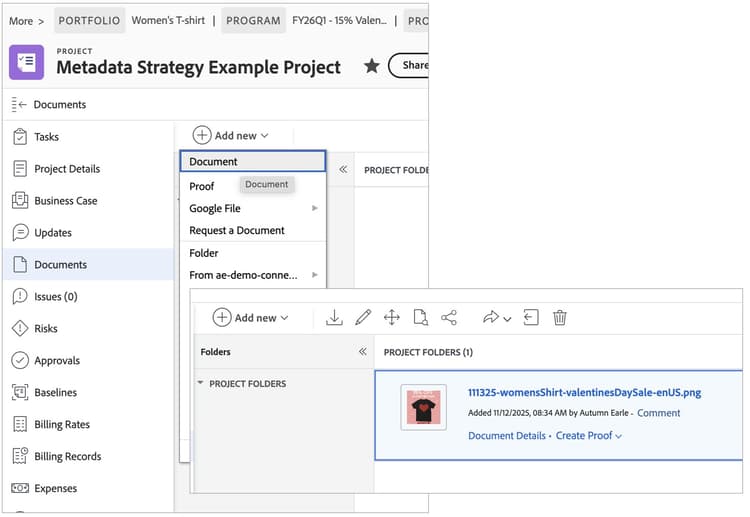
Demo Step 6: Workfront project documents (1 of 3)
-
Select the “Add new” icon in the top-left corner of your project under the “Documents” tab.
-
Select Document Details and add a description.
primary
--spectrum-gray-700
000000
white
primary
--spectrum-gray-700
000000
white
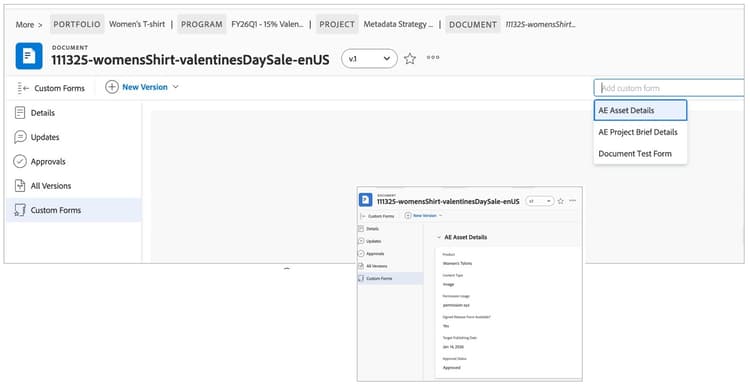
Demo Step 6: Workfront project documents (2 of 3)
Add a Custom Form in the top-right lookup if applicable and fill in.
NOTE: I will provide a Fusion Scenario blueprint that allows you to dynamically attach a custom form to a document upon upload of a document that can be modified to meet your companies needs.
primary
--spectrum-gray-700
000000
white
primary
--spectrum-gray-700
000000
white
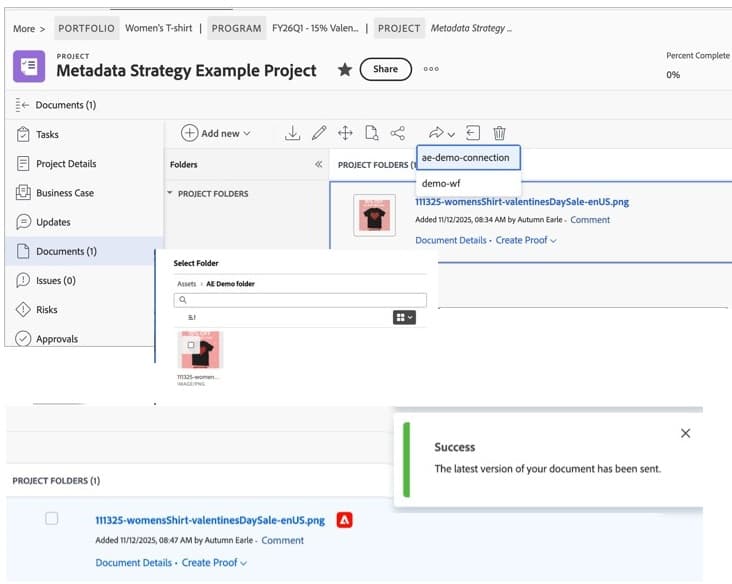
Demo step 6: Workfront Project documents (3 of 3)
-
Click the Project name in the portfolio hierarchy to come back to the main Documents tab.
-
Select the arrow pointing right and click the AEM connection where you want to send the asset.
-
Determine the folder the asset should live in and click “Select Folder.”
-
Users should see a success message and a red Adobe icon beside the asset pushed to AEM.
primary
--spectrum-gray-700
000000
white
primary
--spectrum-gray-700
000000
white

Demo step 7: AEM Assets
-
Click on the Blue Title of the Asset and your browser should now open a new tab in AEM that opens to your asset.
-
Depending on if you are using AEM Assets (right) or standard AEM (below) your view will look different.
-
Open either Asset “Properties” or “Details” to see the metadata that synced during the connection.
primary
--spectrum-gray-700
000000
white
primary
--spectrum-gray-700
000000
white
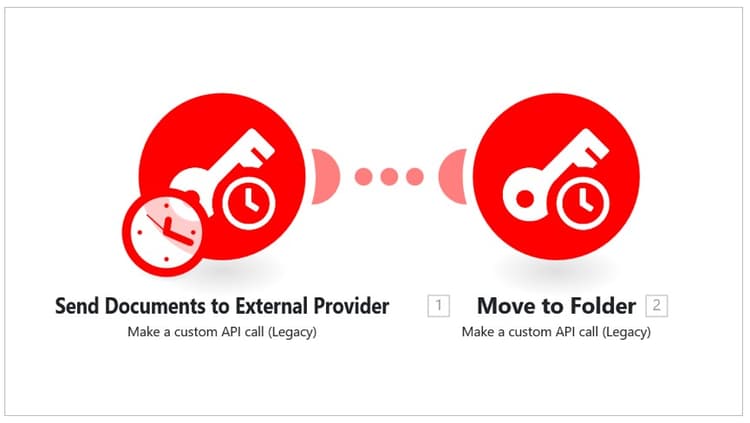
Fusion Demo Step 1: Fusion modules
-
The first Authenticator module connects to the Native Connector.
-
The second module moves the documents.
-
Note that this feature currently uses undocumented API calls.
primary
--spectrum-gray-700
000000
white
primary
--spectrum-gray-700
000000
white
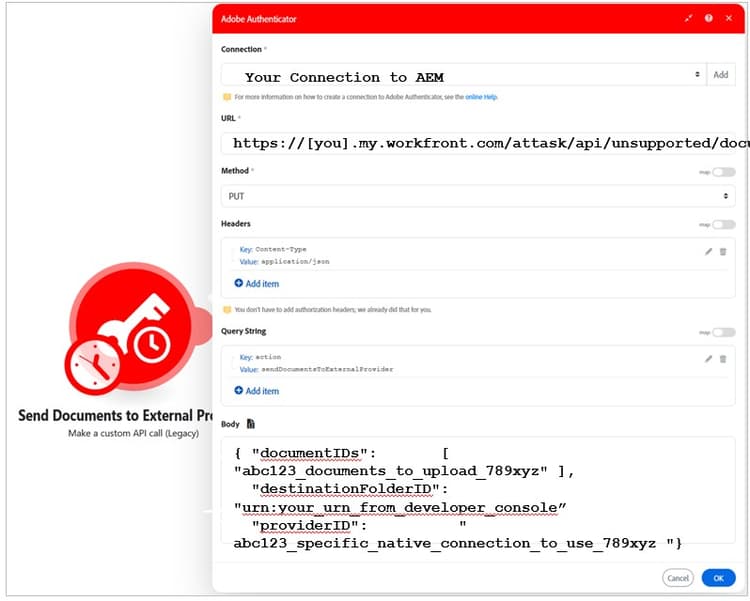
Demo step 2: Workfront document settings
-
Connection: your connection needs to be set up in the Adobe Developer Console.
-
URL: this is the URL of the API and doesn't change.
-
“sendDocumentToExternalProvider” is the command that triggers the upload.
primary
--spectrum-gray-700
000000
white
primary
--spectrum-gray-700
000000
white
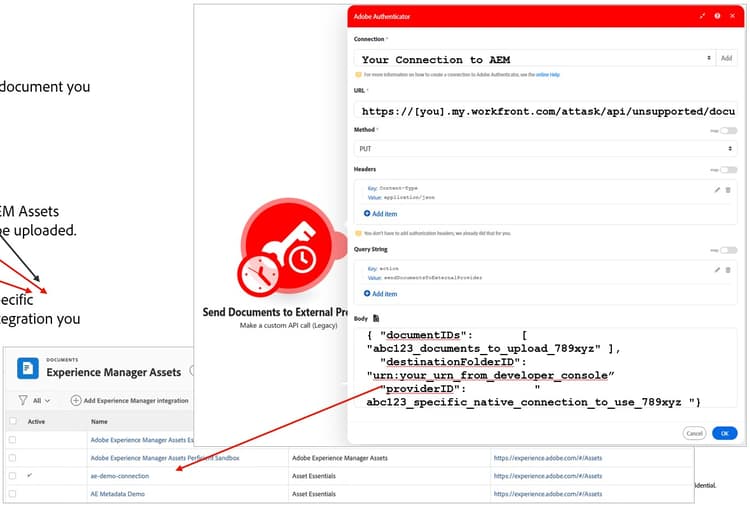
Demo step 2b: Connecting the Connector
-
The documentID is the document you want to upload.
-
The destinationFolderID is the AEM Assets folder where the document will be uploaded.
-
The providerID is the specific Experience Manager Integration you plan to use.
primary
--spectrum-gray-700
000000
white
primary
--spectrum-gray-700
000000
white
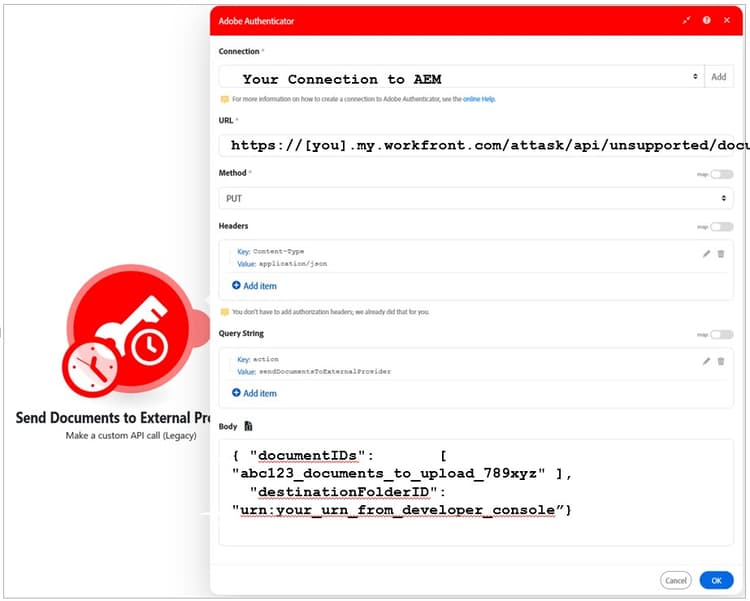
Demo step 3: Moving files
-
Connection: your connection needs to be set up in the Adobe Developer Console.
-
URL: This is the URL of the API and doesn’t change.
-
“sendDocumentToExternalProvider” is the command that triggers the upload.
-
The documentID is the document you want to upload.
-
The destinationFolderID is the AEM Assets folder where the document will be uploaded.
-
The providerID isn’t needed.
primary
--spectrum-gray-700
000000
white
primary
--spectrum-gray-700
000000
white
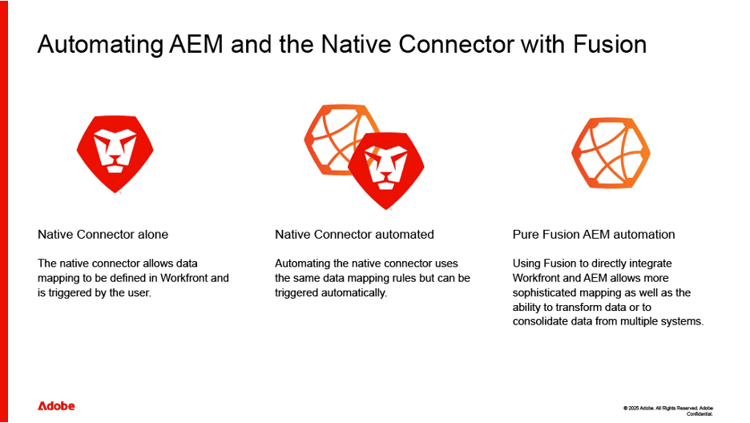
Native Connector vs. Fusion
When it comes to syncing metadata, organizations have two main options:
-
Native Connector: event driven syncs, straightforward mappings, minimal moving parts
- Enables dynamic syncing: real-time or scheduled updates triggered by events like asset uploads or project status changes. This reduces manual intervention and the risk of overwrites
-
Fusion Automation: when you need validation/guardrails, lookups, or multi system orchestration; or automate triggering connector actions at scale
- Extends capabilities by automating complex data integrity checks, integrating Workfront and AEM with other tools, and enforcing governance policies behind the scenes
Governance integration is critical for maintaining metadata quality and compliance, requiring documented policies and protocols.
Field alignment and mapping strategy
-
Field Alignment Essentials: Aligning field types, naming conventions, and value formats ensures consistency across multiple systems
-
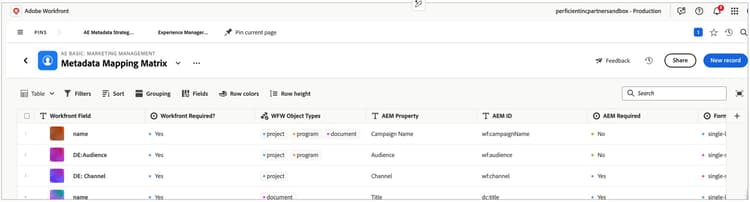
Metadata Matrix Usage: A metadata matrix visualizes field relationships and identifies authoritative data sources effectively in Workfront Planning
-
Preventing Duplication: Defining system ownership of fields helps prevent data duplication and maintains governance
-
Foundation for Scalability: Consistent metadata strategies support scalable, integrated, and robust metadata frameworks
Best practices:
-
Normalize conventions: names, types, and allowed values
-
Define a system of record for each field: Sync direction (uni/bi), trigger (event/schedule), and conflict rules
-
This as a living Metadata Mapping Matrix: version it under change control and maintain consistency
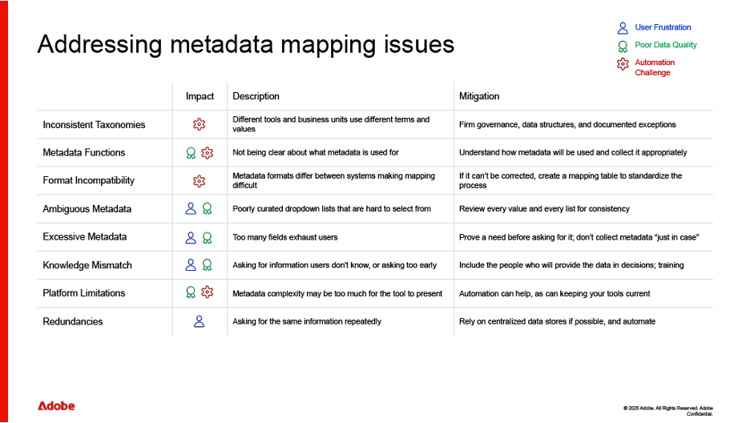
Common metadata challenges
Organizations often face challenges such as:
-
User errors from confusing options or poor timing
- These are often caused by asking for metadata at the wrong time or by offering a confusing array of options. They can result in user frustration and data quality issues.
-
Inconsistent data across systems, leading to process failure
- Poor data has many causes, such as differences between business units, technology limitations, user errors, or a lack of firm governance. This can result in inaccurate reporting, the wrong assets being presented to potential customers, or automation failures.
-
Lack of governance, resulting in fragmented workflows
- Good governance implies clear guidelines, mechanisms for ensuring they’re followed, and regular audits to keep training materials current and to surface data quality issues. Inadequate governance encourages silos to form and prevents your department from working as a team.
-
Permission conflicts that create bottlenecks
-
Redundancies and excessive metadata fields
Addressing these issues requires structured solutions, including clear documentation, effective policies, and automation tools.
Strategic solutions and automation
To address metadata challenges, organizations should adhere to the follow best practices:
-
Governance policies: Automation can both enforce standards and identify exceptions. No manual governance process is perfect—let automation be the backstop.
-
Data transfers between systems: Using automation to move data between systems can allow people to work with meaningful values while ensuring mapping is done consistently and correctly. It also prevents user errors.
-
Asset vs. project blur: keep asset facts in AEM; keep workflow/project data in Workfront; sync only what asset consumers need
-
Centralized data: Fusion can be used to look up metadata values based on a key. For things like web content this can help control when metadata is changed as well as who can change it.
-
User automation: Tedious and error-prone work can be automated, allowing your employees to spend more time adding value rather than drudgery.
Overcoming these challenges requires thoughtful planning, clear communication, and strategic use of automation.
Essential documentation: Resources to leverage
A robust metadata strategy relies on several key documents, and examples of those are provided here.
These resources provide structure and clarity for consistent metadata management.
TIP: Click the blue links to download files. For .xml and .json code examples, hover over the code box and use the 'copy' function in the upper right to export the provided .xml and .json and save them into local files of the right type.
1. Workfront Project Template
-
A real‑world project example showing how to translate metadata strategy into actionable phases, deliverables, and outcomes
-
Hover over the .xml code below, click "copy" in the upper right, paste it into a local file, and save it to a local .xml file
2. Metadata Governance Policy
- A sample policy outlining roles, responsibilities, and decision rights to establish clear ownership and accountability for CSC governance
download the Metadata Governance Policy
3. Metadata Mapping Matrix
- A practical worksheet to document, standardize, and align metadata elements across systems for consistent use and reporting
download the Metadata Mapping Matrix
4. Change Control Document
- A structured process for reviewing, approving, and tracking metadata changes to minimize risk and maintain consistency over time
download the Change Control Document
5. Training and Adoption Plan
- A lightweight enablement guide to help teams understand metadata standards and apply them consistently in day‑to‑day work
download the Training & Adoption Plan
6. Fusion Scenario Blueprint (see the .json below)
-
A prebuilt integration template that shows how to automate attaching metadata to an asset from the Project details using Workfront Fusion
-
Hover over the .json code below, click "copy" in the upper right, paste the content into a local file and save as a .json file
Key takeaways
-
A robust metadata mapping strategy is essential for effective data organization and governance.
-
Secure authentication and permissions are critical for maintaining data integrity and security.
-
Dynamic syncing and automation streamline metadata management and digital operations.
-
Governance is difficult but necessary.
Mastering metadata management between Workfront and AEM Assets requires strategic planning, collaborative roles, essential documentation, and thoughtful automation. By following these expert strategies, organizations can overcome common challenges, enhance data integrity, and build scalable frameworks for future success.
For ongoing learning and support, connect with experts on LinkedIn or explore resources on Experience League.
Common Content Supply Chain FAQ
-
“Can we make everything bidirectional?”
- Short answer: You can, but you usually shouldn’t. Pick a system of record per field to avoid overwrites; reserve bidirectional for truly collaborative fields with clear conflict rules.
-
“How do we handle taxonomy drift between Workfront picklists and AEM tags”
- Short answer: Govern a single vocabulary and use Fusion to reconcile/transform values (example: slug → tagID) before AEM writes.
-
“Where should rights/usage data live?”
- Short answer: Treat rights/usage as administrative metadata in AEM with strong governance; surface a read only view back to Workfront if it informs decisions.
-
“Is Assets Essentials different for metadata?”
- Short answer: Essentials supports core metadata capture and smart tagging; governance principles are the same, but advanced schema/tag administration differs.
-
“How do you prevent bad data at upload?”
- Short answer: Use Workfront form logic + Fusion validation + AEM required fields; fail fast with helpful errors.