Adobe Customer Support Experience
Experience League Support Tickets
Support tickets are now submitted via Experience League. For instructions on how to submit a support ticket, review the section for submitting a support ticket.
We are working to improve how you interact with Adobe Customer Support. Our vision is to streamline the support experience by moving to a single entry point, using Experience League. Once live, your organization will be able to access Adobe Customer Support easily; have greater visibility into your service history via a common system across products; and request help via phone, web, and chat through a single portal.
If you are an Adobe Commerce user, refer to Submit a support case in the Experience League Support User Guide for Adobe Commerce.
Support entitled roles needed for case submission submit-ticket
In order to submit a support ticket in Experience League, you need to have the Support admin role assigned by a System Administrator. Only a System Administrator in your organization can assign this role. Product, Product Profile, and other administrative roles cannot assign the Support admin role and are unable to view the Create Case option used to submit a support ticket. To learn more about the different types of admin roles and their entitlements, refer to Admin roles.
If you are on Commerce, the process for sharing access to work with support cases is different. To learn more, refer to Shared access: grant privileges for other users to access your account in the Experience League Support User Guide for Adobe Commerce.
Adding support entitles roles to an organization
The support admin role is a non-administrative role that has access to support-related information. Support admins can view, create, and manage issue reports.
To add or invite an admin:
-
In the Admin Console, choose Users > Administrators.
-
Click Add Admin.
-
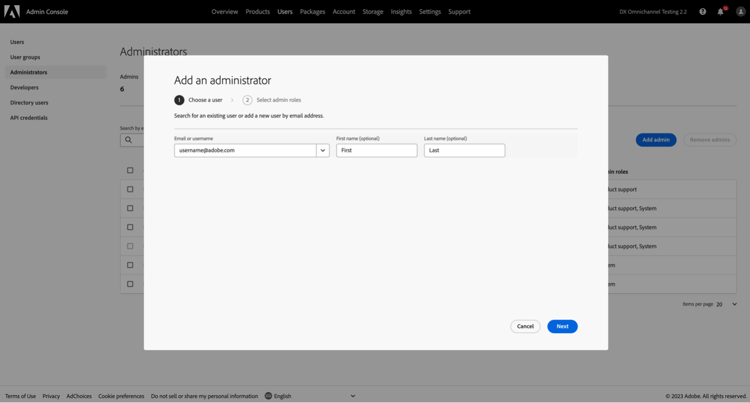
Enter a name or email address.
You can search for existing users or add a new user by specifying a valid email address and filling the information on the screen.
-
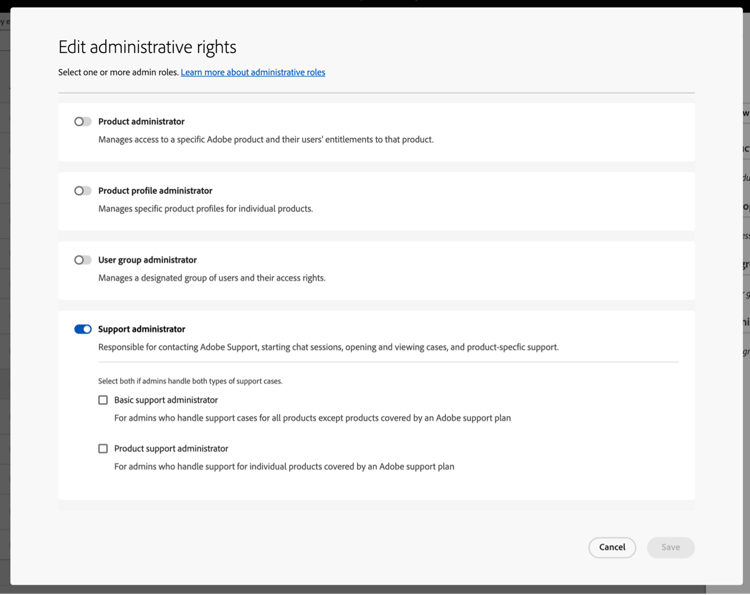
Click Next. A list of admin roles appears.
To assign a Support Admin role to a user (enable a user to be able to contact support):
-
Select the Support administrator option.
-
Choose one of the following two options:
- Option 1: Basic support administrator. Select this option if you would like to give the user support access for all solutions (except Marketo Engage).
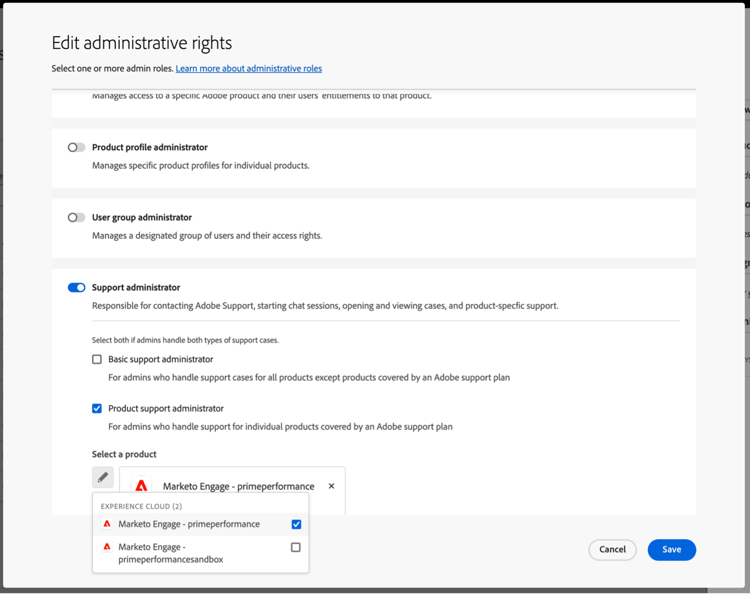
- Option 2: Product support administrator: Select this option for Marketo Engage support. Select which Marketo Engage instances to give the user support access.
-
Once you have made the selections, click Save.
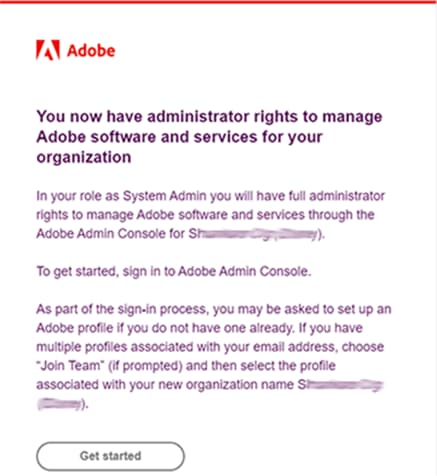
The user receives an email invitation regarding the new administrative privileges from message@adobe.com.
Users must click Get started in the email to join the organization. If new admins do not use the Get started link in the email invitation, they would not be able to sign into the Admin Console.
As part of the sign-in process, users may be asked to set up an Adobe profile if they do not have one already. If users have multiple profiles associated with their email address, users must choose Join Team (if prompted) and then select the profile associated with the new organization.
For more details follow the edit enterprise admin role instructions in the administrative roles documentation. Note that only a system administrator for your organization can assign this role. For more information on administrative hierarchy, visit the administrative roles documentation.
Create a support ticket with Experience League
Experience League is a self-service support portal designed to provide personalized assistance and an easy-to-use experience for entitled customers.
-
To create a ticket in Experience League, select the Support tab in the top navigation.

-
From the Home menu, you can Open a support ticket, View and manage your cases, Request a Callback, or access additional learning resources.
The Request a Callback option allows you to schedule web meetings with screen sharing for P2 and P3 cases, enabling faster and more efficient issue resolution. It is available for Adobe Experience Manager, Admin Console, Adobe Journey Optimizer, Analytics, Audience Manager, Campaign, Commerce, Customer Journey Analytics, GenStudio, Marketo, Real-Time Customer Data Platform, Target, and Workfront. Meetings can be scheduled at the customer’s convenience. It also provides immediate phone callbacks for P1 cases across all products mentioned above, except Adobe Commerce.

-
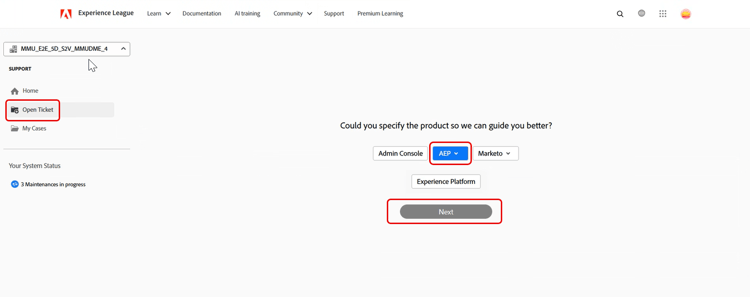
To submit a case, select Open a support ticket. You can also select the Open Ticket in the sidebar menu.

Fill out the support ticket
After you select Open a support ticket or Open Ticket, the case creation form appears.
The form uses a guided, multi-step workflow that helps you provide the information needed for Adobe Support to troubleshoot your issue efficiently. You can move through the form using the following sections:
- Product Selection
- Problem Description
- Priority and Business Impact
- Contact Information and Watchers List
- Review and Submit
You can also toggle between sections to update information before submitting the case.
Follow these steps to create a support ticket:
-
Click the product name to select the affected product, and then click Next.
-
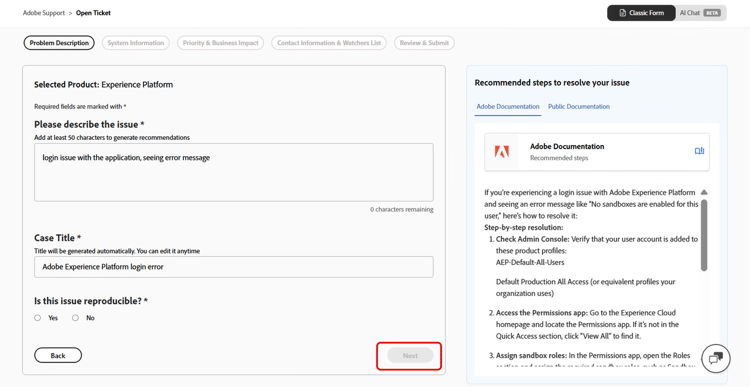
In the Problem Description section, enter a description of the issue. The case title is automatically generated based on the issue description. You can edit the title if needed. Confirm whether the issue can be reproduced. Select Yes if the issue is reproducible. A text box appears where you can describe the steps required to reproduce the issue. Select No if the issue cannot be consistently reproduced.
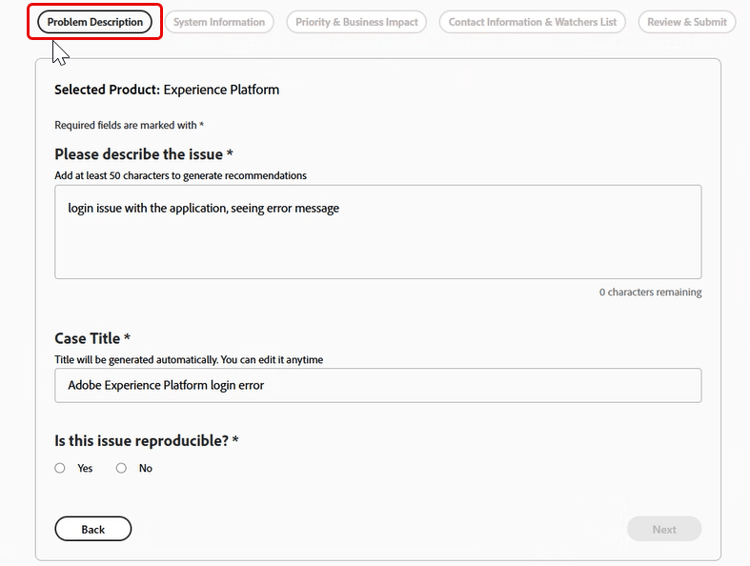
Include details such as:
- What you’re trying to do
- What isn’t working as expected
- Steps you have already taken
- Whether the issue is reproducible
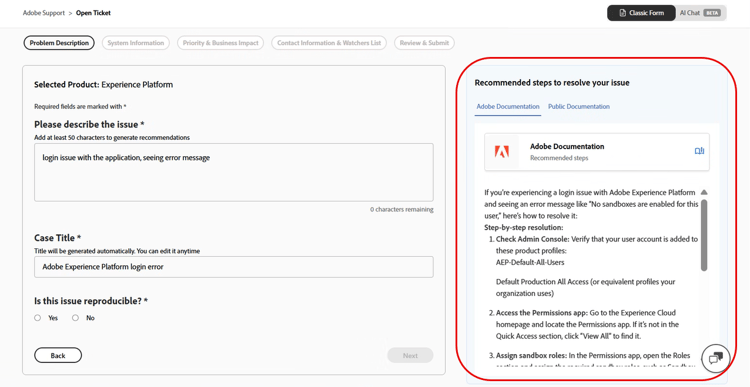
As you enter the problem description, Experience League displays AI-powered recommendations in a panel next to the form. These recommendations:
- Suggest relevant documentation or known solutions
- Help you confirm if the issue is already addressed
- Reduce the need to submit a case for common issues
The recommendation panel adapts to the level of detail in the issue description and appears without interrupting case creation. You can review recommendations at any time and continue submitting the case. When the issue description exceeds 50 characters, the system generates AI-powered recommendations tailored to the issue.
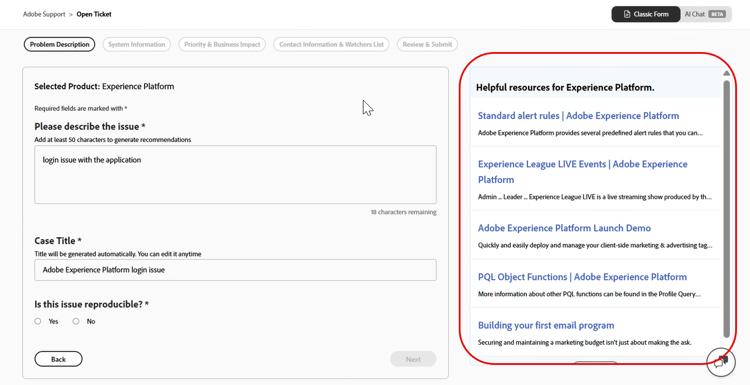
When the description contains fewer than 50 characters, the system displays recommended articles for guidance. A built-in character counter tracks the minimum requirement in real time.
-
Click Next.
-
In the System Information section, provide the Product Version, Environment, Product Offering, and indicate whether any recent changes were made to the environment or instance. Select Yes to provide additional details about the changes. Select No if no changes were made and click Next.
note NOTE Based on the selected product, additional fields may appear. These fields include details about the environment where the issue occurs. 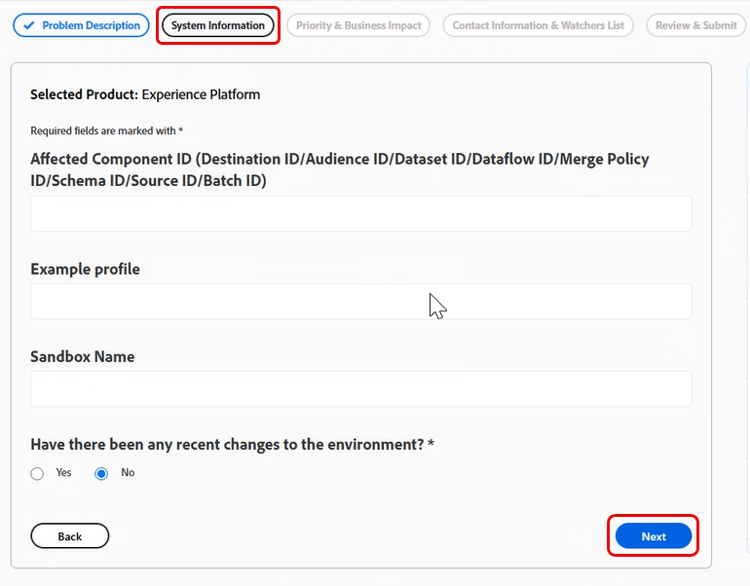
-
In the Priority & Business Impact section, select the following:
- Case Priority (P4 - Minor, P3 - Important, P2 - Urgent, P1 - Critical)
- Provide the Business Impact details when the selected Priority is P1 – Critical, and then click Next.
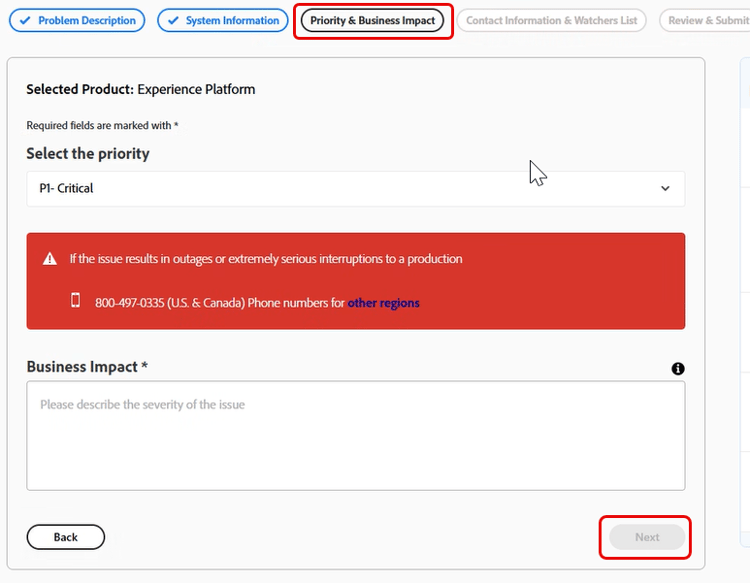
For details on how Case Priority and Business Impact affect support response times, see Targeted Initial Response Times for Support in the Success Plans Resources documentation.
-
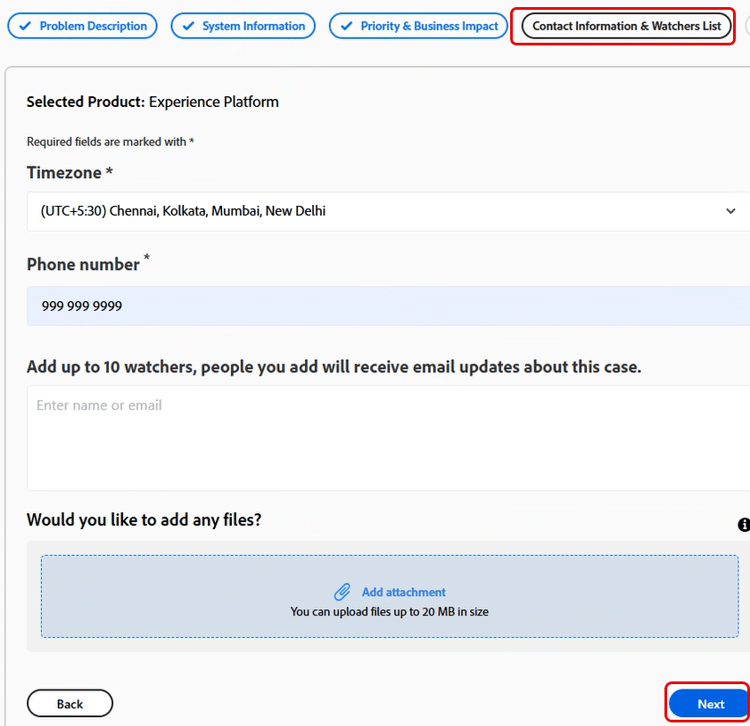
In the Contact Information & Watchers List section, select the time zone, enter your phone number, add watchers, attach any files if needed, and then click Next.
-
In the Review & Submit section, review your case details and click Approve & Submit Case.
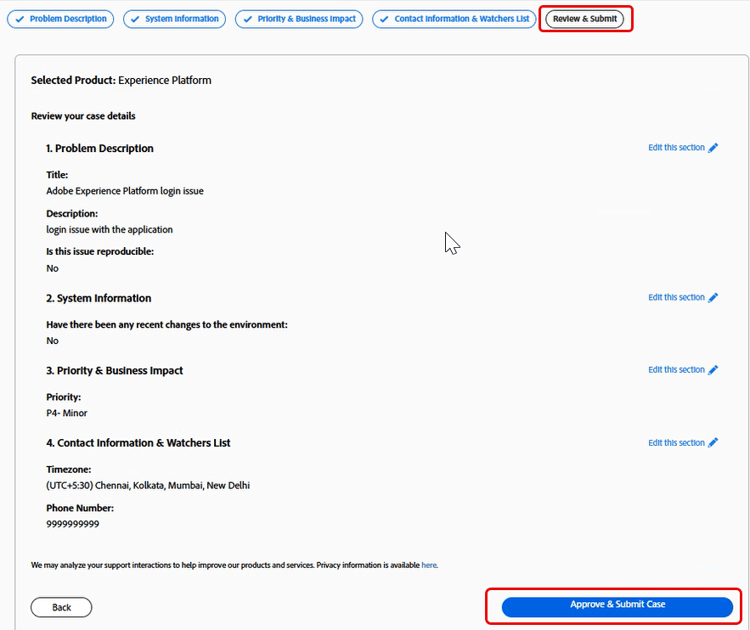
The Review & Submit step summarizes all the entered information and allows you to:
- Review all case details in one place
- Navigate back to any previous step to make edits
- Return to the review summary without losing progress
After submission:
- The case is logged in Experience League
- You can track updates and communicate with Support through the portal
- Adobe Support responds based on the priority and impact you provided
AI chat in the case creation experience
Experience League Support provides an AI-powered chat interface as an alternative way to create and manage support cases. The AI chat experience is opt-in and does not replace the classic case creation workflow.
To access AI chat, follow the steps below:
-
Navigate to Home and select Open a support ticket. You can also select the Open Ticket in the sidebar menu.
-
Click the product name to select the affected product, and then click Next.
-
In the upper-right corner, select AI Chat.
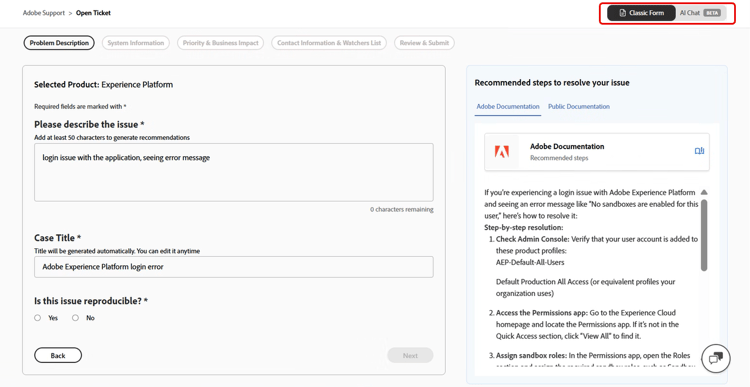
To switch between Classic Form and AI Chat, use the toggle in the upper-right corner. You will not carry over current progress when switching, but completed cases or actions remain unaffected.
Get started with AI chat
When you open AI chat, you see the following options:
-
Ask a question
-
Work on an existing case
-
Open a new case
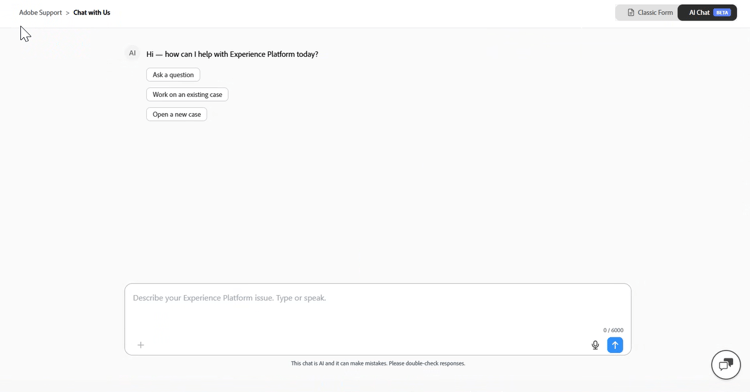
You can describe the issue by typing in the text field or by using speech-to-text.
Ask a question
Select Ask a question to get instant answers to product, Adobe services, and support-related questions directly within the chat, without the need to open a support case.
The AI draws on the Adobe knowledge base to provide relevant answers, documentation links, and known solutions based on your query.
If the AI is unable to resolve your query directly in the chat, it will guide you toward opening a new support case to connect with the Adobe Support team.
Work on an existing case
Select Work on an existing case to manage and get updates on your existing support cases directly within the chat.
The AI displays a list of your open cases. You can refer to a case by its position in the list or by its case number to select the case you would like to work on.
Once you select a case, you can:
- Request a summary
- Check for updates
- Take follow-up actions such as escalating the case or requesting a callback within the same chat experience.
Open a new case
Select Open a new case to describe your issue in your own words instead of filling out structured form fields.
The AI guides you through the case creation process by asking targeted follow-up questions to gather the required details, dynamically adapting the flow based on your responses.
The AI collects required information such as:
- Product details
- Issue type
- Reproduction steps
Optional fields can be skipped if the information is not readily available at the time of submission.
Once sufficient information has been collected, the AI automatically generates a structured case summary based on your conversation, including:
- Case title
- Description
- Reproduction steps
You can review the draft before submitting to ensure all details are accurate, and you can add attachments, logs, screenshots, and other supplemental details at any point during or after the case creation conversation to provide the support team with the full context they need.