Quick actions panel
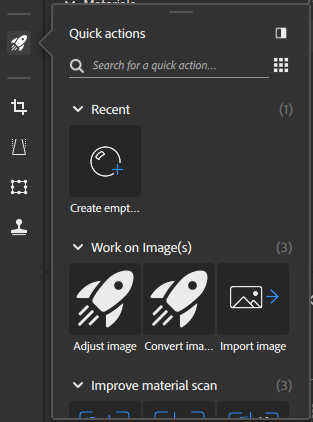
Quick actions are a collection of features and workflows that let you perform powerful actions in just a few clicks. Use Quick actions to create a material, create a project, or to add the layers you need to your existing stack.
From the quick action panel click on a Quick action to add it to the stack or create a new asset depending on the Quick action type. Quick actions are divided into the following categories:
- Recent: Access your most recently used Quick Actions.
- Work on images: Import, convert or adjust images.
- Improve material scan: Align, refine, or tile a scanned material to get better results.
- Create a material from image(s): Add the necessary layers to your layer stack to convert one or more images into a material.
- Create a material from scratch: Create a new material asset with starting layers.
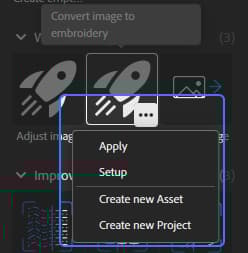
When you hover over a quick action, you can use the options button that appears to:
- Apply the quick action to the layer stack.
- Setup the quick action through dialogs.
- Create a new asset using the selected quick action.
- Create a new project using the selected quick action.
recommendation-more-help
substance-3d-sampler-help-guide