Excluding resources in a resource path
This page explains how to setup an ignore file to specify resources and folders that will be ignored during the crawling process of the the Assets window. It allows to avoid unwanted resources from being displayed.
Creating an ignore file
Navigate to the location of the resource folder in which you want to hide resources. Then create a file named as follow:
.ignore_assets_pt
It should look like this once created:
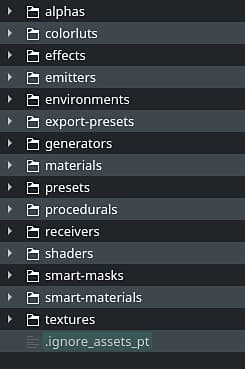
Example
The following file content will discard any resources and folders other than the default library folders:
## exclude all

*


## re-include library directories

!alphas

!colorluts

!effects

!emitters

!environments

!export-presets

!generators

!materials

!presets

!procedurals

!receivers

!shaders

!smart-masks

!smart-materials

!templates

!textures
Rules and guidelines
The following table shows the general rules that applies to the ignore file.
folder/filename.extension folder/sub-folder# This is a comment# Match anything starting with Alpha alpha* # Match any file with given extension *.jpgRange of characters can be specified between brackets to match folder and filenames.
- [abc]: Match one character in the given list
- [a-c]: Match one character in the given range
- [!abc]: Match one character not in the given list
- [!a-c]: Match one character not in the given range
Range and list can be numbers as well with the format [0-9].
# Exclude any UDIM image in PNG *_[0-9][0-9][0-9][0-9].png# This is a comment [#]This/Is/A/Path# Match a subfolder with trailing space folder/subfolder[ ]# Re-include specific file !my_file_name.png