Viewport menu
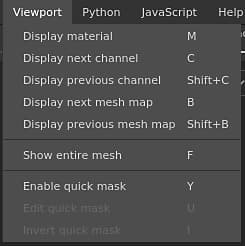
The viewport menu can be used to change the display mode of the Viewports.
Action
Description
Display material
Switch the viewports to Material mode which shows the 3D model with lighting and shading.
Display next channel
Switch the viewports to solo mode to display the next Texture Set channel.
Display previous channel
Switch the viewports to solo mode to display the previous Texture Set channel.
Display next mesh map
Switch the viewports to solo mode to display the next baked Mesh map type.
Display previous mesh map
Switch the viewports to solo mode to display the previous baked Mesh map type.
Show entire mesh
Adjust the viewport camera to center it on the 3D model.
Enabled quick mask
See the Quick mask page for more information.
Edit quick mask
See the Quick mask page for more information.
Invert quick mask
See the Quick mask page for more information.
For more information about the display modes see the Display settings.
For more information about the Quick Mask see the dedicated page.
recommendation-more-help
substance-3d-painter-help-guide