Fiber Glass Edge Wear
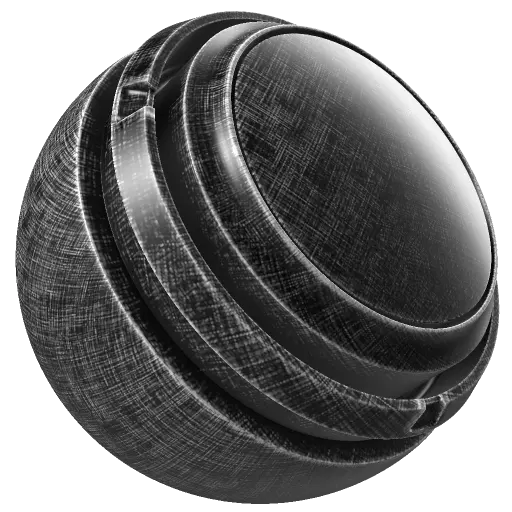

In: mask, generator
Description
The Fiber Glass Edge Wear generator adds realistic fiber glass edge wear and fraying details based on baked Curvature and Ambient Occlusion maps. You can optionally also use Micro Height and Micro Normal maps for additional detail.

The Fiber Glass Edge Wear generator outputs a monochrome (black and white) texture. As a result, it’s useful for generating masks to add fiber glass edge wear details to a layer.

Baked position, curvature, ambient occlusion and world space normal maps are required as image inputs. Learn more about baking here.

Inputs

Input name
Description
Custom grunge Grayscale
Use a custom texture or an anchor point.
Curvature Grayscale
Use the baked Curvature map.
Ambient Occlusion Grayscale
Use the baked Ambient Occlusion map.
World Space Normal Color
Use the baked World Space Normals map.
Position Color
Use the baked Position map.
Micro Normal Color
Use a custom normal texture or an anchor point.
Micro Height Color
Use a custom texture or an anchor point.

Parameters

Parameter name
Description
Seed

Set the seed value used to generate the dirt texture.

  • Click Random to switch to another random seed.
  • Click the pencil to see the current seed value, and enter a specific value if desired.
Invert
Invert specific internal maps (e.g., Curvature, AO) before they're combined into the final mask.
Wear Level
Adjust the total amount of wear and overall visibility of the generator effect.
Wear Contrast
Adjust the contrast of the final wear result.
Use Triplanar

When Use Triplanar is enabled, the texture is projected from three directions (X, Y, Z axes) instead of relying only on UVs.

  • Without triplanar enabled, the texture follows the UV layout.
  • With triplanar enabled, the texture is projected from multiple angles and blended.
Triplanar Blending Contrast
Adjust how smoothly a texture blends when it is projected using triplanar mapping. This adjusts the softness of the blending between the projections from each direction.
Grunge Amount
Adjust the intensity of the grunge details.
Use Custom Grunge
Toggle usage of a custom grunge map on or off.
Edges Smoothness
Adjust the softness of the edge wear effect.
Ambient Occlusion Masking
Adjust how much the ambient occlusion map affects the result.
Curvature Weight
Adjust how much the curvature map affects the result.

Micro Details

Parameter name
Description
Micro Height
Toggle usage of a custom Micro Height map on or off.
Micro Normal
Toggle usage of a custom Micro Normal map on or off.
Curvature Type

Determines the Curvature type.

  • Standard: Produces a usually quite sharp result, but can lack wider details.
  • Sobel: Produces similar results compared to standard, but slightly blurrier because it evaluates the normal map using a Sobel filter.
  • Smooth: Produces different levels of blur (like mipmaps) to accumulate information. This usually provides smoother curves, but details can get lost.
Curvature Intensity
Adjust the strength of the Curvature in Standard and Sobel Curvature mode.
Height Details Intensity
Adjust the amount of the Micro Height details.
AO Radius
Adjust the radius (range) of the Ambient Occlusion in micro details.
AO Depth
Adjust the depth (intensity) of the Ambient Occlusion in micro details.
recommendation-more-help
substance-3d-painter-help-guide