Baking issues
This page lists technical issues related to baking textures in Substance 3D Designer, and offer troubleshooting steps for each.
In this page
‘Match by name’ does not work
‘Match by name’ does not work

When the ‘Match’ option is set to ‘By mesh name’, the matching does not appear to be applied, or not consistently across all scene objects.

In Designer versions 14.1 and lower, low poly and high poly objects were matched using the name of their parent objects – in most cases, their parent transform.
Since Designer 15.0, the name of the geometry objects are used directly.
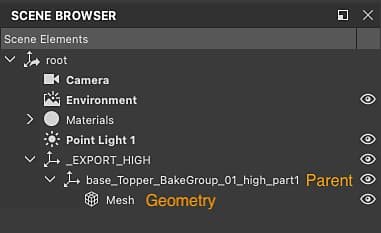
There are two paths you may take to get the expected macthing:
-
Adjust the name of the geometry objects to apply matching names.
-
Revert to the behaviour or previous Designer versions, by ajusting the ‘Name filtering mode’ option in the Project settings:
- Go to Edit > Preferences > Projects
- Select the last project file in the list
- Below the list of project files, select the ‘Bakers’ tab
- Set the ‘Name filtering mode’ to 'Parent name (Legacy)