Visible if expressions
The ‘Visible if’ expression lets you control the visibility of inputs, outputs and parameters in graphs.
When exposing parameters, you may want to hide or show parameters or node connectors based on the status of other parameters. E.g., a slider only showing when a boolean parameter button is set to true, because it would have no effect otherwise and that might confuse users.
To achieve this, you may input a logical expression into the Visible if property of:
- a graph’s input parameter;
- a graph’s Input node;
- a graph’s Output node.
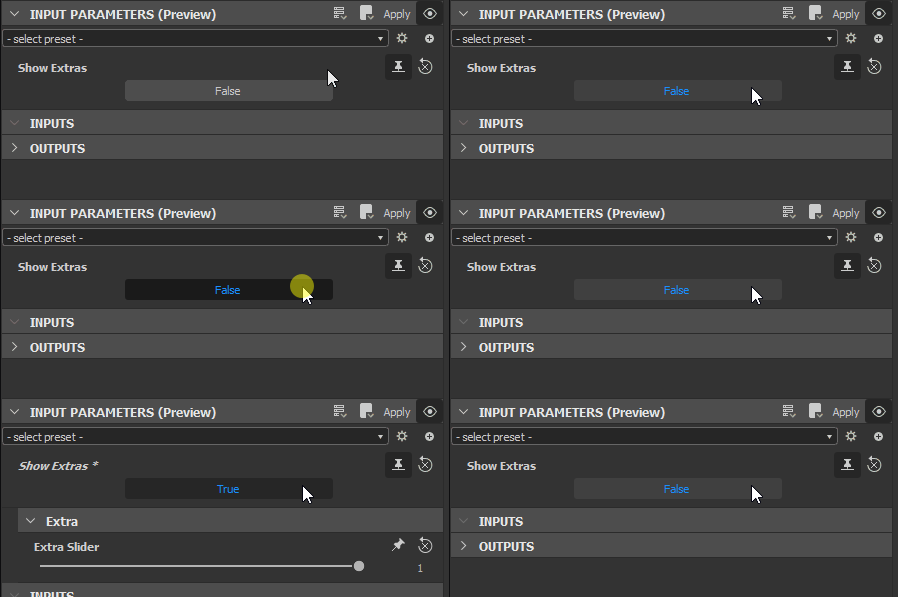
If the logical expression evaluates to true, the parameter, input or output is displayed in all instance nodes representing the current graph. Otherwise, it is hidden.
Complex conditions are possible, provided the logical expression stating these conditions is valid.
- This feature only impacts whether a parameter or connector is displayed in the user interface, and has no effect on the computations and result of a graph.
- When exposing or applying a function to any parameter used in ‘Visible if’ statements, those statements will be ignored and default to ‘true’.
true.Writing ‘Visible if’ expressions
ACCESSING INPUT PARAMETERS
Any Visible If Expression will need to use at least one input, this can be done through the following syntax:
input.identifier

input["identifier"]
If a referenced parameter does not exist, or the logical expression is invalid, a warning is displayed on the Visible if property.
AVAILABLE OPERATORS
The “Visible if” fields accepts the following parameters:
- Boolean, Float and Integer inputs.
trueandfalsevalues (case sensitive, no caps!).x: access the subparameter&&: and||: or!: not<,>,<=,>=,==,!=: comparison(): brackets
MUST ALWAYS EVALUATE TO BOOLEANS
A Visible If Expression is used as the condition for an “IF” statement, that means it must always result in true or false.
- Boolean values can directly evaluate as the condition. A simple button with a boolean value requires no more than this. See below examples, first case;
- Non-boolean parameters generally require a comparison operation. See above for comparison operators, below for examples;
- Some non-boolean values can be truthy or falsy, which means they can evaluate as
trueoffalse– E.g. an integer value of0evaluates to false.
Examples
input["my_input"] input.my_input input["my_input"] == true input.my_input == true!input["my_input"] !input.my_input input["my_input"] == false input.my_input == false input["my_input"] != true input.my_input != trueinput["my_input"] < 3 input.my_input < 3input["param1"] == 2 input.param1 == 2input["my_input"].y < 3 input.my_input.y < 3input["param1"] || input["param2"] input.param1 || input.param2input["param1"] > 0 && input["param2"] > 1 input.param1 > 0 && input.param2 > 1