Bevel (Filter Node)
Bevel
In: Filters/Effects
Intermediate
Description
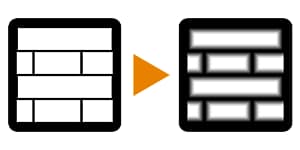
Peforms an edge-beveling effect on an input grayscale Heightmap. Returns both beveled Heightmap and Normalmap based on that Heightmap.
This is a useful node for applying exact curve profiles on an ideally binary (high contract black/white), basic Heightmap.
Parameters
Inputs
- input: Grayscale Input
Heightmap to convert. - Custom Curve: Grayscale Input
Gradient that determines the exact curve/slope. Ideally a Gradient Linear node, on which you can perform any kind of adjustment such as Levels or Curves. Only active when “Use Custom Curve” is True.
Parameters
- Distance: -1.0 - 1.0How far the bevel effect should reach.
- Corner Type: Round, AngularWhether the beveling profile should be rounded or straight.
- Smoothing: 0.0 - 5.0How much additional smoothing (blurring) to perform after the bevel.
- Use Non-Uniform Blur: False/TrueWhether smoothing should be done non-uniformly.
- Use Custom Curve: False/TrueToggles use of your own custom height curve. See above for more info.
- Normal Intensity: 0.0 - 50.0Intensity of the generated Normalmap.
- Normal Format: DirectX, OpenGL
Switch between different Normalmap formats (inverts the Green channel).
Example Images
| table 0-row-1 1-row-1 |
|---|
|
recommendation-more-help
dd48abc6-e399-43d2-9777-578ec70c5a23