[Limited Availability]{class="badge informative"}
Create Amazon Marketing Cloud measurement reports amc-measurement-reports
Use the Measure tab in an Amazon Marketing Cloud (AMC) project to review audience reach, frequency, and conversion outcomes. After you create an AMC project, create measurement reports for campaigns that have already run using the data available in your AMC instance.
Create a report create-report
To create an AMC measurement report, follow the steps in Create campaign summary report.
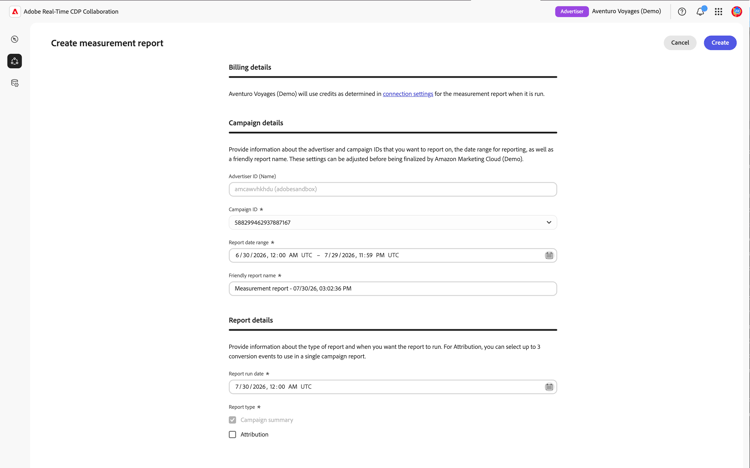
Campaign details campaign
The Advertiser ID identifies the Amazon Advertising account associated with the AMC instance. AMC uses this account context to retrieve campaigns for measurement.
The Campaign ID list is populated automatically with campaigns available in the connected AMC instance. A campaign appears only if it falls within the default discovery lookback window and has enough unique users to satisfy AMC’s minimum aggregation threshold. Select the campaign whose Amazon Ads activity you want to measure.
If the campaign you need is not listed, verify that it belongs to the connected Amazon Ads account and review Troubleshooting. For more information about the threshold, refer to the AMC aggregation threshold documentation.
Date range, run date, and report name dates
Set the Report date range to the period when the selected AMC campaign ran. AMC supports a 365-day lookback window with a maximum span of 90 days.
Set the Report run date. This is the date on which the report executes. The run date must be at least one day after the report end date and can be up to 46 days in the future. For the full set of date constraints, see AMC constraints reference.
Report type report-type
All AMC reports include a Campaign summary. Optionally, you can include Attribution data to measure whether campaign impressions resulted in customer actions, such as purchases or sign-ups, within a 30-day window after ad exposure. Attribution requires the relevant conversion events to be available in your AMC instance. For campaigns focused on reach or awareness, the Campaign summary provides the delivery metrics you need.
Conversion events (attribution only) conversion-events
For Attribution reports, AMC applies a fixed 30-day attribution lookback window. This setting cannot be adjusted.
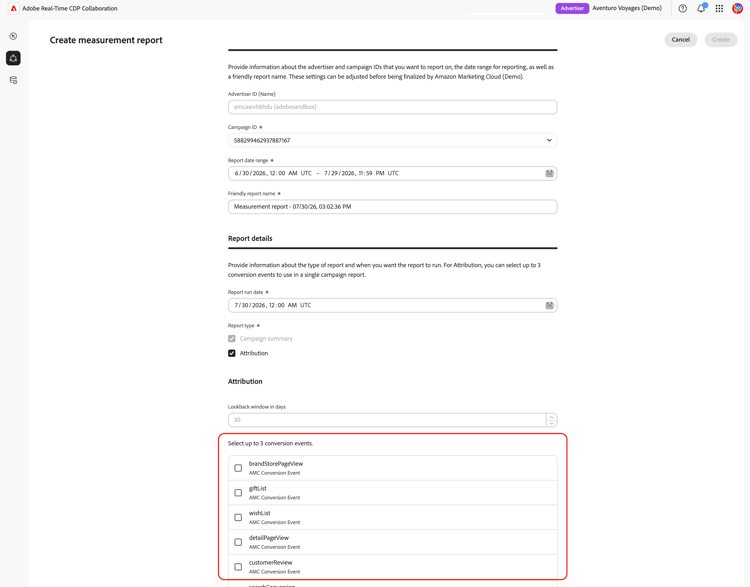
Conversion events represent on-site customer actions tracked by Amazon Ads, such as a purchase, wishlist addition, shopping cart action, or product detail view. Attribution reports support up to three events. Select the events that align with the campaign outcomes you want to measure. If the Attribution option is unavailable, see Troubleshooting.
After you create the report, it appears in the Measure tab with a scheduled or pending status. On the configured run date, AMC processes the report query and returns the results within 24 hours.

View a report view-report
Once a report has run, the results are available in the Measure tab of your AMC project. Locate your report and select View full report to review the results.

The report displays the results available for the selected report type. Campaign summary reports show delivery results for the selected Amazon campaign.
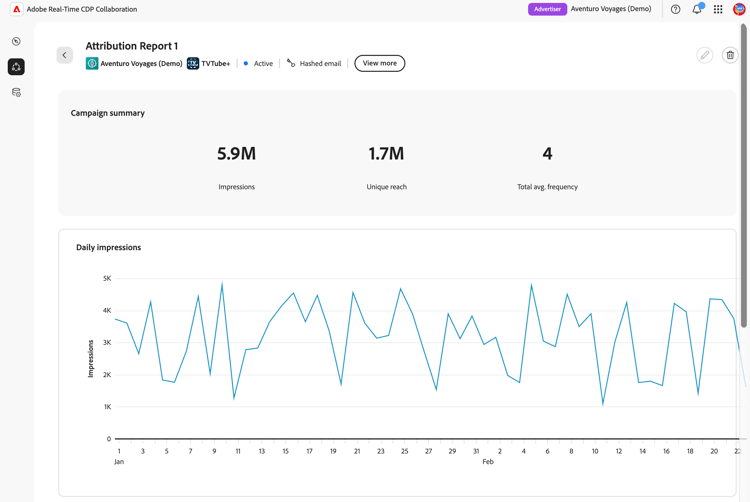
Reports that include Attribution also show conversion activity associated with the selected Amazon Ads conversion events.
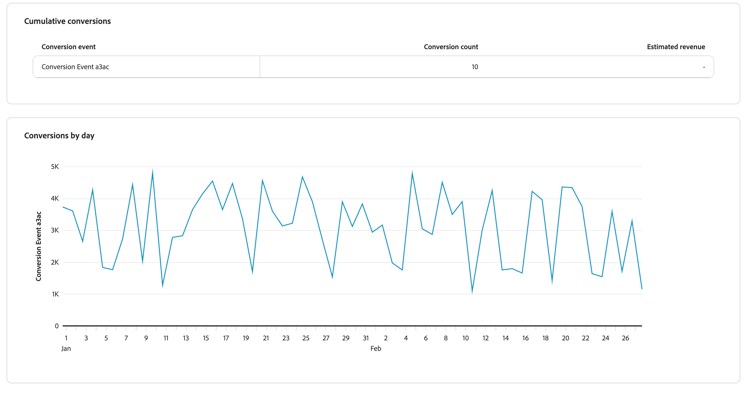
For more information on interpreting report results, see Measure performance.
AMC constraints reference constraints
The following constraints apply to all AMC measurement reports.
Troubleshooting troubleshooting
No Measurement Data Available
The Measure tab shows “No Measurement Data Available” until the background data setup queries triggered at project creation have completed. This can take up to 24 hours. If the ‘No Measurement Data Available’ message persists after 24 hours, verify that your AMC instance has campaigns that ran within the last three months, as this is the default lookback window used during campaign discovery. If eligible campaigns exist and the message persists, check your campaign status in your Amazon Ads account.
No campaigns appear in the Campaign ID dropdown
Campaigns may be absent even when the Measure tab is visible. AMC applies a minimum user threshold to campaign data. Campaigns that do not meet the minimum unique users threshold are excluded and report queries will return no results. Verify that the campaigns you want to report on have sufficient reach. For details on AMC’s aggregation thresholds, refer to the AMC aggregation threshold documentation.
Results are not visible after the run date
Allow up to 24 hours after the scheduled run date for AMC to process the report queries and return results. If the report remains pending after that period, verify that the run date has passed and that the report status is no longer showing as pending.
Conversion events are unavailable and Attribution is grayed out
This can occur for three reasons:
- Conversion tracking is not enabled. Your AMC Advertiser account may not have conversion tracking configured. Navigate to your Amazon Ads account and verify that conversion events are being tracked for the relevant campaigns.
- No recorded conversion events. Even with tracking enabled, your AMC instance may not have recorded any conversion events yet.
- Aggregation threshold not met. AMC applies a minimum threshold to conversion data. If a conversion event type does not have a sufficient number of occurrences, it will not be returned and will not appear in the list.
Conversions appear lower than expected
If the report run date is fewer than 30 days after the end of the date range, AMC may not have captured all conversions within the attribution window. Create a new report with a run date at least 30 days after the date range ends.
Next steps next-steps
Use the report results to evaluate campaign performance and inform future campaign planning in Amazon Advertising. For example, you can adjust targeting, suppress overexposed audiences identified in the frequency distribution, or reallocate spend to high-performing placements. To analyze a different campaign or reporting period, create another measurement report with the appropriate settings.
For an overview of all available AMC collaboration capabilities, see Amazon Marketing Cloud.