Manage Virtual Coach usage and billing
Activate Virtual Coach, monitor Monthly Active User (MAU) credit consumption, and download learner performance reports as an Adobe Learning Manager administrator.
Activate Virtual Coach for your account activatevirtualcoach
Virtual Coach is available as an add-on to Adobe Learning Manager. After purchase, provisioning generates an activation key that’s emailed to the account administrator.
-
Sign in to Adobe Learning Manager as an administrator.
-
Navigate to the Billing page from the left navigation pane.
-
In the Virtual Coach section, enter the activation key you received by email.
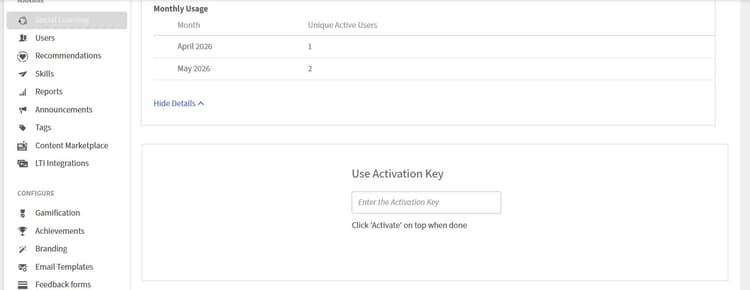
Enter your activation key in the Virtual Coach section of the Billing page to turn on the feature. -
Select Apply. Virtual Coach is enabled for your account.
Once activated, you receive an in-app notification confirming the feature is live. Four sample role-play scenarios are added automatically to the Content Library so authors can begin immediately.
View MAU credit balance
Monthly Active User (MAU) credits count the number of unique learners who use Virtual Coach each month.
-
Navigate to the Billing page.
-
In the Virtual Coach section, select View Usage Details.

-
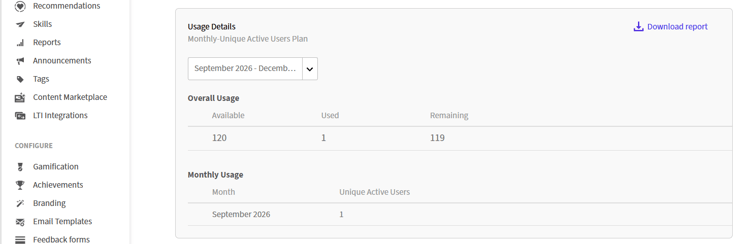
Use the Select period drop-down to choose the date range you want to review.
The Overall Usage table shows:
- Available: total MAU credits purchased.
- Used: credits consumed to date.
- Remaining: credits available for the rest of the contract period.
The Monthly Usage table shows the number of unique active learners by calendar month.
-
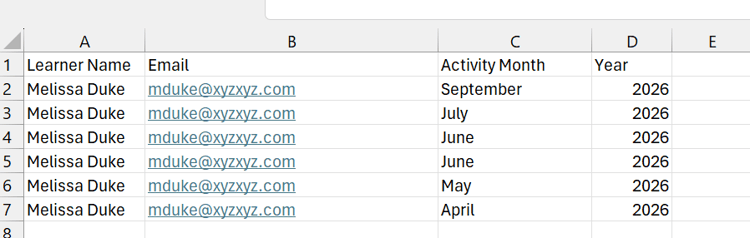
Select Download Detailed Report to export the full usage data.
How MAU credits are consumed
An MAU credit is consumed when a learner launches a Virtual Coach session in a calendar month. Additional sessions by the same learner in the same month don’t consume additional credits. Unused credits at the end of the contract period lapse and don’t carry over.
MAU credits are counted per unique learner per calendar month, regardless of how many sessions each learner launches.
Example: single learner, multiple sessions. Sarah launches five Virtual Coach sessions in January. She’s counted as a single unique user for the month, so 1 MAU is consumed regardless of how many times she practices.
Example: same learner, multiple months. Sarah uses Virtual Coach in both January (3 sessions) and February (2 sessions). Each calendar month counts separately, so 2 MAUs are consumed — 1 for January and 1 for February.
Example: multiple learners, same month. 100 sales reps each launch one Virtual Coach session in January. Each unique learner counts as one MAU for that month, so 100 MAUs are consumed.
Example: team practice over time. Your team of 50 people uses Virtual Coach throughout the year. In a month where only five of the 50 practice, five MAUs are consumed for that month; in a month where all 50 practice again, 0 additional MAUs beyond what’s already been consumed for returning learners that month, since each learner is only counted once per calendar month regardless of how many times they practice within it.
To learn about Virtual Coach reports, navigate to Virtual Coach reports.