Virtual Coach reports
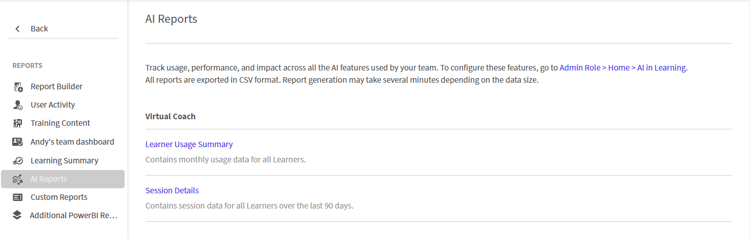
As an admin, you can view two reports related to Virtual Coach. They are Learner Usage Summary and Session Details.
Learner Usage Summary
The Learner Usage Summary contains monthly usage details of all learners enrolled within the account. These usage details contain insights into usage and learning patterns.
Generate Learner Usage Summary
To generate a Learner Usage Summary:
-
Login as an administrator.
-
Navigate to Manage > Reports > AI Reports.
-
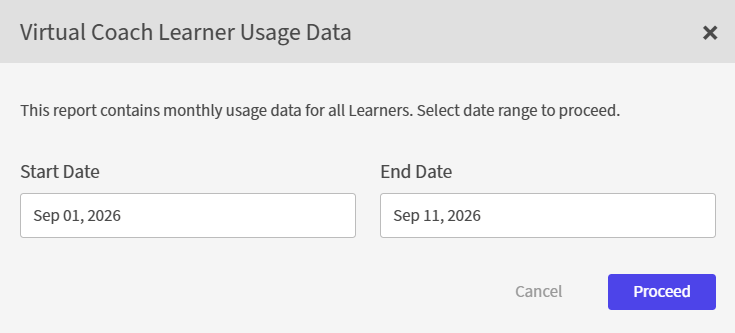
In the Virtual Coach section, select Learner Usage Summary. The Virtual Coach Learner Usage Data popup appears.
-
Select the Start Date and the End Date.
-
Select Proceed. The report is generated as a .csv file. You can find the downloaded .csv file in the Downloads folder of your File Explorer.

Session Details
The Session Details report contains session details of all learners enrolled within the account over the past 90 days. These usage details contain insights into usage and learning patterns.
Generate Session Details
To generate a Session Details report:
-
Login as an administrator.
-
Navigate to Manage > Reports > AI Reports.
-
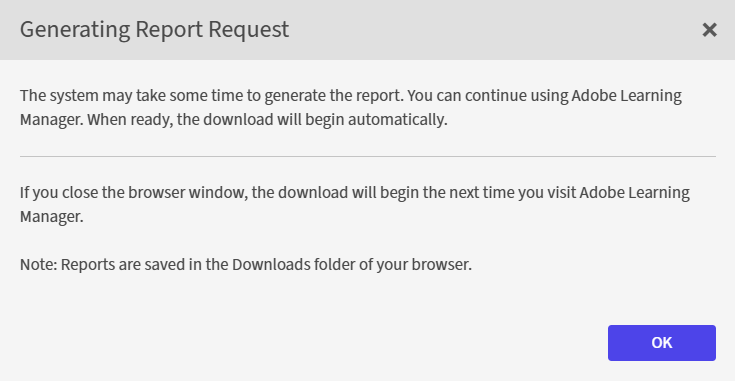
In the Virtual Coach section, select Session Details. The Generating Report Request popup appears.
-
Select OK. The report is generated as a .csv file. You can find the downloaded .csv file in the Downloads folder of your File Explorer.