Safe Exam Browser
Safe Exam Browser provides a secure environment for Learners to take native Adobe Learning Manager quizzes by restricting access to other browsers and applications during an assessment.
Administrators can enable Safe Exam Browser integration at the account level and upload a configuration file (.seb) to define quiz restrictions. After the integration is enabled, Authors can configure individual quizzes to require the use of Safe Exam Browser.
This article explains how to enable Safe Exam Browser integration for your account.
Enable Safe Exam Browser integration
Configure Safe Exam Browser integration to make the option available to Authors when they configure quizzes. Before you begin, ensure that you have the Safe Exam Browser file for your account.
To enable Safe Exam Browser integration:
-
Login to the ALM as an Administrator.
-
Select Settings > General.
-
Navigate to the Safe Exam Browser integration.
-
Select Edit.
This expands the Safe Exam Browser integration.
-
Select Enable.
-
Select Browse and upload the Safe Exam Browser file from the system. View Configure Safe exam browser file configuration for more information.
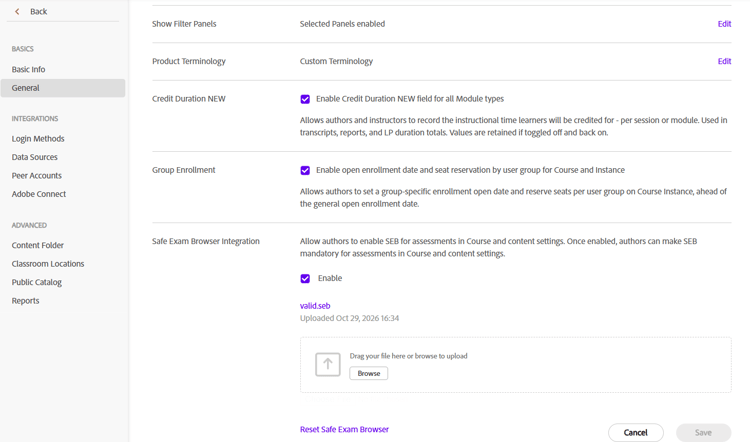
-
Select Save.
The Safe Exam Browser is now available for Authors to enable when configuring supported quizzes.
View Create a course with SEB for more information about configuring Safe Exam Browser as an Author.
Configure the .seb file for macOS configure-the-seb-file-for-macos
Create a .seb file using the SEB Configuration Tool to define your quiz restrictions, security settings, and allowed applications. Before using Safe Exam Browser (SEB), ensure that the .seb file meets the following requirements:
- Set the browserWindowWebView parameter to 3 (Integer) to enable SEB.
- Set startURL to the URL that corresponds to the target environment.
- Ensure that the .seb file includes the required quitURL information.