[Private beta]{class="badge informative"}
Auto-generation of content variants (Beta) auto-generate-variants
Journey Optimizer introduces AI-based simulation that can automatically generate multiple variants to test your content. This feature reduces the need to manually create variants, making it easier to validate personalization logic across complex templates.
When rendering content for simulation or proofing, the system analyzes your content and identifies all personalization tokens and branching rules. It replaces personalization tokens with meaningful values that provide a near-realistic preview of the final content.
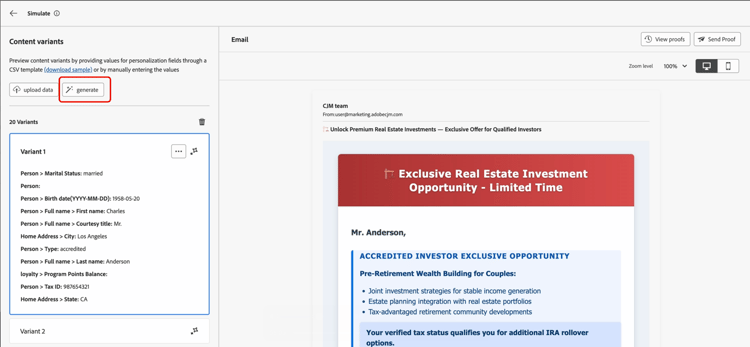
Consider a financial services email template with branching logic based on investor type, age group, marital status, tax ID verification, and location. Without variants generation, you would need to manually create dozens of variants to validate all paths. With auto-generated variants, the system produces representative variants that automatically cover these conditions. Each generated variant is rendered in the preview pane, showing exactly which blocks and conditions are applied.
Generate content variants
To generate variations for your content and preview them, follow these steps:
-
Open your content and select Simulate content / Simulate content variations.

-
Click the Generate button.
-
Journey Optimizer automatically generates variants based on detected attributes.
-
Review the list of generated variants in the left pane and select a variant to see its personalized rendering in the preview pane.