On this page: Learn how to deliver outbound messages from a read audience journey in scheduled batches, called waves, to balance load, protect downstream systems, and support deliverability.
You can deliver outbound messages from a journey in batches (waves) over time instead of all at once. Wave sending helps balance load, avoid overwhelming downstream systems (such as call centers or landing pages), and support deliverability and sender reputation—especially for high-volume read audience journeys.
You configure it at the journey level when you define how the audience enters and how actions are scheduled. You define the number of waves, their size (as a percentage of the audience or as absolute numbers), and when each wave runs.
Limitations and guardrails limitations-guardrails
- Wave sending is only available for read audience journeys with the As soon as possible and Once scheduler types. Learn more on the journey schedule.
- Wave sending is not available for recurring, event-triggered, business-event, test mode or dry-run journeys.
- You must define at least 2 waves and you can add up to 10 waves.
- The minimum interval between the start of two waves is 30 minutes.
- A wave start cannot be before the journey start or in the past.
- Splitting the audience into waves can take up to 1 hour. Profiles may not enter the journey until then.
- Within a single journey version, two waves never run at the same time. The next wave starts only after the previous wave has finished. For example, if waves are scheduled 1 hour apart but the first wave runs for 2 hours, the second wave starts when the first wave ends, not at its scheduled time.
- Wave starts can be delayed when the platform applies quota limits or when the system capacity is under heavy load.
Configure wave sending in a journey configure-wave-sending
-
Start your journey with a Read Audience activity.
-
Double-click the Read Audience activity to open its properties and select the Deliver journey action in waves option.
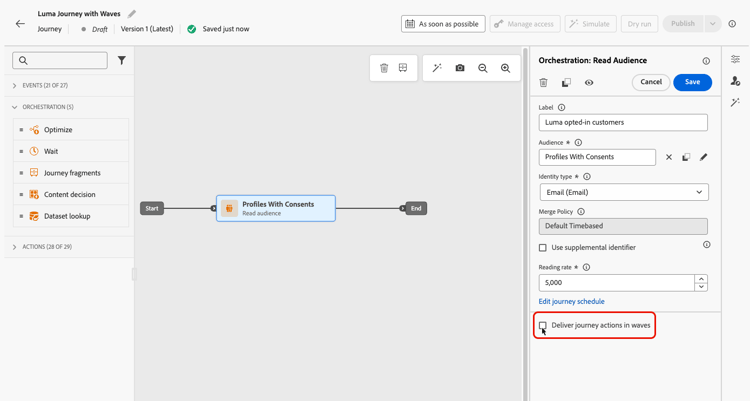
-
Set the number of waves (for example, 4).
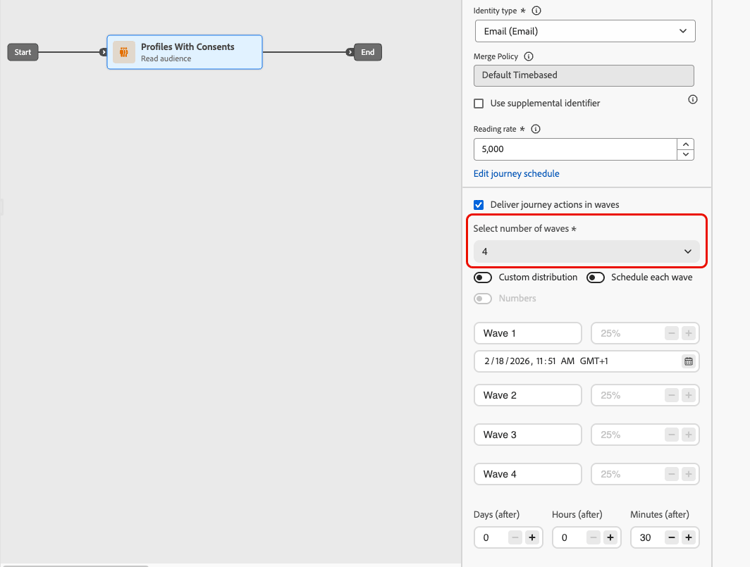
note NOTE You must define at least 2 waves and can add up to 10 waves. -
Choose how to define wave size and timing as detailed below.
Equal waves equal-waves
By default, the audience is split into waves of equal size. Set a fixed interval between the start of each wave (for example, 2 hours).
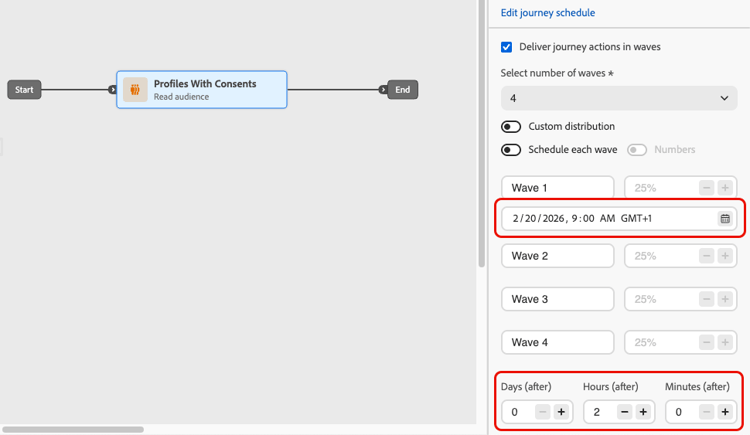
The system then schedules subsequent waves automatically (for example, first wave at 9:00 AM, second at 11:00 AM, third at 1:00 PM, fourth at 3:00 PM).
Custom distribution custom-distribution
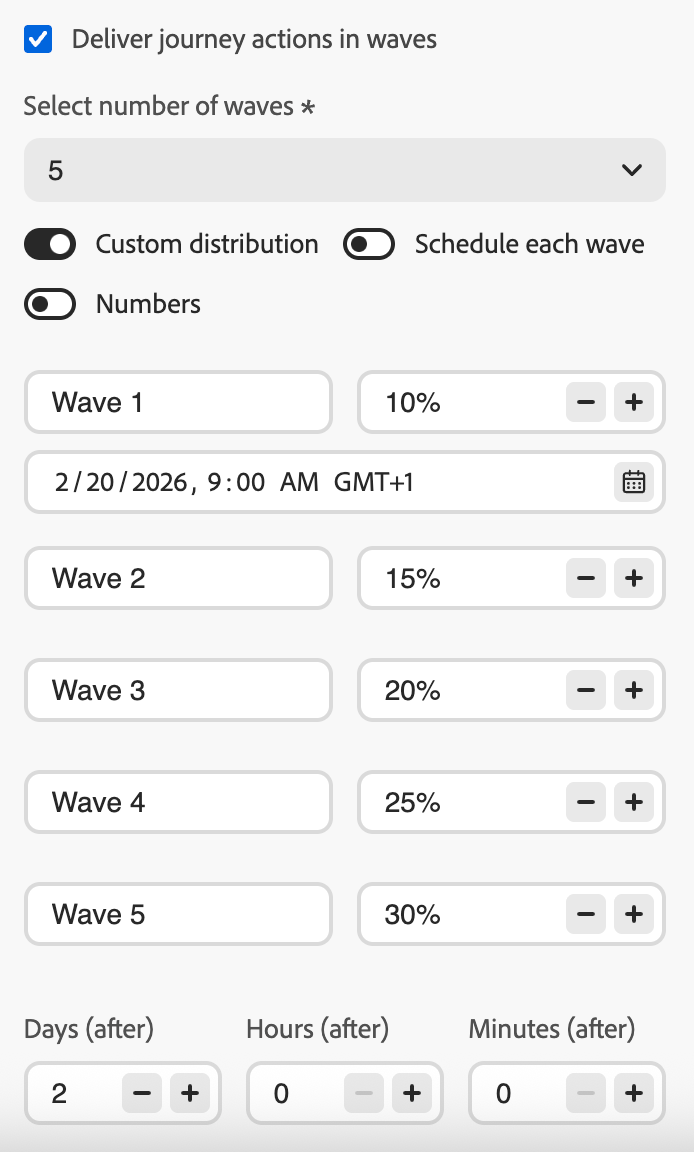
Select the Custom distribution option to define the size of each wave as a percentage of the total audience (for example, 15%, 20%, 25%, 40%).
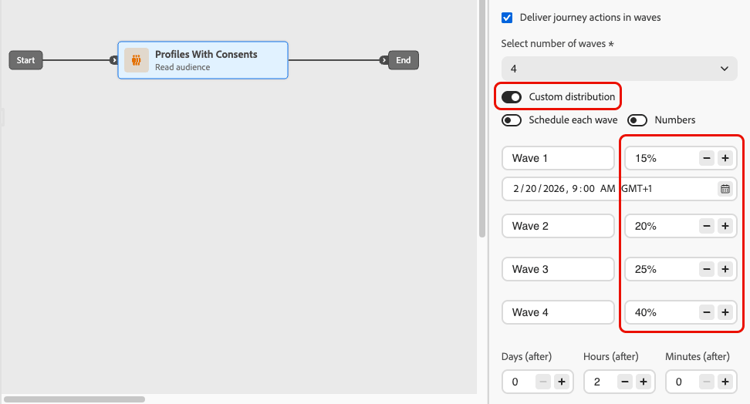
Select Numbers to define the size of each wave as an absolute number of profiles (for example, 10,000; 50,000).
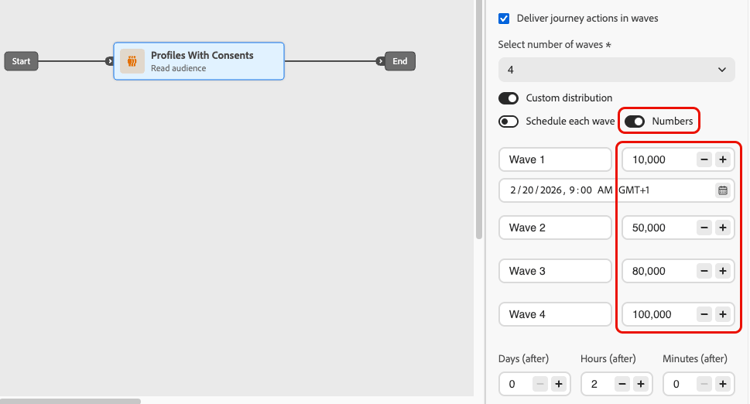
- When using percentages, all waves must total 100%. A warning is displayed if this is not the case.
- When using numbers, the system does not validate coverage — ensure your wave sizes cover the intended audience. Learn more
Custom schedule custom-schedule
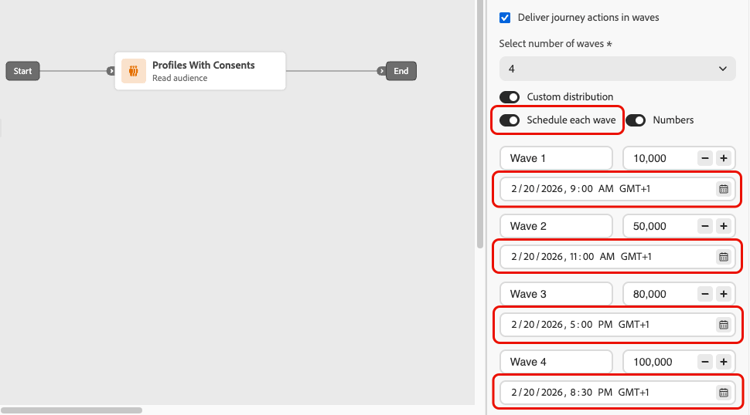
Select Schedule each wave to define a specific start date and time for each wave. Waves do not need to be evenly spaced (for example, 9:00 AM, 11:00 AM, 5:00 PM, 8:30 PM).
Use cases use-cases
Wave sending helps you control when and how many messages go out, which can improve deliverability, protect sender reputation, and align sends with your operational capacity. Consider using waves in these scenarios:
-
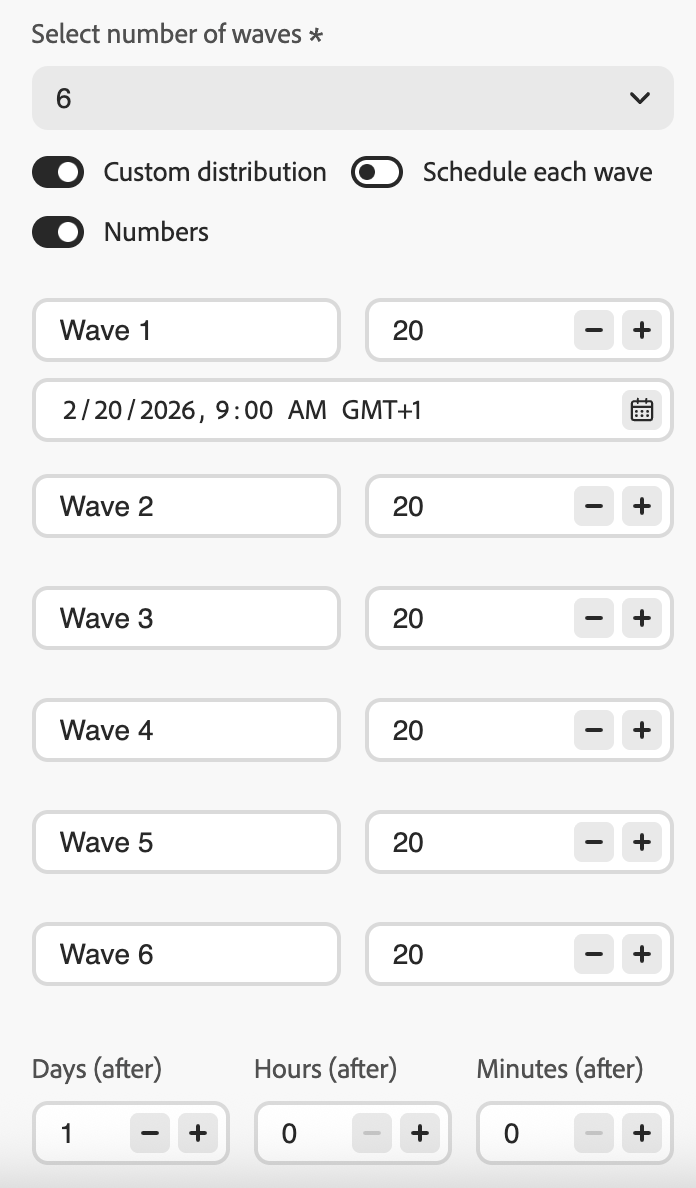
Call center or response management: Limit how many messages go out per day or per hour so that downstream teams (e.g., customer care) can handle responses. For example, send 20 messages per day to match call center capacity.
-
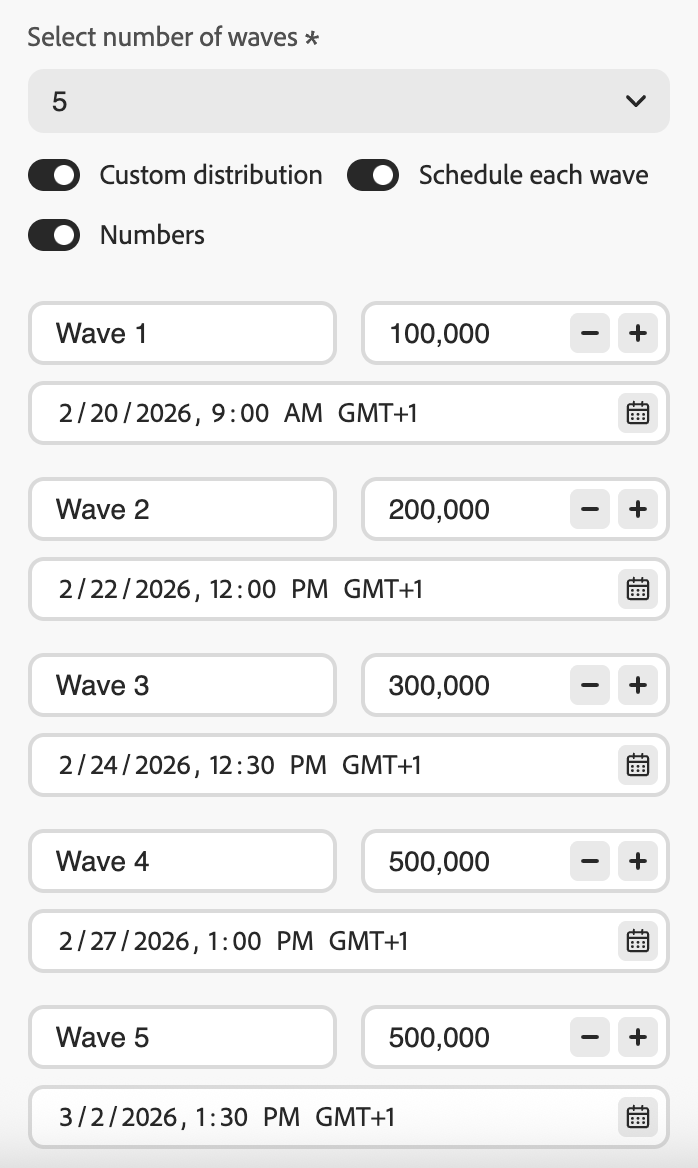
High volume and deliverability: Avoid sending a very large journey send in one shot. Spread delivery over time to help maintain sender reputation and reduce the risk of being flagged as spam.
-
Ramp-up: When using a new platform or IP, progressively increase volume (for example, 10% in the first wave, then 15%, 20%, and so on) to build reputation gradually.
Frequently asked questions faq
- If the sum of your wave sizes exceeds the audience (for example, you schedule 100,000 in the first wave for an audience of 100,000), the first wave will send to the full audience and the remaining waves will have no one left to send to—they will not execute.
- If the sum is less than the audience (for example, you define four waves totaling 40,000 profiles for an audience of 100,000), only the profiles included in those waves will receive the message. The rest of the audience will not receive the communication and will not be retried in later waves.
The audience is evaluated once when the journey is triggered. A snapshot of qualifying profiles is taken at that point and used for all waves — audience membership is not re-evaluated before each subsequent wave.
However, profile attributes are read at the time each wave processes, not at journey start. This means that for waves spread across multiple days:
- Personalization attributes (for example, a profile’s first name or loyalty tier) reflect the profile’s state at the time that wave runs.
- Consent and suppression checks are applied at send time for each wave. If a profile opts out between two waves, they will not receive messages from the subsequent waves.
In summary: who is included in the journey is fixed upfront, but the data used to send to those profiles reflects their current state when their wave is processed.
See also see-also
- Use an audience in a journey—configure the Read Audience activity.
This section contains structured knowledge intended to support interpretation, retrieval, and question answering related to this topic.
For complete understanding, this information should be combined with the documentation on this page. Neither source is intended to stand alone; the page describes the feature, while this section provides additional context that helps disambiguate terminology, intent, applicability, and constraints.
- TL;DR: This page explains how to configure wave sending in Adobe Journey Optimizer read audience journeys to deliver outbound messages in controlled batches over time, improving deliverability and protecting sender reputation.
Intents:
- Enable wave sending on a Read Audience journey to deliver messages in batches
- Configure equal waves with a fixed interval between each wave
- Define custom wave sizes as percentages or absolute profile counts
- Schedule each wave with a specific start date and time using custom scheduling
- Control delivery volume to protect sender reputation or align with operational capacity
Glossary:
- Wave sending: A delivery mode that splits the Read Audience into batches (waves) and sends messages to each batch at scheduled intervals instead of all at once (product-specific)
- Equal waves: A wave configuration where the audience is split into equal-sized portions with a fixed interval between wave starts (product-specific)
- Custom distribution: A wave configuration where each wave’s size is defined manually as a percentage or absolute number of profiles (product-specific)
- Custom schedule: A wave configuration where each wave has a specific start date and time, allowing non-uniform spacing (product-specific)
Guardrails:
- Wave sending is only available for Read Audience journeys with the “As soon as possible” and “Once” scheduler types; it is not available for recurring, event-triggered, business-event, test mode, or dry-run journeys.
- A minimum of 2 waves and a maximum of 10 waves must be defined.
- The minimum interval between the start of two consecutive waves is 30 minutes.
- A wave start time cannot be before the journey start or in the past.
- Splitting the audience into waves can take up to 1 hour; profiles may not enter until then.
- Within a single journey version, two waves never run simultaneously; the next wave starts only after the previous one finishes.
- Wave starts can be delayed by platform quota limits or heavy system load.
- When using percentage-based custom distribution, all waves must total 100%.
- When using number-based custom distribution, the system does not validate total coverage; the user must ensure wave sizes cover the intended audience.
- If wave sizes exceed the audience, the first wave sends to the full audience and remaining waves do not execute.
- If wave sizes total less than the audience, only profiles in defined waves receive the message; the rest are not retried.
Terminology:
- Canonical name: Wave sending — Acronym: none — variants: batch delivery, wave-based delivery, phased send
- Synonyms: “waves” = “batches” = “delivery phases”
- Do not confuse: “Wave sending” ≠ “recurring journey” (wave sending splits a single audience read into timed batches; recurring journeys re-read the audience on a schedule)
FAQ:
- Q: Can wave sending be used on recurring journeys? — No; wave sending is only available for Read Audience journeys with the “As soon as possible” or “Once” scheduler type.
- Q: What is the minimum time between two waves? — 30 minutes between the start of two consecutive waves.
- Q: What happens if my wave sizes total more than the audience? — The first wave sends to the full audience and subsequent waves have no profiles left to send to; they do not execute.
- Q: Can I assign different content or segments to individual waves? — No; all waves use the same audience and journey content. Only size and timing can be customized per wave.
- Q: How many waves can I configure? — Between 2 and 10 waves per journey.
- Q: When should I use wave sending? — Use it to protect sender reputation for high-volume sends, align delivery with downstream team capacity (e.g., call centers), or progressively ramp up volume on a new IP or platform.