On this page: Learn how to use the Deduplication targeting activity in an Orchestrated campaign to remove duplicate records from the results of inbound activities before using the targeted data.
The Deduplication activity is a Targeting activity. This activity allows you to delete duplicates in the result(s) of the inbound activities, for example duplicated profiles in the recipient list. The Deduplication activity is generally used following targeting activities, and before activities that allow the use of targeted data.
Configure the Deduplication activity deduplication-configuration
Follow these steps to configure the Deduplication activity:
-
Add a Deduplication activity to your Orchestrated campaign.
-
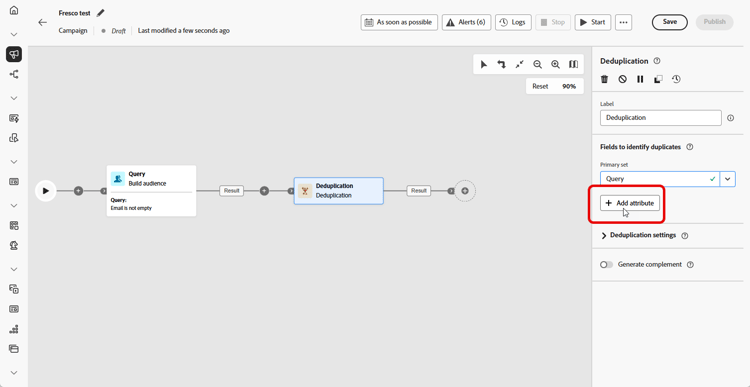
In the Fields to identify duplicates section, click the Add attribute button to specify the fields for which the identical values allow the duplicates to be identified, such as: email address, first name, last name, etc. The order of the fields allows you to specify those to process first.
-
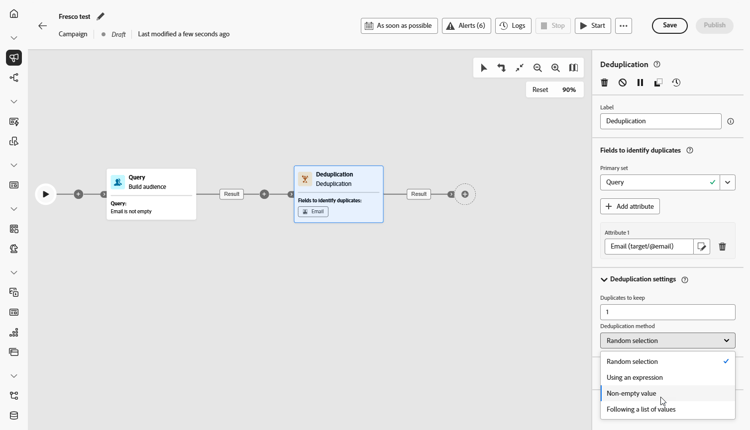
In the Deduplication settings section, choose how many unique records to keep using the Duplicates to keep field. The default is 1, which keeps one record per duplicate group. Set it to 0 to keep all duplicates.
For example, if records A and B are duplicates of Y and record C is a duplicate of Z:
- If the value of the field is 1: Only the Y and Z records are kept.
- If the value of the field is 0: All records (A, B, C, Y, Z) are kept.
- If the value of the field is 2: C and Z are kept, plus two values from A, B, and Y, randomly or based on your deduplication method.
-
Choose a Deduplication Method, this defines how the system decides which records to keep from each group of duplicates:
- Random selection: Randomly selects the record to be kept out of the duplicates.
- Using an expression: Keeps records with the highest or lowest value based on an expression you define.
- Non-empty values: Keeps records where the selected field is not empty, e.g. keep only profiles with a phone number.
- Following a list of values: Allows you to prioritize specific values for one or more fields, e.g. you can give priority to records with “Country” set to France. Click Attribute to choose a field or create a custom expression. Use the Add button to enter preferred values in the priority order.
-
Check the Generate complement option if you wish to exploit the remaining population. The complement consists of all the duplicates. An additional transition will then be added to the activity.
Example deduplication-example
In the following example, a Deduplication activity is used to remove duplicate records from the target audience before sending a delivery. The audience is first filtered to include only profiles with a non-empty Email field. Then, the Deduplication activity uses the Email address to identify and exclude duplicates.

This section contains structured knowledge intended to support interpretation, retrieval, and question answering related to this topic.
For complete understanding, this information should be combined with the documentation on this page. Neither source is intended to stand alone; the page describes the feature, while this section provides additional context that helps disambiguate terminology, intent, applicability, and constraints.
- TL;DR: This page explains how to configure the Deduplication targeting activity in an Orchestrated campaign to remove duplicate records from the results of inbound activities before using the targeted data.
Intents:
- Add a Deduplication activity to an Orchestrated campaign.
- Specify the fields that identify duplicates, in processing order.
- Choose how many unique records to keep per duplicate group using the Duplicates to keep field.
- Choose a Deduplication Method to decide which records are kept from each duplicate group.
- Generate a complement to exploit the remaining (excluded) population.
Glossary:
- Deduplication activity: a Targeting activity that deletes duplicates in the result(s) of the inbound activities, for example duplicated profiles in the recipient list (product-specific)
- Fields to identify duplicates: the section where you specify, in order, the fields whose identical values identify duplicates (for example email address, first name, last name) (product-specific)
- Duplicates to keep: the field that sets how many unique records to keep per duplicate group (product-specific)
- Deduplication Method: the setting that defines how the system decides which records to keep from each group of duplicates (product-specific)
- Random selection: a Deduplication Method that randomly selects the record to keep out of the duplicates (product-specific)
- Using an expression: a Deduplication Method that keeps records with the highest or lowest value based on a defined expression (product-specific)
- Non-empty values: a Deduplication Method that keeps records where the selected field is not empty (product-specific)
- Following a list of values: a Deduplication Method that prioritizes specific values for one or more fields, in a priority order entered using the Add button (product-specific)
- Generate complement: an option that adds an additional outbound transition carrying the remaining population excluded as duplicates (product-specific)
Guardrails:
- The Deduplication activity is a Targeting activity, generally used following targeting activities, and before activities that allow the use of targeted data.
- The default value of Duplicates to keep is 1, which keeps one record per duplicate group.
- Setting Duplicates to keep to 0 keeps all duplicates.
- By default, the record to keep out of the duplicates is randomly selected.
- Enabling Generate complement adds an additional transition to the activity, carrying the complement (all the duplicates).
Terminology:
- Canonical name: Deduplication activity — variants: Deduplication
- Do not confuse: “Random selection” (randomly selects which record to keep) ≠ “Following a list of values” (prioritizes specific field values in a defined order) ≠ “Non-empty values” (keeps records where the selected field is not empty) ≠ “Using an expression” (keeps the highest or lowest value per a defined expression) — these are the four Deduplication Method options.
- Do not confuse: “Duplicates to keep” (how many records survive per duplicate group) ≠ “Deduplication Method” (which records are chosen to survive).
FAQ:
- Q: What does the Deduplication activity do? — It deletes duplicates in the results of the inbound activities, for example duplicated profiles in the recipient list.
- Q: When is the Deduplication activity typically used? — Generally following targeting activities, and before activities that allow the use of targeted data.
- Q: What happens if Duplicates to keep is set to 0? — All duplicates are kept (for example, records A, B, C, Y, Z in the page’s example).
- Q: What is the default Deduplication Method? — By default, the record to keep out of the duplicates is randomly selected (Random selection).
- Q: How do I identify which fields define a duplicate? — In the Fields to identify duplicates section, click Add attribute to specify the fields, such as email address, first name, or last name; the order of the fields specifies which to process first.
- Q: How can I use the records excluded as duplicates? — Toggle on Generate complement to add an additional outbound transition carrying the remaining (duplicate) population.
Personas:
- marketer: Can add a Deduplication activity to an Orchestrated campaign to delete duplicates in the results of inbound activities, and toggle on Generate complement. Can select fields to identify duplicates, such as email address and first name, and choose a Deduplication Method. The page states that the default value of Duplicates to keep is 1, which keeps one record per duplicate group. Where: “Configure the Deduplication activity”.
Onboarding:
- Level: Intermediate
- First minimal step: Add a Deduplication activity to your Orchestrated campaign.
- Success check: An additional transition is added to the activity when the Generate complement option is checked.