Journey re-entry
Account journeys only
When you enable re-entry for an account journey, you can control when and how often an account can re-enter the same journey. Use the re-entry settings to set criteria, limits, and wait times so that accounts requalify for the journey in a controlled way.
An account can requalify for a journey when the following items are true:
- The account is within the number of allowed re-entries for the journey.
- The account has met the wait time threshold (the minimum time to wait before requalifying).
- The account is not currently in the journey.
Enable re-entry for an account journey
You can enable re-entry and change re-entry settings when the journey is in a Draft status.
-
Open the draft account journey.
-
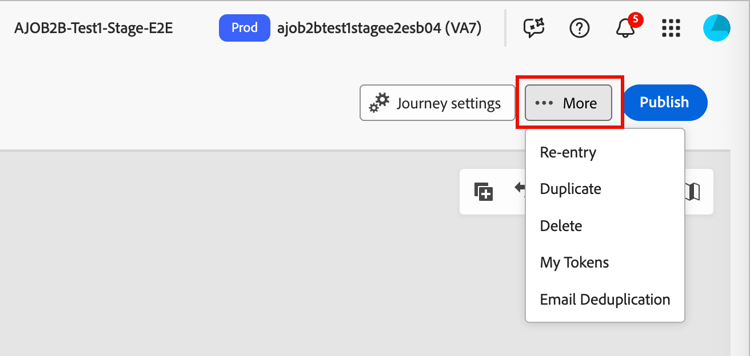
Click the More… menu at the top right and choose Re-entry.
-
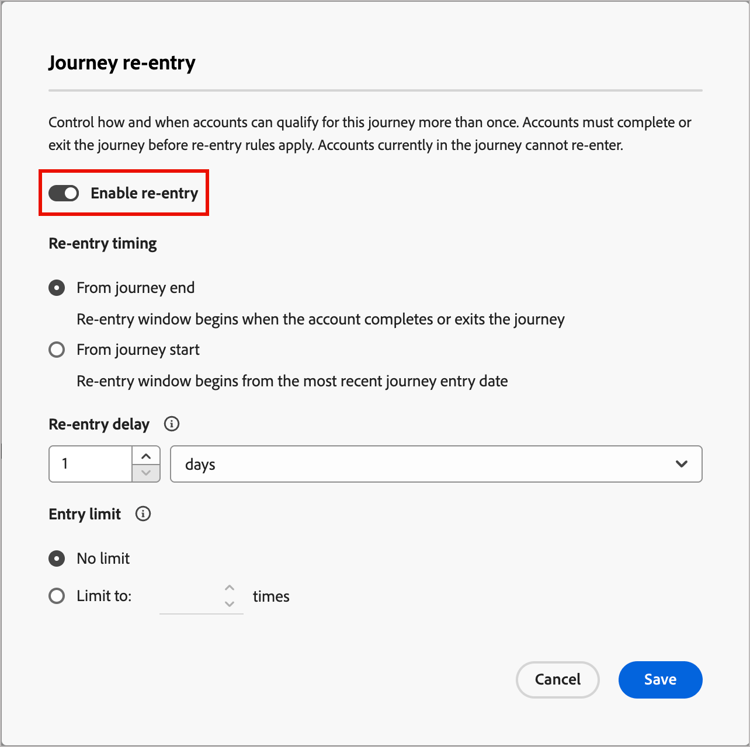
In the Journey re-entry dialog, toggle the Enable re-entry option.
When the feature is enabled, the options for timing, delay, and limits are displayed.
-
For Re-entry timing, choose how the wait is calculated:
-
Wait from end of journey - The wait period starts when the account exits or completes the journey. For example, “30 days after the account completes the journey, they can re-enter.”
-
Wait from start of journey - The wait period is based on when the account first entered the journey. For example, “30 days from when the account started the journey, they can re-enter.”
-
-
Set the Re-entry delay, which is the wait duration in hours or days.
This setting determines how long an account must wait after exiting or starting the journey before they can re-enter.
-
Set the Entry limit to define the maximum times an account is allowed to enter the journey.
When an account reaches the limit, it no longer qualifies for entry until the limit is reset or the journey is republished with a new limit.
This limit applies per account for that journey.
-
Click Save.
Account progression and activity
For a published account journey, the journey map displays account progression for the journey nodes. Each node on the map displays the number of accounts to reach that node and, for live journeys, the number of accounts currently at that node. Each time an account re-enters a journey, it counts as a distinct entry.