Email deduplication
To ensure that the same email is not sent multiple times to the same email address within a journey, use email deduplication in account journeys. When you enable this feature, duplicate email addresses are blocked until the first record with that email address completes the journey. After an account finishes a journey, a person can qualify to receive emails again as part of a new account entering the journey.
When to use email deduplication
There are some key scenarios to consider for enabling email deduplication:
-
Email is not used as an identity in Real-Time CDP - The same email address may appear across multiple person profiles. If those duplicate profiles qualify for the same journey and you want to prevent sending the email more than once, enable this feature.
-
Single person associated with multiple accounts - If your Real-Time CDP data model associates a single person with multiple accounts, enable this feature to avoid sending the same email twice when multiple profiles with the same email address qualify for the same journey.
Enable email deduplication for a journey
To enable email deduplication for an account journey:
-
Open an account journey.
-
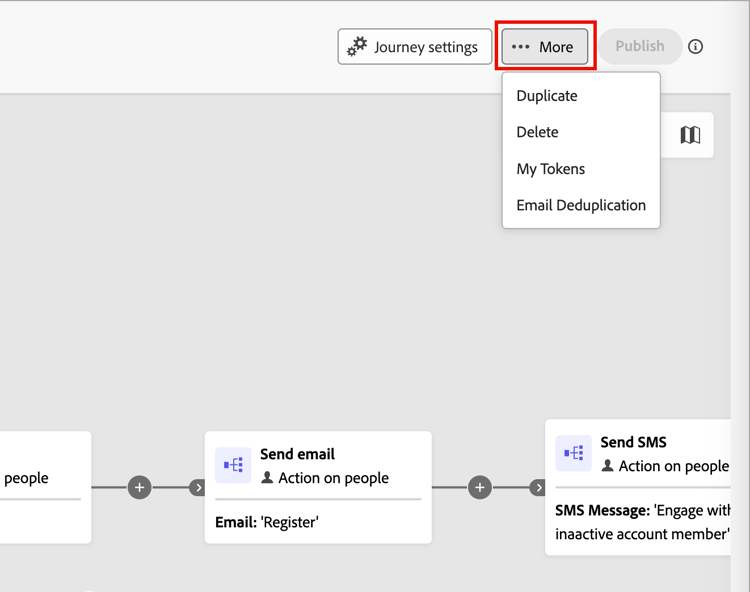
Click More (…) in the top-right corner of the journey workspace.
-
Choose Email Deduplication.
-
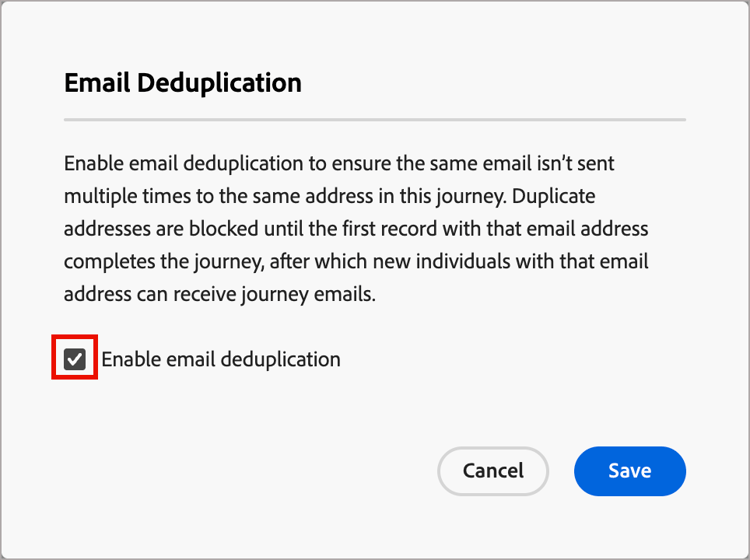
In the dialog, select the Email Deduplication checkbox.
-
Click Save.
When email deduplication is enabled, the journey checks each email address before sending the email. If a record with the same email address has already entered that journey node, the new entry is blocked until the first record completes the journey.