B2B Namespaces and schemas
The Journey Optimizer B2B Edition setup on the simplified architecture includes configuration of the Experience Platform namespaces and schemas that are used with B2B sources. The Postman automation utility is required for generating B2B namespaces and schemas.
-
You must have access to Adobe Real-Time Customer Data Platform B2B Edition for your B2B schemas to qualify in Real-Time Customer Profile.
-
Your Experience Platform B2B entities must use the standard relationships outlined in the B2B namespaces and schemas guide.
Review the following information about the underlying set up for the namespaces and schemas to be used with B2B sources. It also provides details for setting up your Postman automation utility, which is required for generating B2B namespaces and schemas.
Set up the auto-generation utility
Refer to the following resources for prerequisites and detailed information about how to set up your Postman environment to support the B2B namespace and schema auto-generation utility.
- Download the namespace and schema auto-generation utility collection and environment from the GitHub repository.
- For information about using Experience Platform APIs including details about gathering values for required headers and reading sample API calls, see Getting started with Adobe Experience Platform APIs.
- For information about generating your credentials for Experience Platform APIs, see Authenticate and access Experience Platform APIs.
- For information about setting up Postman for Experience Platform APIs, see Postman in Adobe Experience Platform.
Environment values
With an Experience Platform developer console and Postman set up, you can apply the appropriate environment values to your Postman environment. The following table provides example values and additional information about populating your Postman environment:
CLIENT_SECRET{ACCESS_TOKEN}.{CLIENT_SECRET}API_KEYc8d9a2f5c1e03789bd22e8efdd1bdc1bACCESS_TOKENBearer {ACCESS_TOKEN}META_SCOPEent_dataservices_sdk.ent_dataservices_sdkCONTAINER_IDglobal container holds all standard Adobe and Experience Platform partner provided classes, schema field groups, data types, and schemas. With regards to Marketo, this value is fixed and is always set to global.globalTECHNICAL_ACCOUNT_IDD42AEVJZTTJC6LZADUBVPA15@techacct.adobe.comIMSims-na1.adobelogin.com.ims-na1.adobelogin.comIMS_ORGABCEH0D9KX6A7WA7ATQE0TE@adobeOrgSANDBOX_NAMEprodTENANT_IDb2bcdpproductiontestPLATFORM_URLhttp://platform.adobe.io/.http://platform.adobe.io/Run the scripts
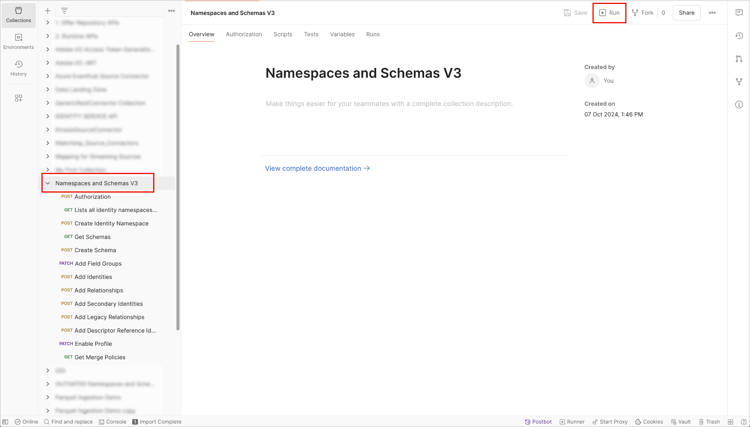
After the environment values are in place, use the Postman interface to run the script for creating the namespaces and schemas. Select the root folder of the auto-generator utility and then select Run from the top header.
The Runner interface appears. From here, ensure that all the checkboxes are selected and then select Run Namespaces and Schemas Autogeneration Utility.
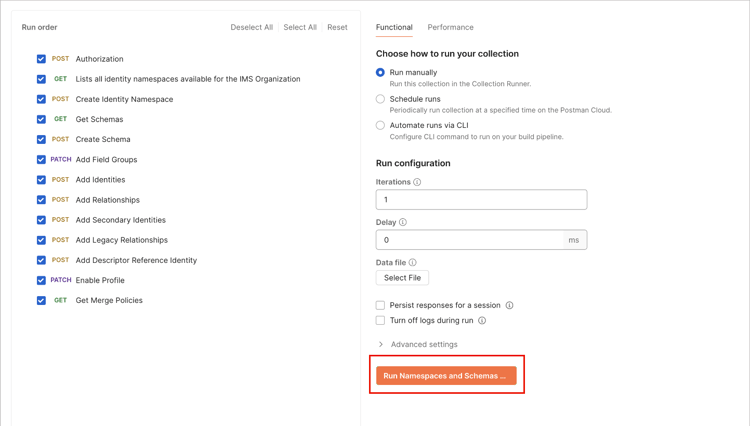
A successful request creates the required B2B namespaces and schemas.
B2B namespaces
Identity namespaces are a component of Experience Platform Identity Service that serve to distinguish the context of an identity. A fully qualified identity includes an identity value and a namespace. See namespaces overview for more information.
B2B namespaces are used in the primary identity of the entity.
b2b_personCROSS_DEVICEb2b_accountB2B_ACCOUNTb2b_opportunityB2B_OPPORTUNITYb2b_opportunity_person_relationB2B_OPPORTUNITY_PERSONb2b_campaignB2B_CAMPAIGNb2b_campaign_memberB2B_CAMPAIGN_MEMBERb2b_marketing_listB2B_MARKETING_LISTb2b_marketing_list_memberB2B_MARKETING_LIST_MEMBERb2b_account_person_relationB2B_ACCOUNT_PERSONB2B schemas
Experience Platform uses schemas to describe the structure of data in a consistent and reusable way. By defining data consistently across systems, it becomes easier to retain meaning and therefore gain value from data.
Before Experience Platform can ingest data, there must be a schema that describes the data’s structure and provides constraints to the type of data that can be contained within each field. Schemas consist of a base class and zero or more schema field groups.
For more information on the schema composition model, including design principles and best practices, see Basics of schema composition.
| table 0-row-2 1-row-2 2-row-2 3-row-2 4-row-2 5-row-2 6-row-2 7-row-2 html-authored no-header | |
|---|---|
| Base class | XDM Business Account |
| Field groups | XDM Business Account Details |
| Profile in Schema | Enabled |
| Primary identity | accountKey.sourceKey in the base class |
| Primary identity namespace | B2B Account |
| Secondary identity | extSourceSystemAudit.externalKey.sourceKey in the base class |
| Secondary identity namespace | B2B Account |
| Relationship |
|
| table 0-row-2 1-row-2 2-row-2 3-row-2 4-row-2 5-row-2 6-row-2 7-row-2 html-authored no-header | |
|---|---|
| Base class | XDM Individual Profile{target="_blank"} |
| Field groups |
|
| Profile in Schema | Enabled |
| Primary identity | b2b.personKey.sourceKey in the XDM Business Person Details Field Group |
| Primary identity namespace | B2B Person |
| Secondary identity |
|
| Secondary identity namespace |
|
| Relationship |
|