Journey Agent B2B
Journey Agent B2B is an AI-powered assistant in Adobe Journey Optimizer B2B Edition that helps you design, execute, optimize, and monitor B2B journeys through natural language. It reduces the time and complexity involved in building and managing customer journeys by combining automation, data-driven recommendations, and real-time observability.
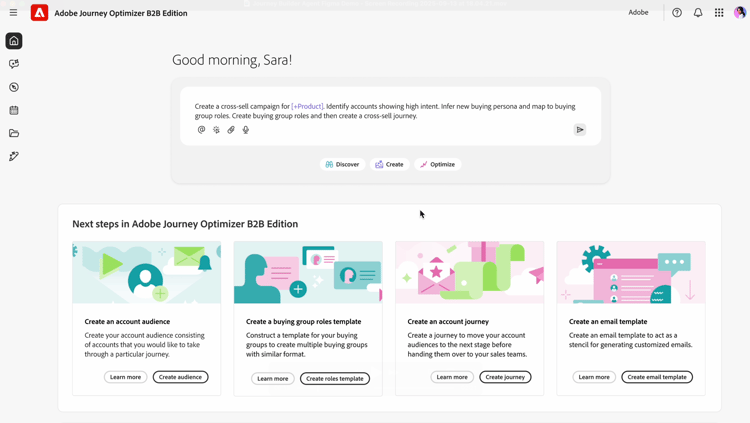
The Journey Agent B2B provides a set of AI skills, each focused on a different aspect of the B2B journey lifecycle. Currently available skills are:
- Journey Build skill – Create, update, and optimize journeys from natural language prompts
- Journey Observability skill – Ask questions about how accounts and people are moving through active journeys
Journey Build skill
The Journey Build skill translates your marketing objectives, engagement strategy, and KPIs into complete B2B customer journeys. It addresses three key challenges facing B2B marketers today:
- Dealing with increasingly complex customer journeys (complexity in audience, content and messaging, and omnichannel)
- Increasing efficiency in light of tighter budgets
- Figuring out how the optimal customer journey should be structured
As a marketer, you can use this skill to:
- Create - Translate your marketing objectives, products, engagement strategy, and KPIs into a personalized customer journey with automation and conditions
- Recommend - Leverage past marketing engagement and other historical data to optimize journey creation
- Optimize - Analyze, adjust, and optimize active journeys based on predictions or actual performance
- Manage - Prioritize, manage, and orchestrate overlapping journeys and message delivery
Basic usage
To use the Journey Agent Build skill, type into the prompt window what you are looking to create, using natural language:
“Create a B2B journey to invite decision makers to a roadshow in engaged accounts most likely to open new pipeline.”
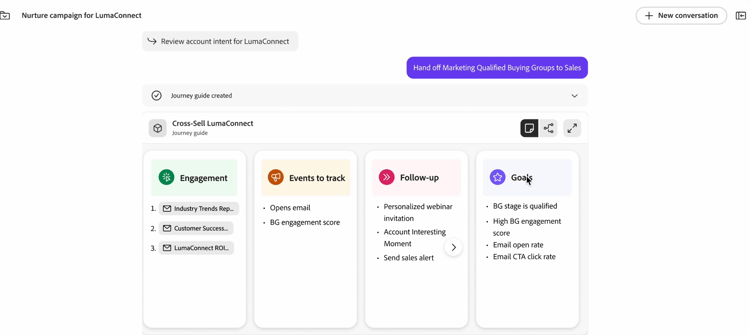
The more detail you provide, the better the reply is. If you have existing marketing materials that describe the event, or your product, etc., paste that into the prompt, so the Agent has a better understanding of the goal.
“Act as a B2B journey strategist to create a multi-stage customer account journey that nurtures and engages decision-makers and marketing personas in the early exploration phase of <Solution Name>. The goal is to convert anonymous visitors into known contacts, deepen engagement with relevant content on <domain>.com, and prime qualified leads for <Product Name> sales outreach. Use channels such as email and paid media, leveraging existing audience segments and content. Structure the journey across awareness, consideration, and evaluation stages over 4–6 weeks, with clear triggers, actions, and goals for each stage. Include KPIs like conversion rates, engagement scores, and demo requests, and return the output as a structured journey flow.”
This detailed prompt provides:
- Clear Intent: What do you want the AI to do? Be specific about the task or outcome.
- Context-Rich: Provide relevant background or constraints. Include examples or references if possible.
- Structured Format: Use bullet points, numbered steps, or templates.
- Role Assignment: Specify the AI’s role - ‘Act as a data analyst…’
Use the agent to iterate refinement: Start simple, then refine your prompt based on the results. Feedback loops improve results over time.
End-to-end B2B journey creation
The Journey Build skill can generate an end-to-end journey flow (account or person journey) from natural language text prompts and metadata, through a conversational experience rather than a traditional user interface.
End-to-end Journey prompt examples:
- Create a cross-channel journey to nurture accounts that have not engaged with my content in the past 30 days.
- Create a journey to cross-sell a solution to accounts showing high intent with no open pipeline by providing personalized content for the most important buying group roles.
- Create a B2B journey to invite decision makers to a roadshow in engaged accounts most likely to open new pipeline.
- Create a journey for whitespace accounts with intent for my solution, focusing on people engaged with content on the website.
Multi-stage journeys
You can act as a B2B journey designer to create a multi-stage customer account journey that informs decision-makers and marketing personas early in the exploration phase. The goal is to convert anonymous visitors into known contacts, deepen engagement with relevant content, and prime qualified leads for sales outreach.
- Use channels such as
Email,Paid media,Personalized web experiencesto leverage existing audience segments and content. - Structure the journey across
awareness,consideration, andevaluationstages over 4–6 weeks, with clear triggers, actions, and goals for each stage. - Include KPIs, such as
conversion rates,engagement scores, anddemo requests, and return the output as a structured journey flow.
Journey Observability skill
The Journey Observability skill lets you ask natural language questions about how accounts and people are moving through your B2B journeys—without digging through journey maps, logs, or dashboards. It covers two main areas: journey progression and data sync observability.
You can access it in two places within Journey Optimizer B2B Edition:
-
Right-rail Assistant in the journey map – Ask journey-specific questions directly from the journey map. The journey name is automatically injected into context.
-
Full-screen Assistant page – A larger conversational view suited for complex or cross-account questions and exploring multiple journeys.
Account-level journey insight
Trace how a specific account flowed through a journey by asking questions like:
- “Give me basic info on account ACME Industries.”
- “Tell me how account Northstar Services went through the journey ABM Nurture Strategy.”
- “When did account Contoso LLC start this journey?”
Split-node path reasoning and counts
Understand why a branch was taken and how many people or accounts followed each path:
- “Why did account QiDemoAccount24 go to the small US California tech path at split node c764a9?”
- “Give me the people count for each path in split node node-459c7c.”
- “Show me people in the San Jose path for Account8.”
The agent inspects split logic, account attributes, and activities to explain routing decisions and return per-path counts or people lists.
People-level journey outcomes
Analyze individual outcomes within an account or across an entire journey—especially useful for buying group analysis and tracing decision maker vs. influencer behavior:
- “Give me people count in each path for this split node for Account123.”
- “List people in the hidden skip path.”
- “Show me people in the San Diego location path for this account.”
Journey lifecycle and timing
Retrieve key timestamps for a journey or specific accounts:
- “When did this journey go live?”
- “When did the first account enter this journey?”
- “When did account QiDemoAccount50 start this journey?”
External audience and activation visibility
For journeys that push to external channels such as LinkedIn, you can check activation status:
- “Is bsmith@acme.com in the external audience?”
- “List all people activated to LinkedIn through ObservabilityExtAudience01.”
Data sync and pipeline observability
The Observability skill can also surface data sync health information to help troubleshoot why an account or lead was not included in a journey:
- External audience export job metrics and status
- Batch segmentation schedules and completion times
- Buying group maintenance scheduling
- Job manager stats (completed/failed)