Privacy management privacy-management
Adobe Experience Platform Privacy Service provides a RESTful API and user interface to help you manage customer data requests. With Adobe Privacy Service, you can submit requests to access and delete personal customer data from Adobe CX Enterprise applications, facilitating automated compliance with legal and organizational privacy regulations.
Adobe Journey Optimizer B2B Edition provides these privacy tools so that you can meet global data protection requirements. Use Privacy Service to submit and manage access and delete requests for data that Journey Optimizer B2B Edition collects and stores.
You can submit individual requests to access and delete consumer data from Adobe Journey Optimizer B2B Edition in two ways:
- The Privacy Service UI
- The Privacy Service API
Supported privacy regulations regulations
Journey Optimizer B2B Edition privacy tools help you comply with the regulations through Privacy Service. Each regulation applies if you hold data for people who reside in the associated region.
For an up-to-date list of the supported regulations, see Privacy regulations overview in the Privacy Service documentation.
Request types access-and-delete-requests
Journey Optimizer B2B Edition supports two privacy request types:
- Data access - A person can request confirmation that their personal data is being processed, and receive a free electronic copy of that data.
- Data delete - Also called the right to be forgotten, a person can request that you erase their personal data and stop further processing.
View and manage privacy requests view-manage-requests

- Privacy Service Permissions -
Privacy Read PermissionandPrivacy Write Permission - Data Governance -
View Privacy Console
See Manage permissions for Privacy Service in the Privacy Service Guide for more detailed information.
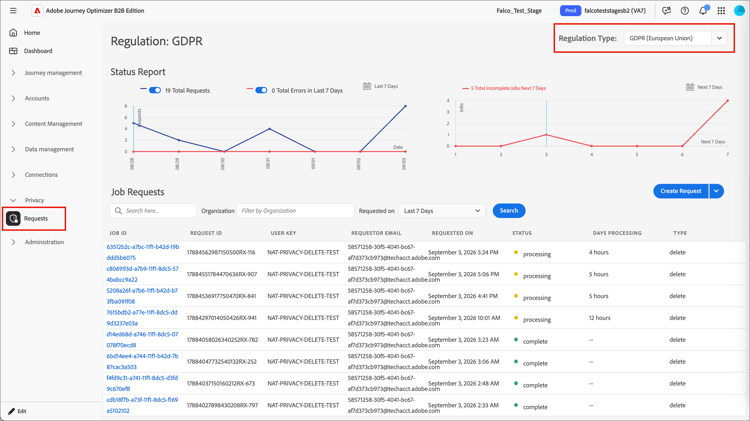
To view privacy request jobs in Journey Optimizer B2B Edition, expand Privacy and select Requests.
Use the Regulation Type option at the top right to change the displayed page for the regulation that you want to manage jobs or submit requests.
Submit a request submit-a-request
-
Select Create Request.
-
For the Job Type, select the request type:
-
Access
When you submit an access request that includes Journey Optimizer B2B Edition, Privacy Service returns:
- Marketo Engage activity associated with the lead.
- Journey Optimizer B2B Edition activity associated with the person or account.
-
Delete
When you submit a delete request for Marketo Engage and Journey Optimizer B2B Edition, the following records are removed:
- The associated lead in Marketo Engage.
- Person and account records created in Journey Optimizer B2B Edition.
- AI Assistant conversation history that references the person’s personal information.
-
-
For Products, select Marketo.
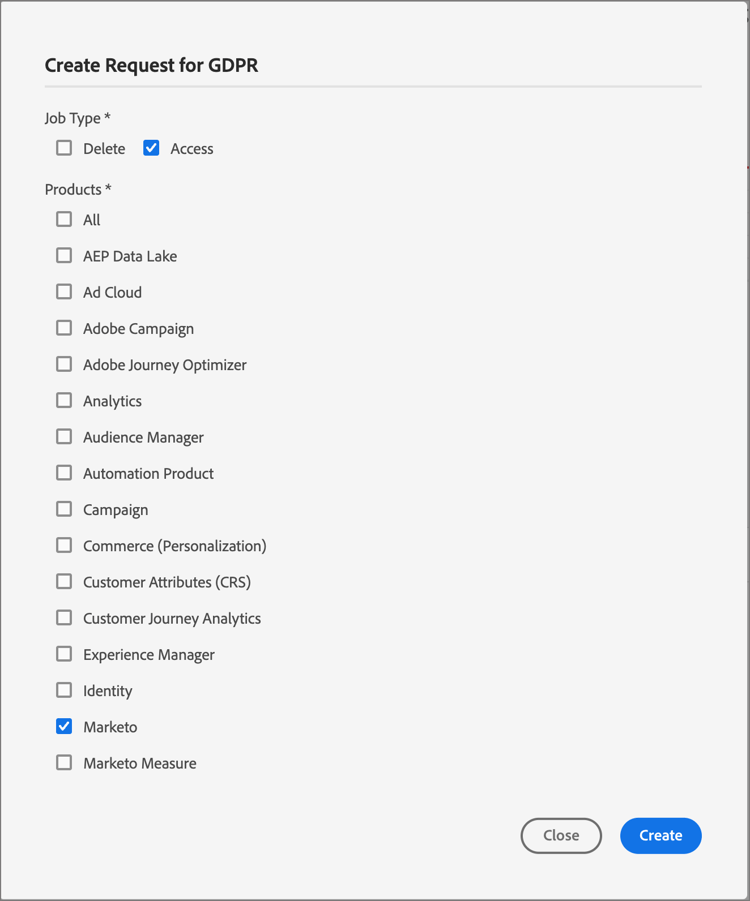
This selection includes data from both Journey Optimizer B2B Edition and your Marketo Engage instance.
-
Scroll to the bottom of the dialog and enter the email address of the person whose data you want to access or delete.
-
To submit the request, select Create.
Privacy Service returns a request ID that you can use to check the status of your request.
API requests api-requests
You can also submit privacy requests using the Privacy Service API. For general API reference, see the Privacy Service API documentation.
- The IMS Org ID for your organization (a 24-character alphanumeric string that ends in
@AdobeOrg). Contact Adobe Support atgdprsupport@adobe.comif you do not know your IMS Org ID. - The email address of the person whose data you want to access or delete.
Use the following field values in your request:
companyContexts.namespaceimsOrgIDcompanyContexts.valueusers.actionaccess or deleteusers.userIDs.namespaceEmailincludemarketo to include both Journey Optimizer B2B Edition and Marketo Engage dataregulationccpaSome regulation values are changing to include a state abbreviation (for example,
ucpa_ut_usa). Older values remain valid for a transition period. See the Privacy regulations overview for the current list before you build integrations against these values.The following example submits a GDPR delete request that includes Journey Optimizer B2B Edition data.
{
  "companyContexts": [
    {
      "namespace": "imsOrgID",
      "value": "1231659F56A68A8B7F000101@AdobeOrg"
    }
  ],
  "users": [
    {
      "action": ["delete"],
      "userIDs": [
        {
          "namespace": "Email",
          "type": "standard",
          "value": "john.doe@adobe.com"
        }
      ]
    }
  ],
  "include": ["marketo"],
  "regulation": "gdpr"
}
Privacy Service returns a response similar to the following.
{
  "requestId": "16331241037112570RX-245",
  "totalRecords": 1,
  "jobs": [
    {
      "jobId": "997b01e3-9568-402c-904b-b4e60a437875",
      "customer": {
        "user": {
          "action": ["delete"],
          "userIDs": [
            {
              "namespace": "Email",
              "value": "john.doe@adobe.com",
              "type": "standard",
              "namespaceId": 6,
              "isDeletedClientSide": false
            }
          ]
        }
      }
    }
  ]
}