Activate Marketo Engage connections to support actions
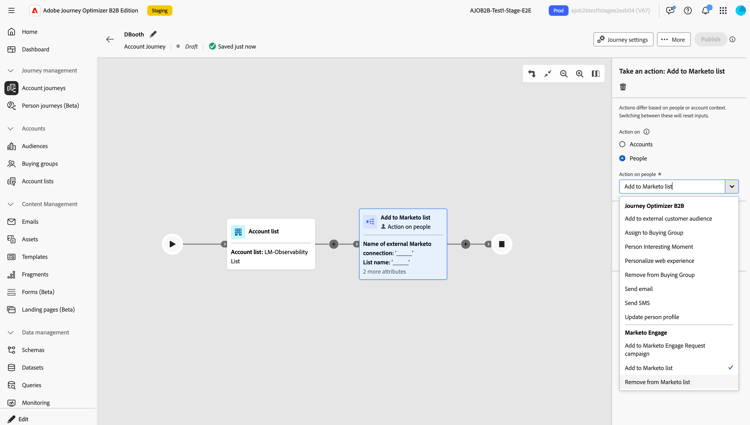
Marketo Engage actions are people-based actions that allow you to coordinate your account-based marketing orchestration between Journey Optimizer B2B Edition and your lead-based marketing efforts in Marketo Engage. Use these actions to orchestrate static list membership and to place people into campaigns.
To use Marketo Engage journey actions, an administrator first creates a custom service in Marketo Engage, which provides the credentials needed for authentication. Then, a product administrator for Journey Optimizer B2B Edition uses the credentials to create a connection to Marketo Engage. Journey Optimizer B2B Edition users can then reference the connection to configure Marketo Engage actions in person and account journeys:
- Add to Marketo List
- Remove from Marketo List
- Add to Marketo Request Campaign
Configure a Marketo Engage connection external-marketo-configure
Complete the following tasks to configure an external Marketo Engage instance for use with journey actions.
Create the Marketo Engage custom service
-
Log in to Marketo Engage as an administrator and create a custom service.
-
Copy the following values to use for the Journey Optimizer B2B Edition connection:
- Munchkin ID
- Client ID
- Client Secret
The role permissions assigned in the custom service govern Marketo Engage workspace visibility for assets, such as lists and campaigns. Marketers can use the same connection multiple times within a journey and use different Marketo Engage connections within the same journey.
Add the integration
-
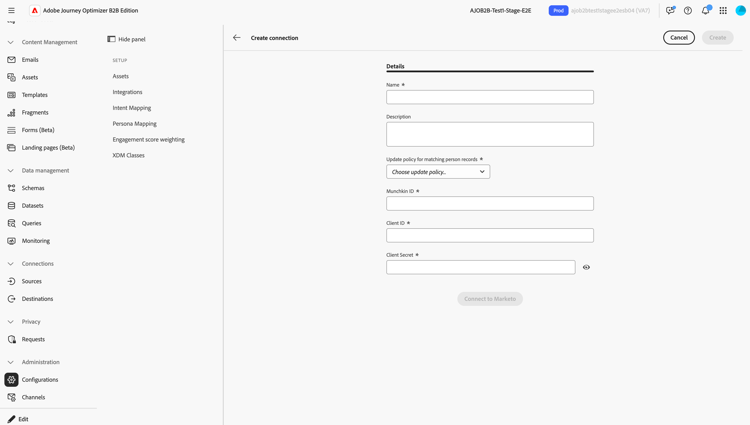
In Journey Optimizer B2B Edition, navigate to Administration > Configurations.
-
Select the Integrations tab.
-
Click Create a connection.
-
Enter a Name (required) and Description (optional).
-
Select the update policy that is used for applying an action to a matching person record.
When an action runs for the connected Marketo Engage instance, the selected update policy determines the person records in Marketo Engage to select if multiple identifiers exist in the unified person profile.
- Update all matching records
- Update only the oldest matching record
- Update only the newest matching record
note NOTE A person/lead proceeds through the journey regardless of a match, except when an error occurs. A journey action does not create a new person record in Marketo Engage when a matching record does not exist. -
Enter the Munchkin ID, Client ID, and Client Secret for the service created in the external Marketo Engage instance.
-
Click Connect to Marketo.
-
Click Create.
Use the connection in a journey action
When a marketer uses a Marketo Engage action in a journey, they can configure the node using the connection name.
With the completed integration, Marketo Engage actions are available from Actions on: in the node properties.