[Beta]{class="badge informative" title="This feature is currently in a limited beta release"}
Landing page configuration
Administrators should ensure that the landing page settings are configured for Marketers who author and publish these pages.
Settings
To review the landing page configuration, go to Administration > Channels. Under Landing Pages in the navigation pane, select Settings.
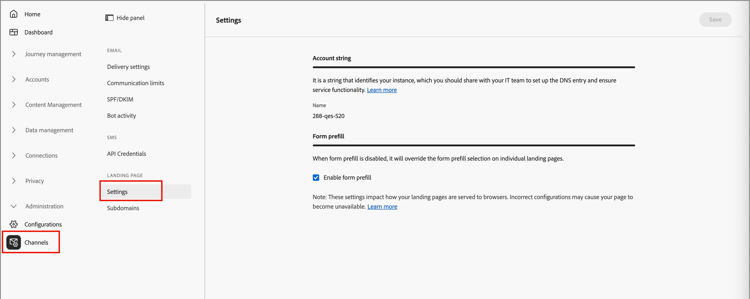
Account string account-string
The account string identifies the Adobe Journey Optimizer B2B Edition instance that is hosting the landing pages. Make sure that your Systems team adds and configures the DNS entry.
Form prefill form-prefill
Enable the Form prefill option to allow forms within your landing pages to use prefilled information for known users. When this option is disabled, landing page authors cannot include prefilled form fields.
Datastream datastream
Set the Datastream option to configure a datastream for landing page event collection.
Subdomains add-subdomain
A landing page subdomain should help to identify the content type, product name, or campaign, and reinforce the page authenticity. Before you configure the subdomains, define one or more CNAMEs to use for your landing pages. For example:
- product.[CompanyDomain].com
- go.[CompanyDomain].com
- signup.[CompanyDomain].com
In these examples, the first part (in bold) is the LandingPageCNAME.
Add a new subdomain for each unique brand URL that you want to host on Adobe Journey Optimizer B2B Edition. You can add a maximum number of 50 subdomains.
To review your subdomains and add new ones, go to Administration > Channels. Under Landing Pages in the navigation panel, select Subdomains.
To add a landing page subdomain:
-
Click Add subdomain at the top right.
-
In the Subdomain details, enter the subdomain information:
- Subdomain - The subdomain URL to use, such as
marketing.yourcompany.com - Default page - The URL for the default subdomain page, such as
marketing.yourcompany.com/products - Fallback page - The URL for the fallback page to be used if a landing page on the subdomain is not active, such as
marketing.yourcompany.com/expired
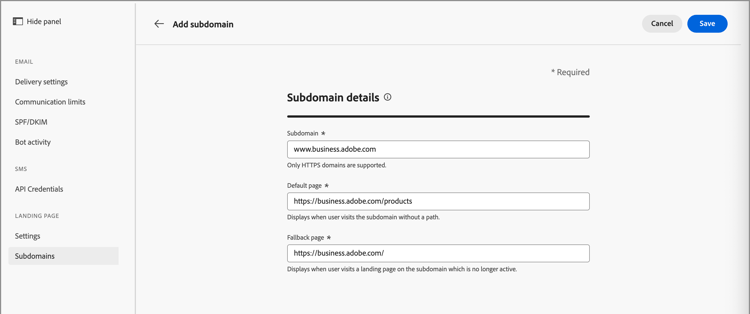
- Subdomain - The subdomain URL to use, such as
-
Click Save.