Redirect with identity
The Redirect with identity action type allows you to share a visitor identifier from the current page to another domain that your organization owns. It is designed to be used with a click event and a value comparison condition. It is functionally similar to the appendIdentityToUrl command in the JavaScript library.
- Log in to experience.adobe.com using your Adobe ID credentials.
- Navigate to Data Collection > Tags.
- Select the desired tag property.
- Navigate to Rules, then select the desired rule.
- Under Actions, select an existing action or create an action.
- Set the Extension dropdown field to Adobe Experience Platform Web SDK, then set the Action type to Redirect with identity.
Use cases
- Identify an individual across domains: If a visitor clicks from one domain to another owned by your organization, you can use this action so that they are still considered the same individual. This identification method is especially useful if you have reports that combine data from multiple domains, preventing visitor inflation.
- Identify an individual from a mobile app to a web app: If a visitor is inside your mobile app and they click a link to your web app, you can use this action so the Web SDK acknowledges that it is the same individual. This workflow allows a consistent experience for reporting and personalization.
Available fields
- Instance: The SDK instance that the action applies to. This drop-down menu is disabled if your implementation uses a single SDK instance.
- Datastream configuration overrides: This command supports datastream configuration overrides, giving you control over which apps and services receive this data. When you set a datastream configuration override in both an individual command and within the tag extension configuration settings, the individual command takes precedence. See Datastream configuration overrides for more information.
Example rule
This command is typically used with a specific rule that listens for clicks and checks desired domains.
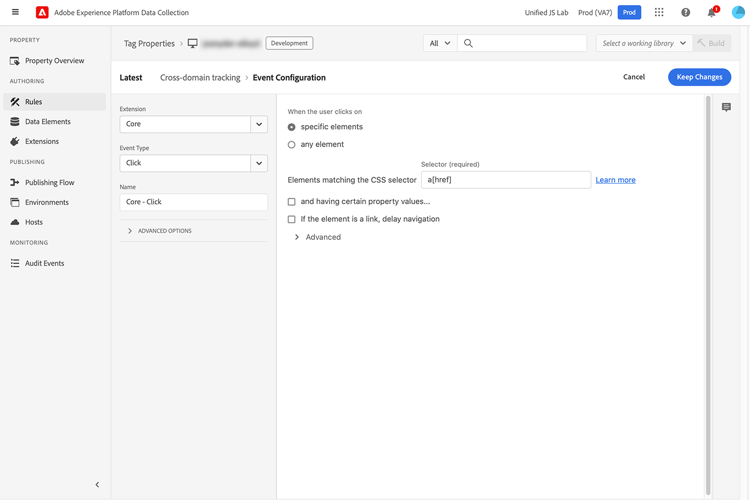
Triggers when an anchor tag with an href property is clicked.
- Extension: Core
- Event type: Click
- When the user clicks on: Specific elements
- Elements matching the CSS selector:
a[href]
Triggers only on desired domains.
- Logic type: Regular
- Extension: Core
- Condition Type: Value Comparison
- Left Operand:
%this.hostname% - Operator: Matches Regex
- Right Operand: A regular expression that matches the desired domains. For example,
adobe.com$|behance.com$

Append the identity to the URL.
- Extension: Adobe Experience Platform Web SDK
- Action Type: Redirect with identity
