Algolia Tags extension overview
The Algolia Tags extension empowers marketers to easily set up rules that send user interaction data to Algolia, helping you deliver more personalized AI Search and Discovery experiences.
This extension is powered by a key feature:
- Algolia Insights: Automatically captures and sends user interaction events to Algolia, which enables powerful analytics, personalized experiences, and improved search relevance.
Prerequisites prerequisites
You must have a valid Algolia account in order to use this extension. Go to the Algolia sign up page to create an account if you do not have one already.
Gather required configuration details configuration-details
To connect Algolia with Adobe Experience Platform, you’ll need the following information:
Install and configure the Algolia Insights extension install-configure
To install the Algolia Insights extension, navigate to the Data Collection UI and select Tags from the left navigation. From here, select a property to add the extension to, or create a new property instead.
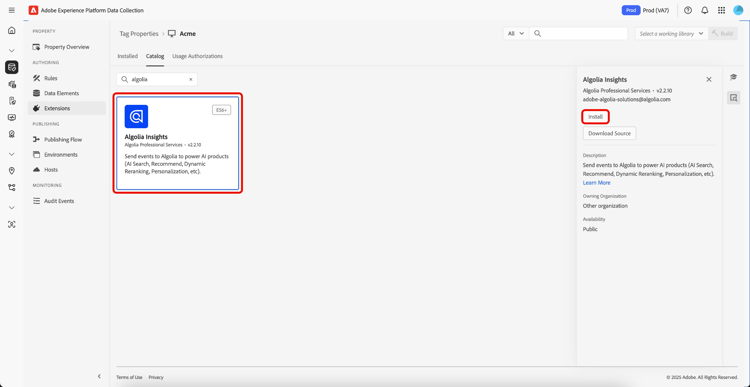
Once you have selected or created the desired property, select Extensions in the left navigation, then select the Catalog tab. Search for the Algolia Insights card, then select Install.
In the configuration view that appears, you must provide the following details:
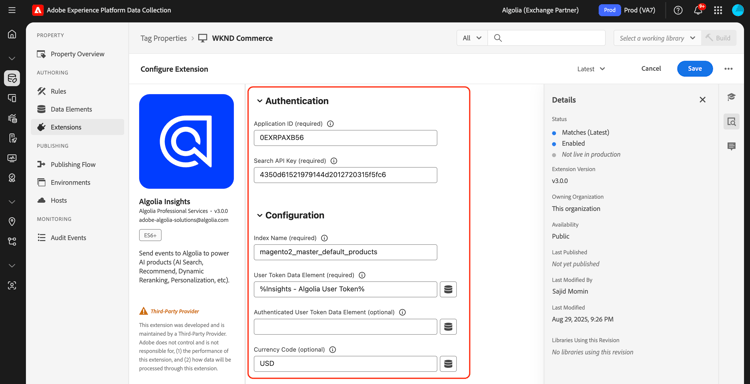
Algolia Insights extension action types action-types
Algolia supports a set of predefined standard events, each with specific contexts and properties. The actions available in the Algolia extension align with these event types, making it easy to categorize and configure the events you send to Algolia based on their type.
Load Insights load-insights
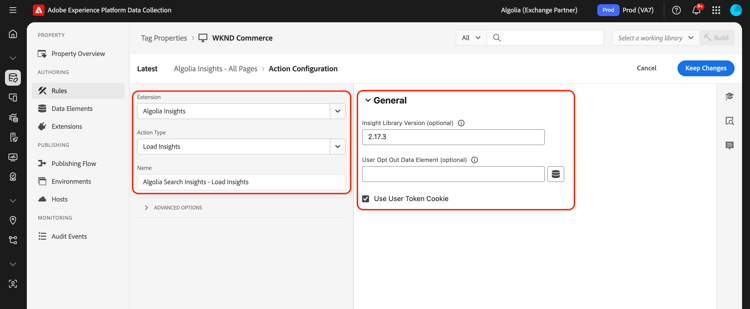
Add the Load Insights action to your tag rule wherever it makes the most sense for loading Algolia Insights based on your rule’s context. This action loads the search-insights.js library onto the page.
Create a new tag rule or open an existing one. Define the conditions according to your requirements, then select Algolia as the Extension and select Load Insights as the Action Type.
2.17.3.true.
Clicked clicked
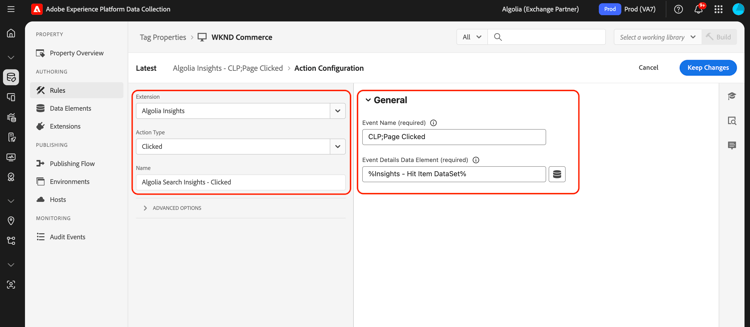
Add the Click action to your tag rule to send clicked events to Algolia. Create a new tag rule or open an existing one. Define the conditions according to your requirements, then select Algolia as the Extension and select Clicked as the Action Type.
The Data Element returns event details in JSON format, including:
indexNameobjectIDsqueryID(optional)positions(optional)price(optional)quantity(optional)discount(optional)objectData(optional)currency(optional)
queryID and positions are included, the event is classed as Clicked object IDs after Search. Otherwise, it’s classed as a Clicked object IDs event.If the Data Element does not provide an
indexName, the Default Index Name will be used when the event is sent.
For more information on the event categories, see the Clicked object IDs after search
and Clicked object IDs guides.
Converted converted
Add the Converted action to your tag rule to send converted events to Algolia. Create a new tag rule or open an existing one. Define the conditions according to your requirements, then select Algolia as the Extension and select Converted as the Action Type.
The Data Element returns event details, including:
indexNameobjectIDsqueryID(optional)recordID(optional)
queryId, the event is classed as Converted after Search. Otherwise, it will be classed as a Converted event.If the Data Element does not provide an
indexName, the Default Index Name will be used when the event is sent.
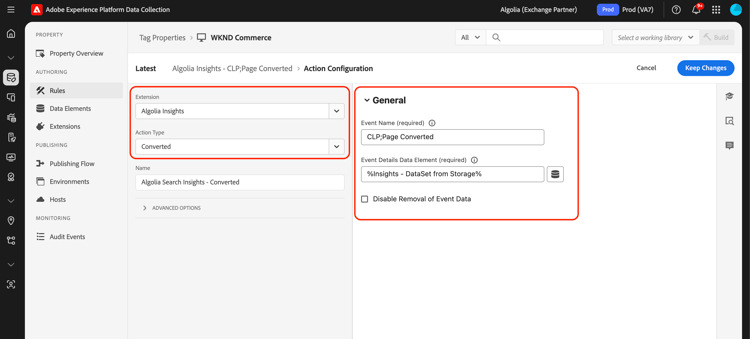
For more information on the event categories, see the Converted object IDs after search and Converted object IDs guides.
Added to Cart added-to-cart
Add the Added to Cart action to your tag rule to send added to cart events to Algolia. Create a new tag rule or open an existing one. Define the conditions according to your requirements, then select Algolia as the Extension and select Added to cart as the Action Type.
The Data Element returns event details in JSON format, including:
indexNameobjectIDsobjectDatapricequantitydiscount(optional)queryID(optional)currency(optional)
.
queryId, the event will be classed as Added to cart object IDs after Search. Otherwise, it will be classed as a Added to cart object IDs event.If the Data Element does not provide an
indexName, the Default Index Name will be used when the event is sent.If the default Data Elements do not meet your requirements, a custom one Data Element can be created to return the desired event details.
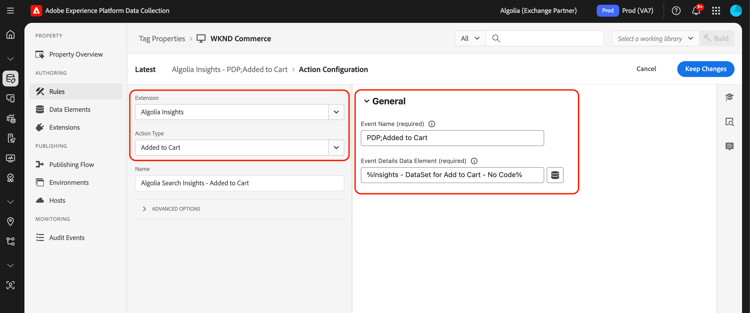
For more information on the event categories, see the Added to cart object IDs after search and Added to cart object IDs guides.
Purchased purchased
Add the Purchased action to your tag rule to send purchased events to Algolia. Create a new tag rule or open an existing one. Define the conditions according to your requirements, then select Algolia as the Extension and select Purchased as the Action Type.
The Data Element returns event details in JSON format, including:
indexNameobjectIDsobjectDatapricequantitydiscount(optional)queryID(optional)currency(optional)
.
queryID in their stored data, the event will be classed as Purchased object IDs after Search. Otherwise, it will be classed as a Purchased object IDs event.This approach allows the purchase event to automatically include all relevant context (query ID, index name, price, quantity, discount) from the user’s earlier interactions with the items.
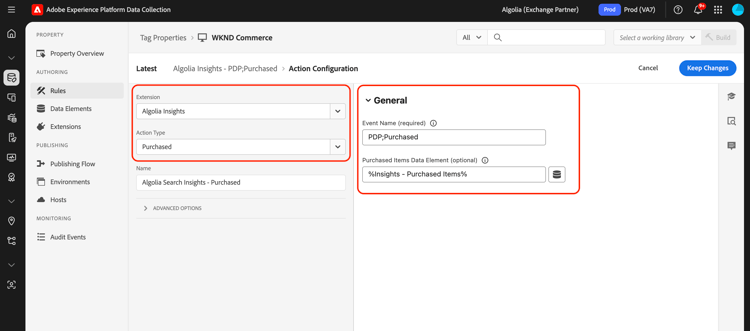
For more information on the event categories, see the Purchased object IDs after search
and Purchased object IDs guides.
Viewed viewed
Add the Viewed action to your tag rule to send purchased events to Algolia. Create a new tag rule or open an existing one. Define the conditions according to your requirements, then select Algolia as the Extension and select Viewed as the Action Type.
The Data Element returns event details in JSON format, including:
indexNameobjectIDs
indexName, the Default Index Name will be used when sending the event.
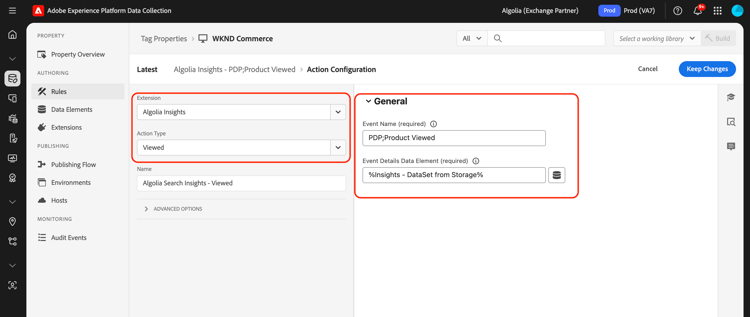
For more information on the view event, see the Viewed object IDs guide.
Algolia Insights extension data elements data-elements
Algolia supports a set of predefined data elements, each with specific contexts and properties. The following sections describes the data elements available in the Algolia Insights extension.
DataSet dataset
The DataSet Data Element retrieves data associated with HTML elements, which is then used in Algolia actions. This data element automatically stores the retrieved event data in browser storage for later use (such as in conversion or purchase events).
General Configuration:
data-insights-object-id and optionally data-insights-query-id and data-insights-position on the HTML Element.data-indexname) on the HTML Element.Commerce Configuration (Optional):
Overrides (Optional):
These fields allow you to override the default behavior of retrieving data from HTML dataset attributes.
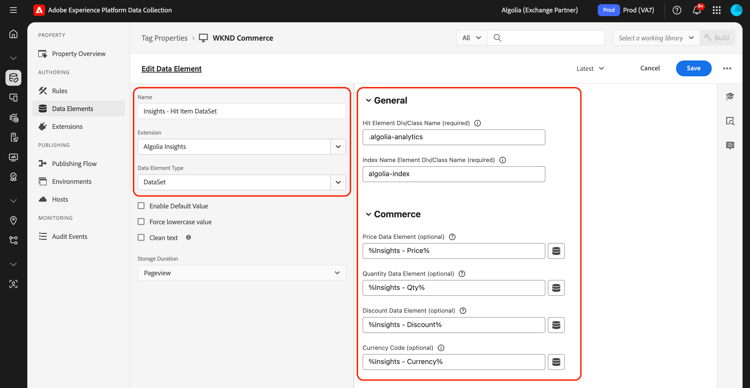
This Data Element returns:
{
  timestamp,
  queryID,
  indexName,
  objectIDs,
  positions,
  objectData,  // Optional: commerce data if price is provided
  currency,    // Optional: if provided
  recordID
}
An example of HTML that contains dataset:
<div data-indexname="acme_master_default_products" class="instant-search-comp__hits">
  <div class="hit-card"
    data-insights-object-id="${hit.objectID}"
    data-insights-position="${hit.__position}"
    data-insights-query-id="${hit.__queryID}">
    <h4 class="hit-name">...</h4>
  </div>
</div>
Query String query-string
The Query String Data Element extracts data from the URL query string to be used in Algolia actions.
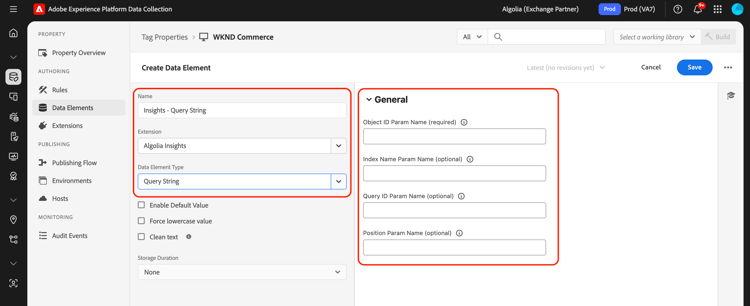
This Data Element returns:
{
  timestamp,
  queryID,
  indexName,
  objectIDs,
  positions
}
An example of HTML that contains query parameters:
<a href="product.html?objectID=${hit.objectID}&queryID=${hit.__queryID}&indexName=${indexName}&position=${hit.position}">Read More</a>
Storage storage
The Storage Data Element retrieves data from the browser session storage for use in Algolia actions. This data element can also be used to augment the stored data with additional commerce information.
This Data Element retrieves event details that were previously stored in session storage (typically by the DataSet data element during click events). The data is automatically removed during conversion events unless the removal is explicitly disabled.
Overrides (Optional):
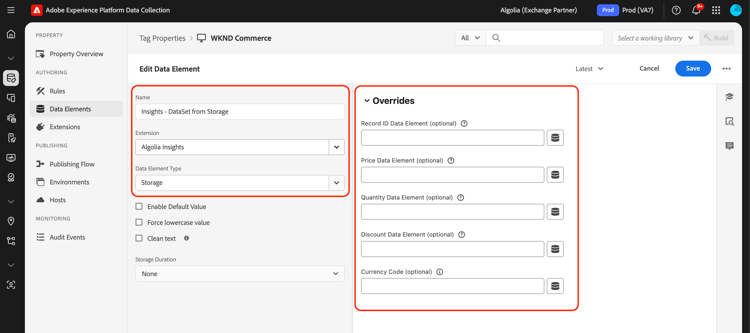
This Data Element returns what is stored in the Session Storage, including any augmented commerce data:
{
  timestamp,
  queryID,
  indexName,
  objectIDs,
  positions,      // If available from original event
  objectData,     // Optional: commerce data if price is provided
  currency,       // Optional: if provided
  recordID
}
Clicked or Converted after Search clicked-converted-after-search
The Clicked after Search or Converted after Search events require a queryID, and positions is also required for Clicked after Search. These properties are available when the insights flag is enabled in InstantSearch and/or Autocomplete query parameters. Refer to the following resources to learn how to configure Insights for your site:
Next steps next-steps
This guide covered how to send data to Algolia using the Algolia Insights tag extension. If you are planning on also sending server-side events to Algolia, you can now proceed to install and configure the Conversions API event forwarding extension.
For more information on tags in Experience Platform, refer to the tags overview.