AEM Edge Function deployment strategy on Edge Delivery Services
On Edge Delivery Services, an AEM Edge Function binds to a site, and each site maps to a git branch. A program gets exactly 3 AEM Edge Function instances, a fixed budget regardless of how many branches your repository has. Plan your branching strategy around that budget before you build it into your release process.
How AEM Edge Functions are scoped
Each site, Production, Staging, and Development, maps to a fixed branch (main, stage, and dev respectively) and gets its own AEM Edge Function instance.
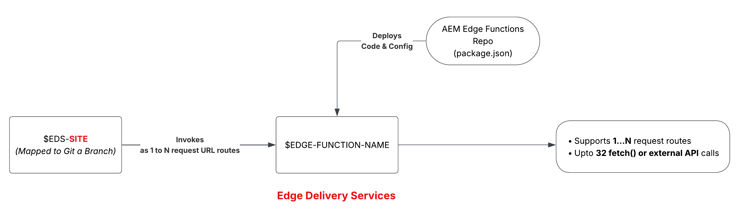
Promote code through your sites
On Edge Delivery Services, your CDN configuration (edgeFunctions.yaml and cdn.yaml) and your AEM Edge Function code live in the same AEM Edge Functions project repository. The high-level steps for promoting code to the next site are:
-
Merge your configuration and AEM Edge Function code changes into the branch mapped to the target site (for example,
devintostage). -
In Cloud Manager, verify the Edge Delivery Services configuration pipeline uses the merged branch.
-
Run the Edge Delivery configuration pipeline to deploy the
edgeFunctions.yamlandcdn.yamlfiles. -
Verify the CLI context (or CI/CD system) uses the merged branch and targets the desired site using the
aio aem edge-functions infocommand. -
Run
aio aem edge-functions deploy <name>(via the CLI or CI/CD system) to deploy the function code to the target site.
Manage secrets across sites
Edge Delivery Services has one config pipeline per program, not one per site. The Dev, Stage, and Prod sites all share it, so you cannot add the same variable name three times with three different values.
In Cloud Manager, open the program’s Edge Delivery configuration pipeline and select View/Edit variables. Add one secret per site, prefixed so the three sites never collide, for example DEV_TRIPS_API_TOKEN, STAGE_TRIPS_API_TOKEN, and MAIN_TRIPS_API_TOKEN. For the exact steps, see Use configs and secrets.
Non-secret configs work the same regardless of site: you declare them directly in edgeFunctions.yaml, committed to Git. For the exact steps, see Use configs and secrets.
Plan your SDLC around site scope
- Test function logic on the
devbranch before merging tostageormain. - Prefix every secret and variable name with its site (
DEV_,STAGE_,MAIN_), since one config pipeline serves all three sites. - Track config and secret drift between sites as part of your release checklist, not as an afterthought.