Contextual Experimentation in AEM as a Cloud Service contextual-experimentation
Experimentation is the practice of testing your site’s design, functionality and code in order to improve performance and make your site more effective and streamlined. This is achieved by changing either content or functionality, comparing the results with a prior version and picking the improvements that have measurable effects.
When done right, it is a powerful pattern to improve conversions, engagement and visitor experience. In general, there are a couple of issues to avoid when looking to adopt the practice:
- Too little: most companies are not experimenting enough, and when they do, they experiment with too little traffic to get meaningful results.
- Too slow: many experimentation frameworks slow the site down so much that the potential new conversions can not make up for the lost traffic and bounces due to slow rendering.
- Too complex: if it takes too much time to set up a new experiment, then fewer experiments will be run.
For sites running on Adobe Experience Manager, developers have the option to add a new experimentation capability to their sites. Three things make this approach different from other experimentation frameworks:
- It is easy to set up tests with the tools your authors are already familiar with and no separate login is needed.
- It is deeply integrated into the AEM delivery system, does not slow down your site and is resilient to changes in code and content.
- It allows the testing of simple content changes as well as experiments covering design, functionality, and code.
Experimentation rail experimentation-rail
The experimentation rail is your primary way to set up experiments. It can be used with your project either in an Edge Delivery Services context or in the Universal Editor. As such, you will need a Github account, a content repository like SharePoint or Google Drive, and you will also need the AEM Sidekick plug-in. If you want to use Universal editor you will also need access to an AEM as a Cloud Service environment. See also the Getting Started – Universal Editor Developer Tutorial page.
Setting up experimentation by using AEM Sidekick in Edge Delivery Services
To access the experimentation rail capabilities within your Edge Delivery Services Project you will need the AEM Sidekick plug-in. To set up the sidekick follow these steps:
- Add the AEM sidekick extension and pin it in your browser.
- Open your project page in preview mode.
- On the AEM Sidekick bar, and click the settings icon

- Click the Experimentation tab to open the experimentation rail.
Setting up experimentation in Universal editor
Before setting up experiments, keep in mind that you will need to use AEM sites as a content source to be able to author in Universal Editor. If needed, you can convert your existing project to AEM sites as a content source by following the tutorial presented in the Setup AEM Sites as a Content Source page. When you are ready to set up experiments in Universal Editor, follow these steps:
- Open your project in Universal Editor and check the A/B Icon Extension. In case the icon is not visible, confirm whether you have enabled the feature in the extension manager. If it is not enabled please enable it or request access.
- Point your
fstab.yamlconfiguration to your project configuration and link it to your AEM author instance. See also Connect your code to your content - Open your AEM instance and if you have your project ready, open it directly in Universal Editor.
- Open the project and the index page where you want to run experiments and click Edit on the top bar.
- Click the A/B icon to open the experimentation extension.
aem-contextual-experimentation@adobe.com.Experiment variants and general workflow experiment-variants-workflow
Before following the rest of the guide to configure your first experiment, there are some frequently used terms that you should be familiar with:
- Control: the experience prior to running the experiment. All experiments try to test and demonstrate an improvement over the control experience.
- Challenger: an experience that is different from the control experience and is “tested” either against it or alongside it.
- Variants: control and challenger are all variants of an experiment.
- Statistical Significance: evaluating if your challenger is really better than the control. Calculating statistical significance allows you to rule out luck and concentrate on the results that have a real effect.
Generally speaking, when setting up an experiment you will use a pre-existing page as the control page. By using the experimentation rail, you will then create a challenger page that is initially a copy of the control page. In the challenger page, you can test different things like content variants, different page layouts, call-to-action (CTA) and so on. You can also use AI generated variants, by using the Generate variation functionality in the experimentation rail.
For each experiment, the traffic is initially split 50/50 between control and challenger but you can configure how the traffic is split as needed. After you activate the experiment you will receive data via the Operational Telemetry service.
The Operational Telemetry service gathers data, for example, the number of visitors in the control page versus the challenger page. You then use this data to pick the necessary improvements for your site. As long as you stay within the established design language of your website and use the existing functionality you should be able to set up an experiment variant and send it to production in a matter of minutes.
Creating experiments in Universal editor
To use the experimentation capabilities in Universal editor you must first set up the experimentation rail as detailed in the chapters presented above and make sure you use AEM sites as a content source. After everything is set up, follow these steps.
Start editing you project in Universal Editor
Open your AEM instance and if you have your project ready, open it directly in Universal Editor. If you do not have a project ready and AEM sites set up as a content source, create a new boilerplate project from the provided template. You could link either your repository or our sample repository to drive it https://github.com/sudo-buddy/ue-experimentation. See also the Setup AEM Sites as a Content Source page. After the project is set up, open it and the index page where you want to run experiments and click Edit on the top bar.
Launch the A/B Extension
Click the A/B icon to open the experimentation extension. On your first use, the interface will be empty. Click Create New to start a new experiment.
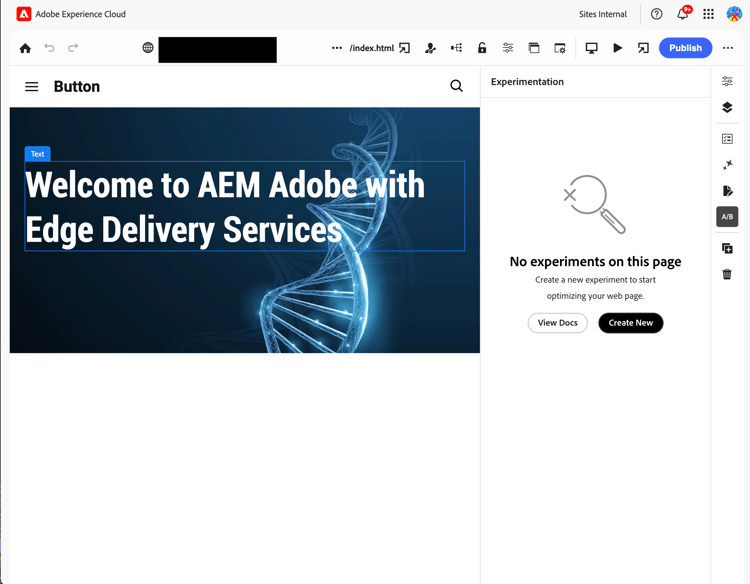
Configure the experiment details
Some of the experiment values are pre-defined, as follows:
Experiment Type: A/B test (only type supported for now)
Optimizing For: Conversion (only type supported for now)
You can also rename your experiment to something more descriptive for example, homepage-head-experiment.
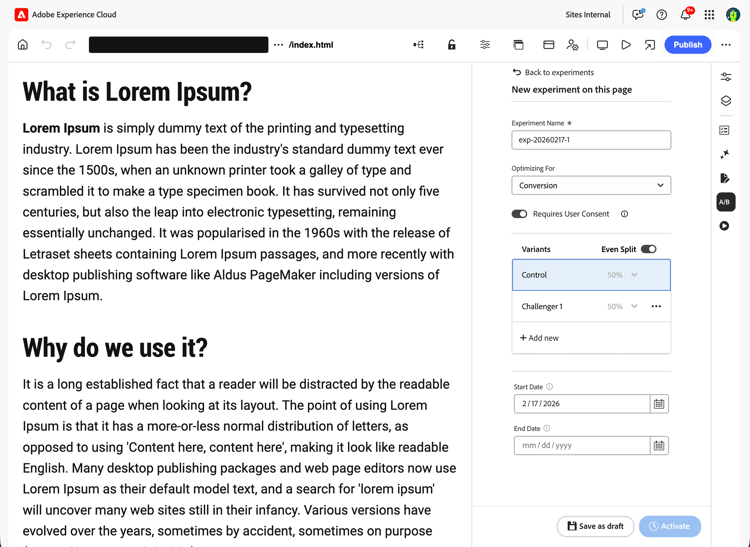
Add and Edit Variants
Make sure you understand the concepts of challenger and variant as presented above before continuing. Click Add New to create a challenger variant:
- You’ll be taken to the challenger page in the same tab — it is initially just a copy of your control.
- Either edit the page directly in-context or click Generate Variation to use AI assistance.
- After making changes, return to the extension to proceed.
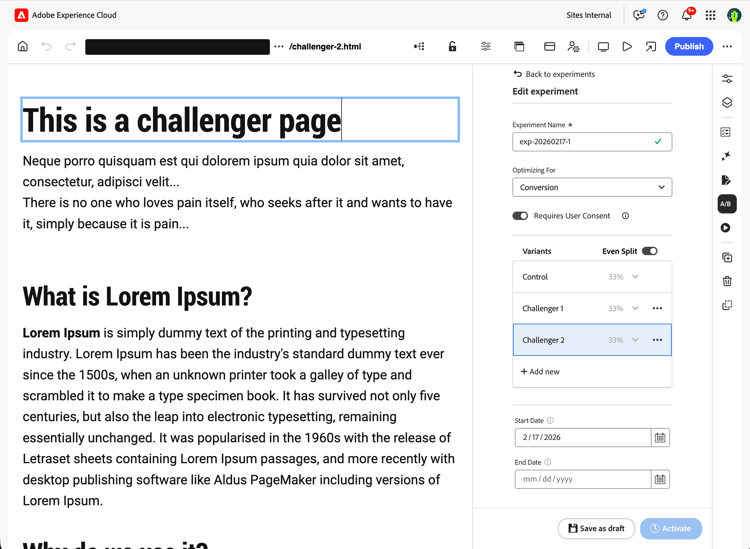
Define Other Properties and Save as Draft
In the experimentation rail you can set a start and end date (both optional). If no start date is provided, the test begins once it is published. If no end date is provided, the test runs indefinitely. You can also adjust the traffic split, we recommend starting with an even 50/50 split.
After you are done, click Save — this will save your experiment as a Draft. Note that the experiment is not active yet. You can return to the overview by clicking Back to Experiment or you can stay in the Edit interface to activate experiment.
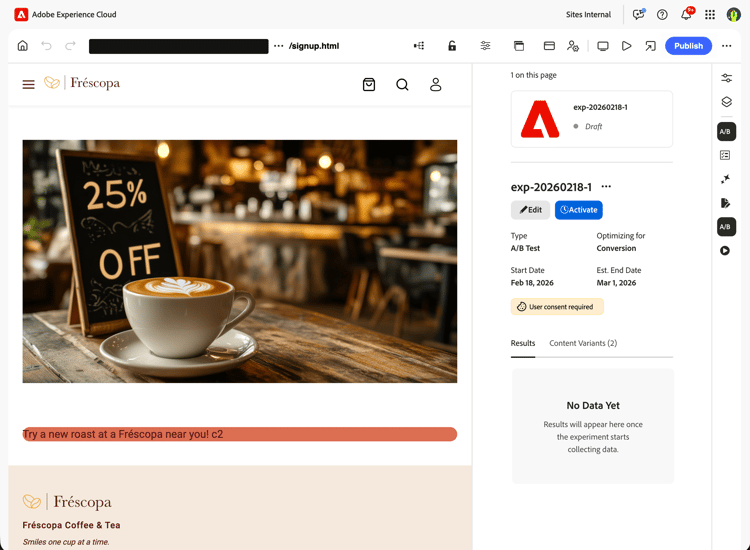
Activate the Experiment
Once you are ready, click Activate to launch the experiment and publish the experiment page. The test will begin collecting Operational Telemetry (RUM) data (see more details in the chapters below).
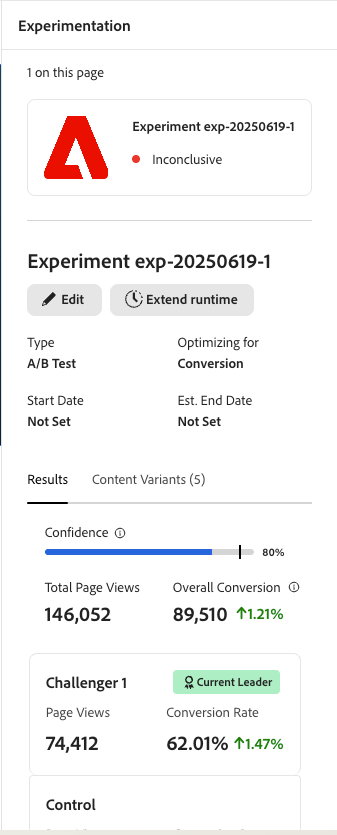
Monitor and Promote
After the experiment reaches statistical significance, click Promote to make the desired variant your new control. Keep in mind that you can promote the experiment variant at any point after activation even if it does not reach statistical significance.
Using experimentation with AEM Sidekick in Edge Delivery Services
If you have AEM sidekick installed you can use the experimentation rail directly with your project in Edge Delivery Service without using Universal Editor. The functionality is essentially the same as the A/B test described above, just keep in mind that you need to be Preview mode to edit and configure the test. After you finish configuring the test, click Activate to push both the control and the challenger variant live and start gathering telemetry data.
Other Considerations other-considerations
Presented below are several aspects you should consider when using context experimentation.
Conversion conversion
Experiments are set up to address conversion (tracks clickable elements on your page). Currently, we support page level experiments with one experiment per page.
Developer and Technical Resources dev-resources
Adobe Experience Manager uses Operational Telemetry to gather operations data that is strictly necessary to discover and fix functional and performance issues on Adobe Experience Manager-powered sites. Operational Telemetry data can be used to diagnose performance issues. Operational Telemetry preserves the privacy of visitors through sampling (only a small portion of all page views will be monitored).
Privacy privacy-experimentation
Operational Telemetry service in AEM as a Cloud Service is designed to preserve visitor privacy and minimize data collection. As a visitor, this means that Adobe will not attempt to collect personal information about you or information that can be tracked back to you. As a site operator, review the data items collected below to understand if they require consent.
AEM Operational Telemetry does not use any client-side state or ID, such as cookies or localStorage, sessionStorage or similar, to collect usage metrics. Data is submitted transparently through a Navigator.sendBeacon call, not through pixels or similar techniques. There is no “fingerprinting” of devices or individuals via their IP address, User Agent string, or any other data for the purpose of capturing sampled data.
It is not permitted to add any personal data into the Operational Telemetry data collection nor may Operational Telemetry data be used for use cases that go beyond strictly necessary.