Enterprise Context enterprise-context
Enterprise Context is the single, authoritative place where your organization records everything an AI needs to create and check content on your behalf. The Governance Agent draws on this shared context to keep every experience on-brand.
What Is Enterprise Context? what-is-enterprise-context
Modern content is increasingly created, adapted, and reviewed with the help of AI. For that to be safe at enterprise scale, the AI must know your rules: how your brand sounds, what you can claim, how you position against alternatives, and how your experiences should look. Enterprise Context captures this knowledge in one governed location so it applies consistently, instead of living in scattered PDFs, wikis, and people’s heads.
Once your context is in place, it becomes the source of truth that guides content generation and powers automated validation of the content you already have.
Why Capture It in One Place? why-capture-it-in-one-place
Most organizations already have this knowledge, but it is fragmented. Brand voice lives in a style guide, claim rules live in a Legal team’s inbox, positioning guidance lives in regional playbooks, and design standards live in a design file. When knowledge is scattered, every new piece of content depends on the right person remembering the right rule. This approach does not scale, and it becomes unreliable when AI is part of the workflow.
Capturing everything in Enterprise Context gives you:
- One source of truth. Every team and every tool works from the same rules, so content stays consistent regardless of who or what produces it.
- Consistent from the start. Because generation draws on your context up front, output follows your voice, claims, positioning, and design standards from the beginning, instead of being corrected in review.
- Ongoing validation. Because rules change over time, Enterprise Context lets you audit existing content against the current rules and identify content that no longer complies.
- Reusable across tools. Your context is not locked inside a single application. It is exposed through a standard interface, the Model Context Protocol (MCP), so that any AI system or agent, Adobe’s or your own, can query the rules that apply to a task and stay within approved bounds.
Enterprise Context is the shared input for different AI agents. After you capture it once, any agent that generates, adapts, distributes, or checks your content can use it.
What Data to Capture what-data-to-capture
Enterprise Context is organized into categories. Each one answers a different question an AI needs answered before it can act on your behalf. You do not have to fill them all in at once. Start with the categories that matter most for your content, and build up over time.
Together, these categories give an AI a consistent picture of how your brand communicates and presents itself.
Where Rules Apply where-rules-apply
Enterprise Context rules are not flat. A rule carries segments that determine when it applies, so you can set a global default and then layer more specific overrides on top.
You define the segments that fit your organization. There is no fixed list to conform to. Common examples include:
These are only illustrations. Add whatever segments your content actually varies by.
Rules resolve by inheritance: a global baseline applies everywhere, and segment-specific overrides apply when their conditions match. For example, you might generate a consumer landing page for an automotive sub-brand in Germany, in German. That request layers several rule sets at once: the global brand rules, the automotive sub-brand overrides, any Germany- and consumer-specific adaptations, and German-language preferences.
How Enterprise Context Is Used how-enterprise-context-is-used
Once your context is in place, it does two jobs:
- Guides generation. Before an AI produces content, it consults the rules that apply to the task, such as voice, claims, positioning, and design, so the result is on-brand from the start.
- Powers validation. Enterprise Context also lets you audit content you already have against your current rules, surfacing where content has drifted from your voice, claims, or design standards so you can fix or regenerate it.
Because your context is exposed through a standard interface, the same rules drive both jobs, and remain available to any other AI tool or agent your organization uses.
Get Started get-started
You do not have to author every rule from a blank page. There are two main ways to populate Enterprise Context, and most organizations use both:
- Add rules manually for the knowledge you already have written down. Each context category (Brand Voice, Claim Guardrails, Market Positioning, and Design System) has its own guided form.
- Import from a document. Upload an existing style guide, brand guidelines, or policy PDF as source material for your context. For step-by-step instructions, see How to Import a Brand Policy.
Work with Enterprise Context work-with-enterprise-context
The sections below describe the building blocks of Enterprise Context: the brand everything lives under, the brand policies you import, and the rules and standards you maintain.
Brands brands
A brand is the top-level container in Experience Governance. It represents a brand whose experiences you want to keep on-brand, and everything else, such as brand policies, context rules, design system, checks, and domains, lives under it.
A brand has a Name, an optional Description, and a Status.
Brand Policies brand-policies
A brand policy is a structured representation of your brand rules that an AI can understand and enforce. Instead of rewriting your guidelines in a technical format, you import them in their original form, a policy document (PDF) and/or a page URL, and the Governance Agent reads them and extracts everything it can into your Enterprise Context.
Importing does more than create checks. Any information the agent finds is added to your context. Depending on what the document contains, that can include brand voice guidance, claim guardrails, market positioning, design-system standards, and the policy checks used to enforce them. A single import can populate your context rules and checks at once.
Once in place, this context lets the agents:
- analyze existing pages to detect brand inconsistencies,
- flag deviations from tone, terminology, or mandatory rules,
- provide guidance to downstream agents, and
- help keep generated or updated content brand-compliant.
This lets you reuse your existing brand documentation while gaining automated governance. For step-by-step import instructions, see How to Import a Brand Policy.
Context Rules context-rules
Context rules capture how your content should be created. Three categories are available, Brand Voice, Claim Guardrails, and Market Positioning, and they share the same fields:
A rule applies only while its Status is Active. Set it to Inactive, Draft, or Archived to take it out of effect.
For an example of these fields in practice, see Brand Voice below.
Brand Voice brand-voice
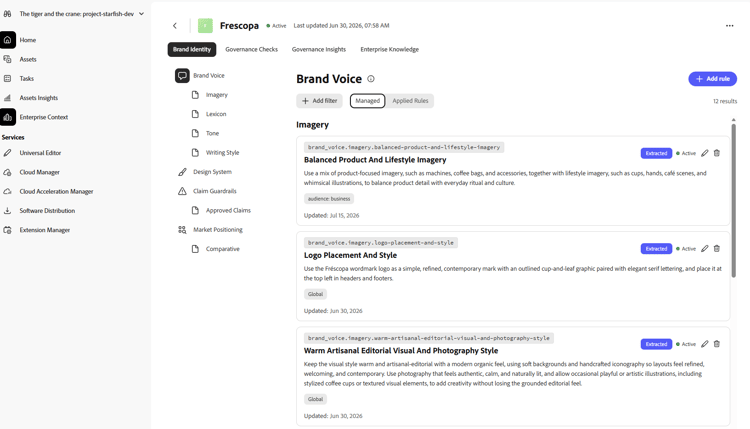
Brand Voice is one of the three context rule categories in Enterprise Context. It answers the question how should we sound?, capturing your organization’s tone, terminology, sentence style, and the words you prefer or avoid, the kind of guidance that would otherwise live scattered across a style guide.
Brand Voice rules use the same fields as any other context rule: Category, Name, ID, Rule, Segments, and Status. Rules extracted automatically when you import a brand policy appear alongside those you add manually, and only rules with an Active Status are applied by the agents.
Design System design-system
The Design System captures your brand’s visual standards, colors and typography, so generated experiences look on-brand.
- Colors are organized into groups (for example, Brand or Secondary). Each color has a name and a hex value.
- Typography is organized into font groups (for example, Heading or Body). Each style has a style name, font family, font size (with unit), font weight, line height, letter spacing (with unit), and font style.
You can scope both colors and typography with segments, so different markets or sub-brands can carry different visual standards.
Checks checks
A check is an automated rule the Governance Agent applies when it reviews content. Checks are how your policies and context become enforceable. The agent may create checks for you when you import a brand policy, or you can define them directly.
A check has:
A check runs only while its Status is Active.
Domains domains
A domain defines which URLs a brand’s checks apply to, for example a pattern like *.example.com. A domain has a URL Pattern, a Brand, and a Status.
Batch Analysis batch-analysis
Batch analysis runs your checks against a set of existing pages, so you can validate content you already have.
To run a batch analysis:
-
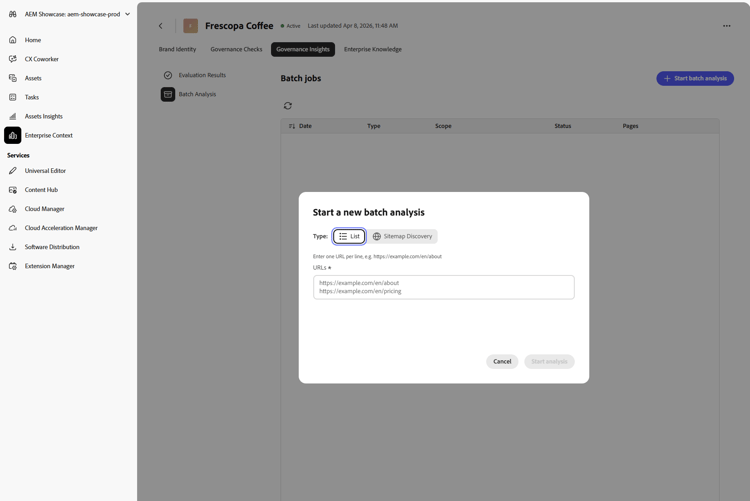
From the brand’s Governance Insights tab, select Batch Analysis in the left panel, then click + Start batch analysis to open the Start a new batch analysis dialog.
-
For Type, select List to paste the URLs you want to analyze directly, one per line.
-
Alternatively, select Sitemap Discovery to have Batch Analysis crawl a sitemap instead of supplying URLs manually. Enter the site or page URL to crawl, set a Max pages limit (default 50), and optionally add Include patterns or Exclude patterns (glob patterns, for example
*/en/*to include only certain paths, or*/content/dam/*to exclude others).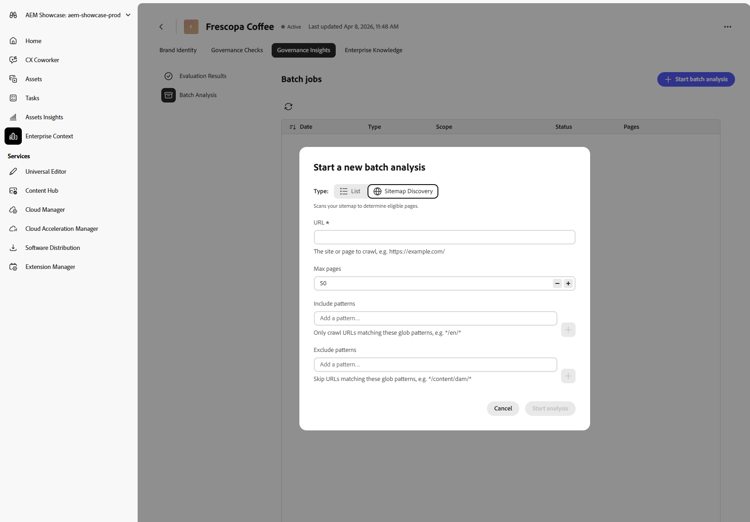
-
Click Start analysis to queue the job. The Batch Analysis list shows every job you run, along with its date, type, scope, status, and number of pages.
-
Once a job completes, review its results under Evaluation Results, as shown below:
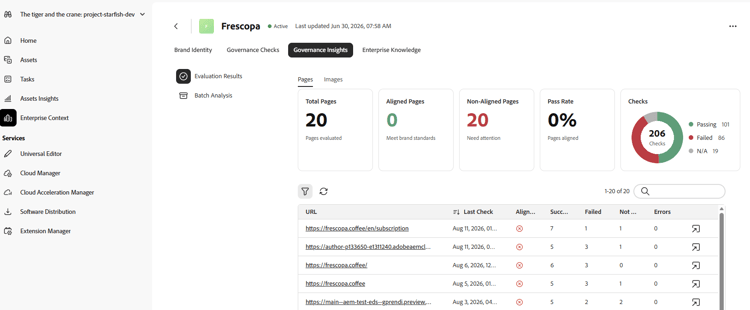
This view reports:
- Summary cards for Total Pages evaluated, Aligned Pages and Non-Aligned Pages (whether pages meet brand standards), and the overall Pass Rate
- A Checks breakdown showing how many individual checks passed, failed, or did not apply (N/A) across the analyzed pages
- A per-page table listing each URL with its last check date, alignment status, and counts of succeeded, failed, not-applicable, and errored checks, with a link to view full details for that page
Results can be filtered to Pages or Images.