Content Discovery Agent discovery-agent
As part of AEM’s Content Advisor Agent, the content discovery agent delivers AEM content on demand through natural, conversational prompts for a streamlined, click-free discovery experience. It intelligently searches across Assets, Content Fragments, AEM Sites pages, and Adaptive Forms to deliver relevant materials such as images, videos, PDF documents, articles, and form templates. Using natural language, you can search for content without building complex queries or applying filters in the AEM Assets interface. Based on your prompt, the agent returns curated results along with asset metadata and delivery URLs, ready to be embedded in other applications.
Some of the key benefits of the content discovery agent include:
-
Unified Content Discovery: Access all types of AEM content, such as images, videos, PDF documents, articles, pages, and forms from a single conversational interface.
-
Faster Campaign Planning: Quickly gather visuals and forms for marketing campaigns across Emails, Web, and Social channels.
-
Enhanced Productivity: Reduce time spent browsing repositories or filtering metadata through automated, intent-based search.
-
Consistent Content Utilization: Ensures reuse of approved assets and fragments, maintaining brand consistency across channels.
Skills skills-discovery-agent
The content discovery agent provides the following skills:
-
Natural language content discovery
The Content Discovery agent enables users to find relevant assets, content fragments, adaptive forms, and AEM Sites pages within Adobe Experience Manager (AEM) using simple natural language prompts—no complex search queries required.
-
Metadata-based asset discovery
The Content Discovery agent uses natural language prompts to find assets based on metadata available for assets in AEM. Users can discover assets using metadata such as tags, author or publisher email IDs, published or modified dates, MIME type, asset type, status, custom metadata properties defined in metadata forms in Assets view or Admin view, and so on. See Common Use Cases and Sample Prompts for complete list.
You can also combine multiple metadata filters within a single prompt to refine search results.
-
Folder-based content discovery:
The content discovery agent can identify assets by interpreting natural language prompts that reference folder names in AEM. Users can simply mention the folder in their prompt, without manually navigating through the repository, significantly reducing the number of clicks needed to locate the right content.
Personas personas-content-discovery
Campaign Managers campaign-managers
The content discovery agent enables campaign managers to quickly identify and reuse trusted, high-performing content for ideation.
Channel Marketers channel-marketers
The content discovery agent allows channel marketers to efficiently find relevant assets to create cohesive, multi-channel experiences.
DAM Librarians dam-librarians
DAM librarians can flag assets that are missing the metadata standards set by the organization, supporting consistent governance and ensuring assets remain complete and ready for use across channels.
Agencies and Partners agencies-partners
Agencies and partners can easily find brand-approved assets within Content Hub and reuse them to accelerate creative work while staying aligned with brand standards.
How to Access access
You can access the content discovery agent in AEM via the AI Assistant. Log on to experience.adobe.com and you can start interacting with AI Assistant by specifying your prompt in natural language using the search box:
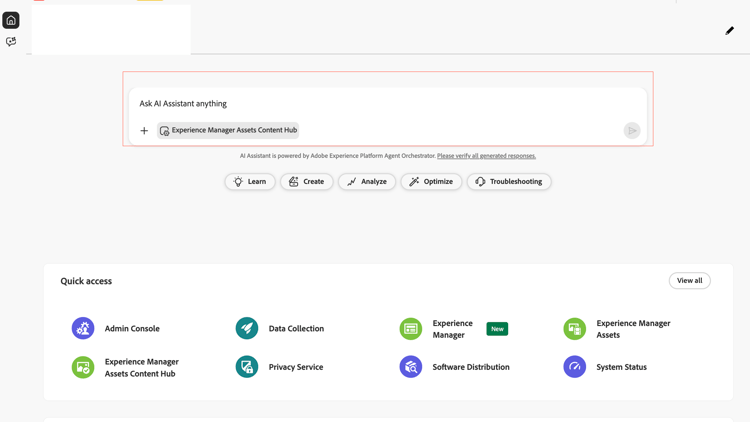
For information on the MCP endpoint to access content discovery agent, contact Adobe Support.
Common Use Cases and Sample Prompts use-cases-prompts
Assets discovery-agent-use-cases-assets
Metadata-based asset discovery
The Content Discovery agent uses natural language prompts to find assets based on metadata available for assets in AEM. Users can discover assets using the following metadata properties: Tags, Created by Email ID, Modified by Email ID, Published by Email ID, Created Date, Modified Date, Published Date, MIME type, Asset Type, Status, file format, file size, image width, image height, and multiple metadata filters within a single prompt.
The Content Discovery Agent also searches the custom properties available in metadata schemas for Admin view and metadata forms for Assets view. You can modify your prompts accordingly to search values available within those custom asset properties.
Sample prompts:
-
Search based on tags: Show images tagged
officein folderWKND. -
Search based on file format, asset type, asset status and Published by Email ID: Show images in
.PNGformat that areapprovedandpublished by <user email ID>. -
Search based on file format, asset type, asset status and Created by Email ID: Show videos in
.mp4format that are approved andcreated by <user email ID>. -
Search based on file format, asset type, asset status and Created Date: Show images in
.PNGformat that are created after January 1, 2025 andpublished by <user email ID> -
Search based on MIME type, Created Date, and Published by Email ID: Show
image/jpegcreated afterJanuary 1, 2025andpublished by <user email ID>. -
Search for assets with missing metadata: Show assets created in the last 90 days with
<Name of metadata property including custom properties>is blank. -
Search for assets using file size, image width, and image height: Show images larger than 5 MB with width greater than 2000 pixels and height greater than 1200 pixels.
Natural language support for custom metadata
The Content Discovery agent supports querying custom metadata properties defined in metadata schemas. You can reference metadata values directly in your prompts without needing to specify them using a strict key-value format. The agent interprets intent and matches relevant metadata fields automatically.
Sample prompts:
-
Finding assets which have a property value is not set: Find me assets whose campaign Name is not set (the property must be indexed for appropriate results).
-
Finding assets which have a property value set: Find me assets whose campaign Name is set (the property must be indexed for appropriate results).
-
Finding assets which have a property value set to X: Find me assets whose campaign Name is Coffee-day.
-
Finding assets which have a property value set to set of values X, Y: Find me assets whose campaign Name is Coffee-day along with those whose campaign Name is tea-day.
-
Showing the value of a particular property field: Get me coffee assets also show me the campaign name of these assets.
-
Find assets which match a date based property condition: Get me assets whose license is not expired.
Folder-based content discovery:
The Content Discovery Agent can identify assets by interpreting natural language prompts that reference folder names in AEM. Users can simply mention the folder in their prompt, without manually navigating through the repository, significantly reducing the number of clicks needed to locate the right content.
Sample prompts:
- Are there any svgs in folder
WKND? - Show assets modified after
Nov 1 2025in folderWKND. - List
lifestyleimages in folderWKND.
Additional questions to enable folder-based content discovery
When a folder name is included in a prompt (without the full asset path), the Content Discovery Agent first checks for a matching folder at the root path /content/dam/<folder-name>.
If a matching folder is not found at the root-level, the agent suggests alternative folder paths where the specified folder name exists in the repository. This helps users quickly identify the correct location without manually browsing the folder structure.
For example, the path /content/dam/<folder-name> was not found. Did you mean one of these?
-
Option 1
-
Option 2
Format-based asset discovery
The content discovery agent can identify assets that meet specific quality requirements, such as file format, allowing users to quickly locate product visuals that are ready for high-quality delivery and reuse across channels.
Sample prompt:
Find product packaging PNG images.
Orientation-based content discovery
The content discovery agent can filter assets by recognizing visual attribute, such as the presence of people and the orientation of an image. This allows users to quickly narrow down content to the most relevant visuals without manually applying multiple filters in AEM.
Sample prompt:
Show assets with person in landscape orientation.
Expanding search results
The Content Discovery Agent returns the top 20 most relevant results per content type for a prompt. If additional matching results are available, users can request the next set by entering a follow-up prompt such as show me more. The agent then retrieves the next set of results from the original search, allowing users to progressively explore larger result sets without refining the prompt.
Finding similar assets
The Content Discovery Agent allows users to find assets similar to a specific result returned in the search results. After the agent displays the top results for a prompt, you can request similar assets by referencing the position of an item in the results list. For example, a prompt such as find assets similar to the 3rd result instructs the agent to identify and return other relevant assets related to that item. This helps users quickly discover related content without creating a new search prompt.
Sorting search results
The Content Discovery agent allows users to sort search results directly within their natural language prompts. Users can specify sorting criteria such as modified date, created date, or asset name, and choose ascending or descending order.
Sample prompts:
-
Find mountain images sorted by modified date in descending order (shows the most recently modified assets first).
-
Show mountain images sorted by name in ascending order (shows the image names starting with letter A first followed by B, and so on).
Context-aware environment detection
In Admin view, the Content Discovery agent automatically detects the authoring environment and uses it to resolve prompts, without requiring you to specify the author URL explicitly.
AEM Sites pages content-discovery-agent-aem-sites-pages
The Content Discovery agent helps users quickly locate relevant AEM Sites pages by interpreting natural language prompts that reference page topics, campaigns, or other contextual keywords. The agent performs a full-text search based on the keywords in the prompt to identify matching pages in the AEM repository, eliminating the need to manually browse through the Sites structure.
Sample Prompts:
-
Find all AEM Sites pages for the summer campaign.
-
Find AEM Sites pages with a Coffee theme.
Content Fragments discovery-agent-use-cases-content-fragments
The Content Discovery Agent helps users quickly locate the right Content Fragments by interpreting natural language references to campaign names, product brands, publication status, and recent creation activity. It allows teams to surface campaign-ready fragments and view brand-specific content, all without manually browsing through folders or applying multiple filters in AEM.
Sample prompts:
-
Show content fragments for creating WKND offer campaign.
-
Show the content fragment for americano beverage.
-
Show me all published content fragments for WKND beverages.
-
List all content fragments created in last 2 weeks.
Forms discovery-agent-use-cases-forms
The Content Discovery Agent helps you quickly find adaptive forms using natural language prompts. It searches through form content and metadata to find matches based on keywords from your prompts. This means you can successfully discover relevant forms even if your search terms are not in the form’s title or description.
Sample prompts:
- Show me all loan application forms.
- Find forms to apply for a agent.
- Find contact forms.
- I’m looking for employee onboarding forms.
- Show me credit card application forms.
Note: Form discovery currently supports Edge Delivery Services forms only and tag-based search is not available for forms at this time.
Search Results discovery-agent-search-results
Assets discovery-agent-search-results-assets
The Content Discovery Agent returns the top results for each query, sorted by relevance to ensure that the exact matches appear first. The agent combines metadata-driven queries with semantic search to assemble a focused set of likely matches, then uses an LLM to rank them based on user intent. This blended approach delivers accurate, context-aware results without depending entirely on a direct keyword match.
Each result is displayed as an asset card, displaying the asset name, preview, and key metadata such as description and format. You can click the Info icon on a card to view additional asset properties.
Use the Show Table option to display results in a tabular format. Click Show all results to view the complete set of 20 retrieved assets in the right pane. You can also click the Download icon to download the list of 20 assets as a .ZIP file with a maximum size of 1.5 GB.
Each result also includes key asset metadata such as the asset path, size, created date and the creator, modified date along with the user who modified the asset, format, download link, and description. If an asset is in approved state, the results also include Dynamic Media with OpenAPI URL. You can click the asset path to seamlessly navigate to the asset location within AEM.

You can use these asset details to quickly evaluate if an asset meets the requirements without navigating to each asset to view these details.
Content Fragments discovery-agent-search-results-content-fragments
The content discovery agent provides full-text search capabilities for Content Fragments, returning the top results that best match the specified prompt. Each result includes Content Fragment name along with key metadata fields such as Content Fragment path, creator, creation date, variations, last modifier, and last modified date fields.
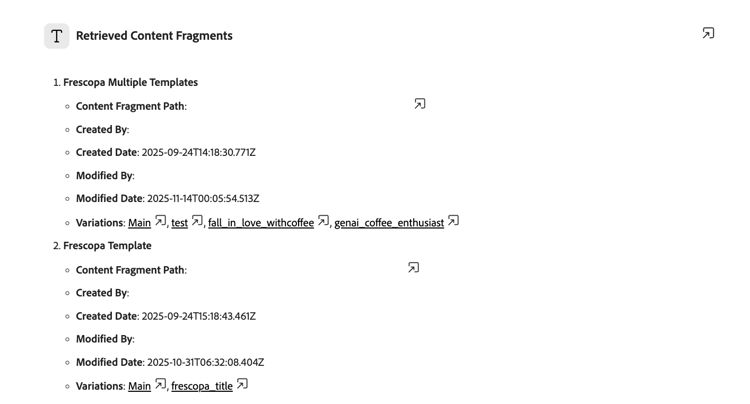
You can click the Content Fragment path to seamlessly navigate to the Content Fragment location within AEM.
Content Discovery Agent availability within Content Hub content-discovery-agent-availability-within-content-hub
You can now access the Discovery Agent directly from the Content Hub interface. This feature is available for Content Hub environments that use the latest search stack, which also provides AI Search and sorting capabilities. Adobe is rolling out the latest search stack to Content Hub customers in phases. If AI Search is available in your Content Hub interface, you can use the Content Discovery Agent.
To view if AI Search is available, navigate to your user profile icon and click Configurations on the Content Hub User Interface. Select the Search tab. If you can see options to select AI Search or Keyword, AI Search is available and you are using the latest search stack.
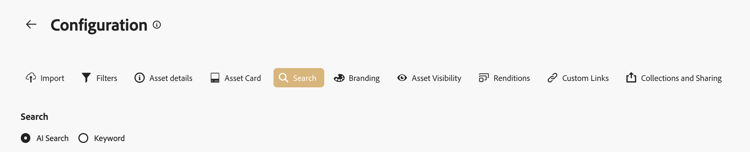
If AI Search is not yet available and you want to enable Content Discovery Agent within Content Hub, create and submit an Adobe Customer Support case to enable it for your deployment.
What’s New in Content Discovery Agent whats-new-content-discovery-agent
Performance-Aware Asset Recommendations performance-aware-asset-recommendations
Content Discovery Agent now surfaces asset performance data directly in search and recommendation results, helping teams prioritize content that drives engagement on AEM Sites.
When you search for assets via the AI Assistant, Content Discovery Agent enriches its natural-language search results with real-time performance signals pulled from AEM Sites analytics — average CTR, page views, and view counts — so you can see not just which assets match your query, but which of those are actually working for your audience.
What’s New:
-
Performance context on every result set. Alongside the usual asset previews (name, format, thumbnail), Content Discovery Agent now surfaces an aggregate performance summary for the returned assets — for example,
These assets average a 9.0% CTR. -
One-click performance filters. Suggested follow-up prompts let you instantly refine results by performance thresholds without re-typing a query:
-
Show high-performing assets (by view count)
-
Show assets on popular pages (by page views)
-
Show high-engagement assets (by CTR)
-
-
Grounded in real usage data. Recommendations are backed by first-party AEM Sites analytics, not just metadata or tagging relevance — so
best asset for this campaignnow factors in how similar assets have actually performed in live experiences.
Discovery skill— Next Best Action Suggestions discovery-skill
Discovery skill now proactively suggests relevant follow-up actions after every search result, helping you dig deeper into your assets without having to guess the right query.
After returning any set of assets, Discovery Agent now analyzes the result context — folder structure, approval status, file formats, result count, and applied filters — and surfaces a contextual Here are some things you can do next list, so your next step is one click away instead of a blank prompt.
What’s New:
-
Context-aware suggestions, not generic ones. The suggested actions change based on what is actually in the result set. If some assets are still pending approval, Content Discovery Agent surfaces that directly (
Show the 7 images that are not yet approved). If a result set spans multiple folders, it suggests narrowing by the folder holding the most assets. If there are more results than shown, it offers to page through them. -
Common next actions surfaced automatically, including:
-
Filtering by folder, format, date range, or approval status
-
Getting a count or breakdown by format or folder
-
Drilling into a specific asset by number (
tell me more about #4) -
Generating a download link for any asset in the result set
-
Exporting the full result set as a CSV table
-
Paging to the next set of results when more are available
-
-
Precise, actionable phrasing. Suggestions reference real numbers from your data (for example,
Filter to only images in /content/dam/frescopa/en/stock/ — that folder holds 91 of your images) rather than generic prompts, so you know exactly what each option will return before selecting it.
Why it matters
Instead of knowing what to ask for next, you get a running set of relevant, data-backed suggestions after every interaction — turning a single search into a guided exploration of your asset library. This is especially useful for large repositories.
Prompting Best Practices prompting-best-practices-discovery-agent
Specify concise details in your natural language prompts so that the agent can return accurate and relevant results. The more clearly you describe what you are looking for, the better the agent can refine and narrow the output. For example, you can:
-
Define asset metadata such as tags, folder names, creation dates, publish status, author names in your prompts to filter assets.
-
Use your organization-specific metadata, such as categories (running shoes, electronics), seasons (autumn, spring), events (black Friday, product launch), and channels (Web, Email, Print) to further filter content.
Limitations limitations-discovery-agent
-
The Content Discovery Agent supports dimension-based prompts only for image and SVG format types. For example,
Find images wider than 1080px. -
Find Similar capability works only for images with Smart Tags enhancements.