Consent attributes not visible on profiles after data ingestion in Adobe Experience Platform
When ingesting consent data via CSV into a profile‑enabled schema in Adobe Experience Platform(AEP), consent attributes do not appear as profile attributes and remain unavailable for conditions or audience management. To fix this issue, include the identityMap field in each record to enable successful unification with the profile.
Description description
Environment
- Product: Adobe Experience Platform
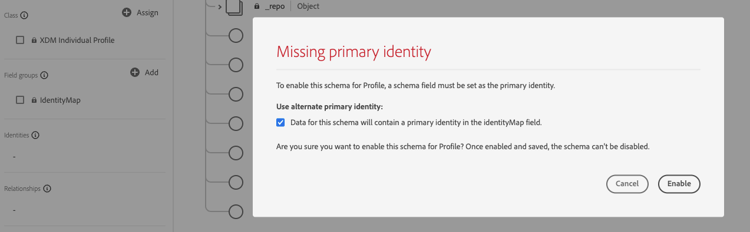
- Constraints: Profile-enabled schema with
identityMapas primary identity source
Issue/Symptoms
Consent values are loaded into the dataset and visible in the Data Lake. These fields do not appear as attributes in the unified profile and cannot be used for segmentation or audience management. The profile snapshot does not include this information.
Resolution resolution
To fix this issue, follow these steps:
-
Review the schema configuration and confirm that it is enabled for Profile and uses
identityMapas the primary identity source. -
Ensure that each record ingested into the dataset includes a correctly formatted
identityMapfield. -
Prepare the CSV file or ingestion payload to include all required identity information in the
identityMapfield. -
Ingest the updated data with the
identityMapfield into Adobe Experience Platform. -
After ingestion, verify the following:
- The batch shows as successfully ingested in both the Data Lake and the Unified Profile Service (UPS).
- Consent attributes appear on the corresponding profiles under Attributes.
-
Confirm that consent values are available for segmentation and audience management.
Note: If the schema does not explicitly define a primary identity, UPS treats identityMap as the primary identifier. Records missing this field fail UPS validation even if they succeed in Data Lake ingestion.
Related reading
- Real-Time Customer Profile overview in Adobe Experience Platform Real-Time Customer Profile Guide
- Add data to Real-Time Customer Profile in Adobe Experience Platform Real-Time Customer Profile Guide
- Create a schema using the Schema Registry API in Adobe Experience Platform Experience Data Model (XDM) Guide