Sandbox tooling agentic skills
Use Sandbox Tooling Agentic Skills to move object metadata—including schemas and audiences—across Adobe Experience Platform environments by describing what you want to accomplish in natural language. Using CX Coworker, you can discover the required metadata, automatically identify dependencies, create migration packages, and migrate objects through a conversational experience.
Prerequisites prerequisites
Before you begin, ensure that you have:
- Access to Adobe Experience Platform and the appropriate organization and sandbox.
- Access to the objects that you want to discover or migrate.
- The Adobe CXO plugin installed in CX Coworker.
For instructions on installing plugins, see the Coworker UI guide.
Use Sandbox Tooling Agentic Skills use-sandbox-tooling-agentic-skills
Interact with Sandbox Tooling Agentic Skills through CX Coworker using natural language. Describe your goal as clearly as possible. Specific requests produce the best results, while vague or overly brief prompts may return lower-quality results or may not invoke the agent.
To use Sandbox Tooling Agentic Skills:
-
Navigate to CX Coworker.
-
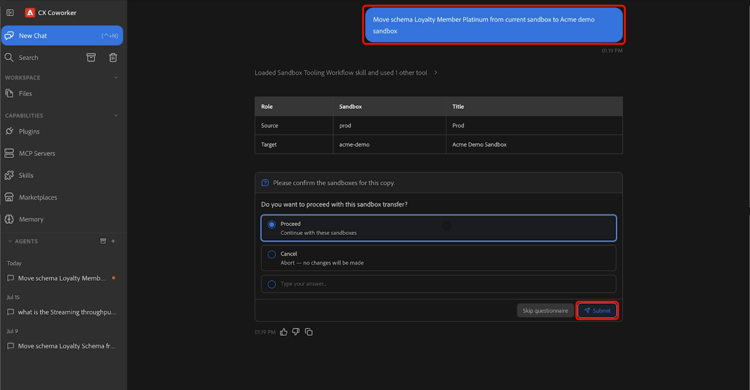
Enter a clear description of what you want to accomplish. For example:
“Move schema Loyalty Member Platinum from the current sandbox to the Acme demo sandbox.”
-
Review the results table, which shows the source and target sandboxes. When you are ready to continue, select Proceed, then select Submit to confirm.
-
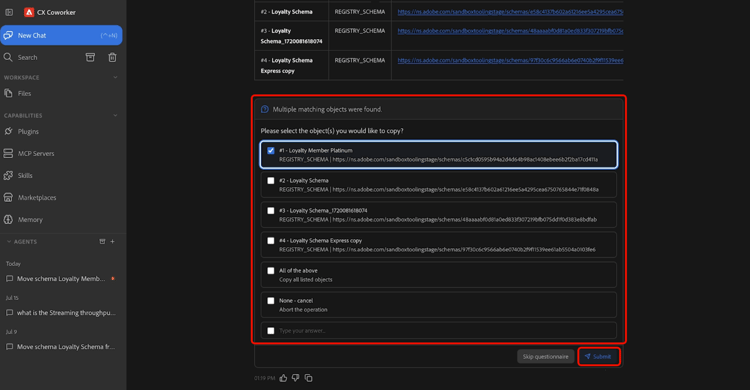
Select one or more objects you want to migrate, then select Submit.
-
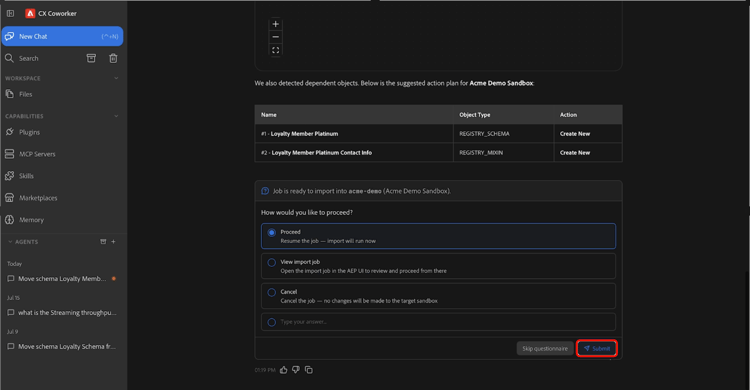
Review the objects and dependencies that the agent identifies and confirm the operation actions - Create New or Use Existing. When you are ready to begin the migration, select Proceed, then select Submit to confirm. The migration may take several minutes to complete.
-
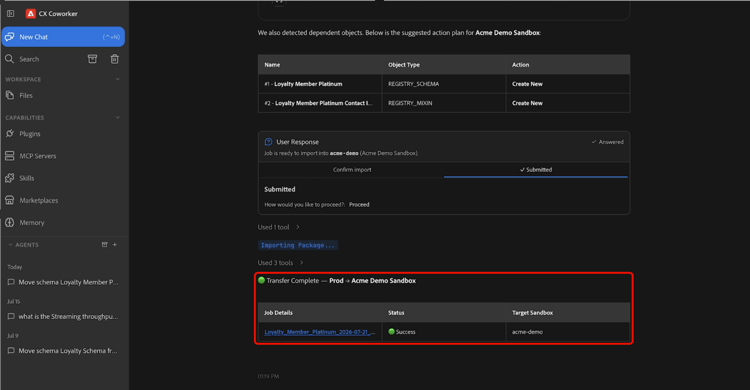
When the migration completes, the selected objects are available in the target sandbox.
For more information about using CX Coworker, see the Coworker UI guide.
Supported use cases supported-use-cases
Explore common ways to use Sandbox Tooling Agentic Skills to simplify sandbox management and metadata migration.
Move object metadata across sandboxes
As a sandbox administrator managing multiple Adobe Experience Platform sandboxes, you can migrate object metadata using natural-language requests instead of manually navigating the user interface.
Using CX Coworker, you can migrate object metadata—including schemas, audiences, and related configuration assets—from one sandbox to another by describing the migration in natural language. Sandbox Tooling Agentic Skills automatically identify and package the required dependencies, helping ensure a reliable migration.
For example:
- “Move schema Luma Loyalty Members Platinum from the current sandbox to the production sandbox.”
Promote audiences between sandboxes
As a sandbox administrator, you can promote audiences between environments without manually recreating or reconfiguring them.
For example:
- “Promote the ‘Audience name’ audience to the staging sandbox.”
Sandbox Tooling Agentic Skills identify the specified audience, validate its dependencies, and migrate all required objects to the target sandbox.
Example prompts example-prompts
Use the following prompts as examples when interacting with Sandbox Tooling Agentic Skills.
Schema prompts
Use these prompts when you know the schema name and destination sandbox.
- “Move schema ‘Schema name’ from the current sandbox to the production sandbox.”
Audience prompts
Use these prompts when you know the audience name.
- “Promote the ‘Audience name’ audience to the staging sandbox.”
Next steps next-steps
After reading this guide, you should understand how to use Sandbox Tooling Agentic Skills to discover, package, and migrate supported objects between sandboxes.
For more information about sandbox tooling, see the Sandbox Tooling guide.