Intelligent implementation and administration overview
Use Adobe CX Enterprise Coworker Chat to set up, migrate, and manage your analytics implementation, and to make sure that you can trust the data behind every answer. Coworker can plan your implementation, turn that plan into a checklist that your team can track, and validate your data after it’s collected.
Intelligent implementation and administration is one of several analysis domains in Coworker Chat. To see all domains, see Start analyzing in Coworker Chat in Analyze data with Coworker Chat.
Best for: Admin
How the implementation workflow fits together
The use cases on this page follow an optional, three-stage workflow. You can use any stage on its own. For example, you can validate your data without first generating a plan or a checklist.
- Plan: Get a personalized, ordered implementation or upgrade plan. See Plan your implementation with Coworker.
- Implement: Turn your plan into a checklist in Coworker Projects that your team can assign and track. See Generate an implementation checklist with Coworker Projects.
- Validate: Confirm that your data is configured and collected correctly. See the validation use cases in the Use cases table.
Prerequisites
To use the use cases on this page, you need:
- Access to Coworker Chat. See Get started analyzing data with Coworker Chat.
- View access to the data that you want to validate. Coworker Chat inherits your permissions from the Adobe applications that it connects to.
Use cases

Creates a personalized, step-by-step plan for implementing Customer Journey Analytics, upgrading from Adobe Analytics, or setting up Content Analytics, Marketing Campaign Analytics, or Streaming Media collection on the Edge. Plans include details such as owners, effort estimates, dependencies, and validation steps.
Sample prompt: “Help me plan my implementation of Customer Journey Analytics”
Additional prerequisite: In addition to the general prerequisites, this use case also requires that you know which implementation path applies to you, and basic details about your current environment, such as your licensing status or planned data ingestion path.
For more information, see Plan your implementation with Coworker.

Turns your Customer Journey Analytics implementation plan into a checklist in Coworker Projects, where your team can assign steps, track status, and add approval gates.
Additional prerequisite: In addition to the general prerequisites, this use case also requires a completed implementation guide conversation, and access to Coworker Projects in your organization.
For more information, see Generate an implementation checklist with Coworker Projects.

Compares dimensions, metrics, and trends between your Adobe Analytics report suites and Customer Journey Analytics data views, flags discrepancies, then recommends fixes to support your upgrade.
Best for: Admin, Analyst
Sample prompts:
- “Compare my AA report suite to my CJA data view”
- “Which metrics do not match between AA and CJA?”
Additional prerequisite: In addition to the general prerequisites, this use case also requires the Adobe Analytics report suite you want to validate, and the Customer Journey Analytics data view that contains the same data.
For more information, see Validate data with Coworker when upgrading from Adobe Analytics to Customer Journey Analytics.
(Limited Availability)
Validates that the dimensions and metrics in an Adobe Analytics project are mapped to dimensions and metrics in a Customer Journey Analytics data view, helps you map any that can’t be automatically mapped, then re-creates the project and its associated components in Customer Journey Analytics.
Sample prompt: “I want to migrate components from AA to CJA”
Additional prerequisite: In addition to the general prerequisites, this use case also requires Adobe Analytics MCP access, and either Adobe Analytics administrator rights or the Component Migration permission.
For more information, see Migrate Adobe Analytics projects to Customer Journey Analytics with Coworker.

Checks your datastream, schema, dataset, data view, and session data to confirm that streaming media tracking is configured and collecting data correctly.
Sample prompt: “How healthy is my streaming media implementation overall?”
Additional prerequisite: In addition to the general prerequisites, this use case also requires that your organization’s Experience Platform and Customer Journey Analytics data is connected to Coworker. For some validation modes, you also need a video session ID or a log file.
For more information, see Validate your Streaming Media implementation with Coworker.
Identifies the datasets that feed your Customer Journey Analytics reporting, then checks schemas, identity quality, and field quality so you can resolve issues before you build dashboards.
For more information, see Validate Customer Journey Analytics data with the data validation skill in Coworker.
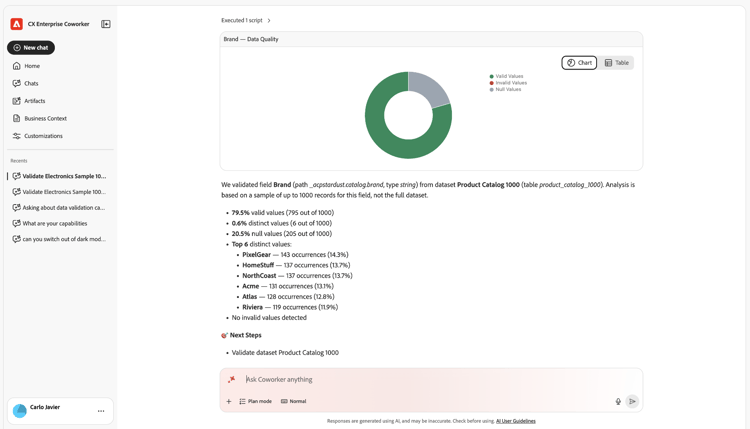
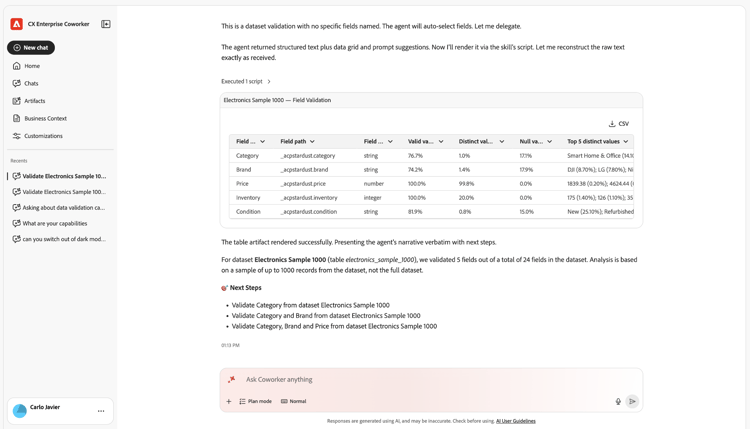
Runs statistical and semantic checks on Experience Platform datasets and fields to find data quality issues, such as invalid values or mapping problems, after a new implementation or as part of ongoing data stewardship.
Sample prompts:
- “Validate the dataset [dataset name]”
- “Validate the [data field] from dataset [dataset name]”
Additional prerequisite: In addition to the general prerequisites, this use case also requires the name or ID of the dataset you want to validate. Optionally, you can provide the name of a specific field to validate.
For more information, see Validate your Experience Platform data with Coworker.
Shows in a video how Coworker plans your implementation, runs supported actions, and guides product and development steps across Adobe Experience Manager, Experience Platform, Web SDK, and Customer Journey Analytics until your website engagement data is ready to analyze.
For more information, see Accelerate data insights with Coworker, AEM and CJA.
Skills used
Coworker uses the following skills for the use cases described in this article. For a list of all analytics skills, including the permissions they require and what they don’t cover, see Skills and limitations in Analyze data with Coworker Chat.
aa-cja-validationdata-validation)Validate data after ingestion into Experience Platform
Tips for better results
- Name the specific report suite and data view you want to compare when validating data.
- Use validation results as a guide for your own changes. The Streaming Media Validation and Data Validation skills identify issues but don’t change your configuration or data.
- Rerun Streaming Media validation after each implementation change. It runs on demand and doesn’t provide continuous monitoring.
- Use the implementation guide skills for planning only. They don’t access your Adobe systems or perform the implementation.
Next steps
- For an overview of data analysis with Coworker Chat, including the other analysis domains and best practices, see Analyze data with Coworker Chat.
- To set up Coworker Chat and walk through a working example, see Get started analyzing data with Coworker Chat.