Recommendations Performance
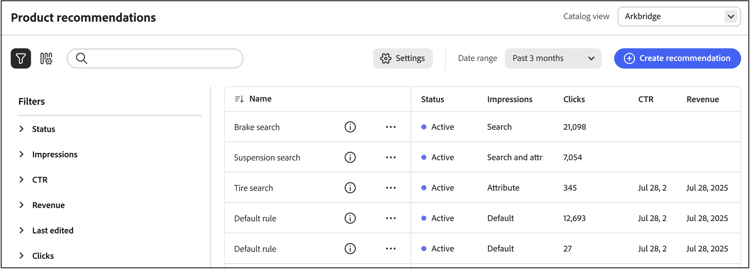
The Recommendations Performance page displays a list of configured recommendations along with key metrics to help you evaluate their effectiveness. You can configure the view to display metrics for the past day, week, or month. These insights show how often each recommendation unit is viewed or clicked, helping you assess performance and identify opportunities for optimization.
View a report
-
Choose the Catalog view, such as All views where your recommendations apply.
Learn more about catalog views in recommendations.
-
Click the Date Range and select one of the following ranges:
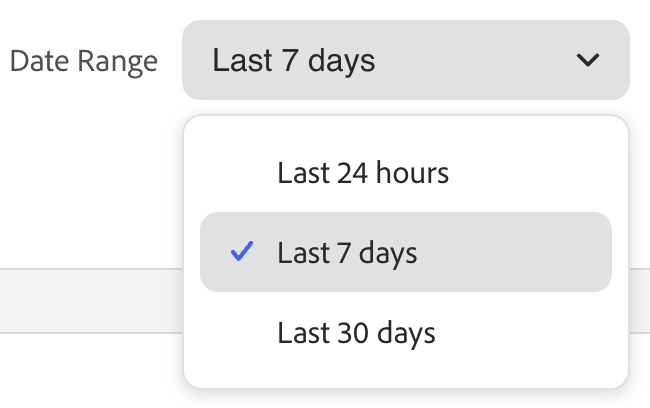
The recommendation table updates to display metrics for that date range and catalog view.
Customize table
-
In the upper-left corner, click the

The visible columns have a check mark.
-
In the menu, do either of the following:
- To show a hidden column, click any column name without a check mark.
- To hide a visible column, click any column name with a check mark.
The table is refreshed to include only the selected columns.
View details
-
In the table, click the (

-
To change the status of the recommendation, click Activate or Deactivate.
Create or manage recommendations
Learn how you can create a new or manage an existing recommendation.
Workspace controls
Column descriptions
Select catalog view
The Catalog view selector on the Recommendations page does two things:
-
Filters the table – Shows only recommendations (and their metrics) that apply to the selected catalog view.
-
Sets the scope for new recommendations – When you create a recommendation, the selected catalog view is used as the unit’s scope. Options are All views or a specific catalog view.
- All views – The recommendation applies to all catalog views (product availability is still filtered per view).
- Catalog view – The recommendation applies only to the selected catalog view (for example, one storefront, language, or brand).
By specifying a catalog view for each recommendation, you can:
- Configure recommendations for all catalog views (global) or for one catalog view.
- Preview and filter products by catalog view on the create recommendation page.
- Show only products that are available to each storefront.
- View metrics and storefront behavior per catalog view.
How the catalog view filters products
Product availability is enforced per catalog view even for recommendation units under the All views selection. This works in addition to any inclusion or exclusion filters you set on the recommendation unit.
Example: Recommendation with inclusion filters under the All views selection
- All views recommendation includes SKUs: SKU_ABC, SKU_CDE, SKU_XYZ.
- Catalog view: Kingsbluff cannot sell SKU_ABC or SKU_CDE. Shown: SKU_XYZ plus any other SKUs valid for Kingsbluff.
- Catalog view: Arkbridge cannot sell any of the included SKUs. Shown: Only SKUs permitted by Arkbridge. If none are available, the recommendation unit does not appear on that storefront.