Migration Assessment Tool
A Commerce migration assessment is an automated analysis of your existing Adobe Commerce implementation. Adobe’s tooling scans your Commerce codebase and produces a structured report that inventories everything built, customized, or modified. The report then indicates how the customizations made to your codebase impact your migration to Adobe Commerce as a Cloud Service.
Once your codebase has been processed, the assessment report is linked to your IMS Organization ID and shared to Adobe Experience Cloud. No access to your production environment is required, except initially sharing your project codebase.
Any member of your IMS organization can view the shared assessment at: https://experience.adobe.com/commerce-migration-assessment/shared-assessments.
The assessment provides:
- A complete inventory of every custom module in your store, organized by type and impact level
- A migration complexity rating (High, Medium, or Low) computed from risk-predictive metrics
- A prioritized view of the highest-impact backend and storefront areas requiring migration planning
- A description of each custom module, that you can use as direct input for Adobe’s AI developer tools
Access the migration assessment
Adobe connects a completed migration assessment to your organization’s Adobe IMS org. Once the assessment is connected, any user in that organization can access the report at https://experience.adobe.com/commerce-migration-assessment/shared-assessments.
Understanding the migration assessment report
The report is organized into three tabs: Summary, Module Reports, and Report Reliability.
Summary tab
The Summary tab provides an overview of key signals organized into these areas:
- Migration Complexity
- File Type Breakdown
- Highest-Impact Modules
- Migration Drivers
- Customization Breakdown
Migration complexity
The Migration Complexity section contains the assessment rating for your store overall. It explains how the score was calculated and highlights your primary risk drivers.
Migration Complexity and Complexity Score
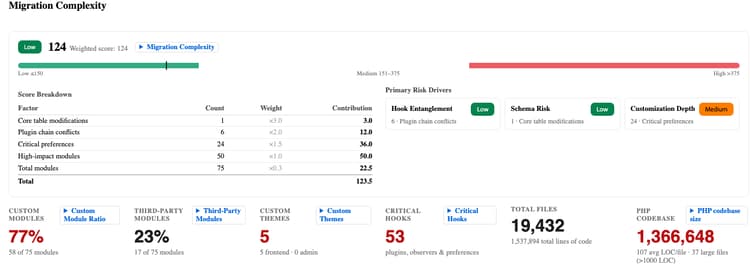
The Complexity Score weights each input by how difficult it is to migrate. The score maps to a Migration Complexity rating using fixed thresholds:
Custom Module Ratio

The percentage of your modules that were built specifically for your implementation. A higher ratio means more custom code must be audited and migrated. The average customer’s Custom Module Ratio is approximately 62%.
File Type Breakdown
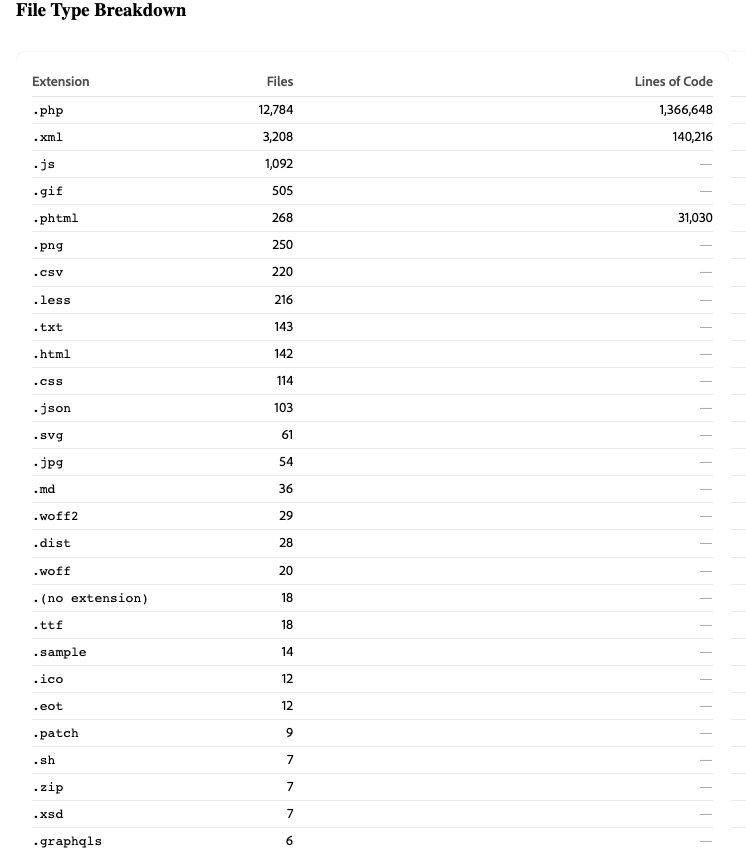
A list of the number of files in your codebase, organized by type.
Highest-Impact Modules
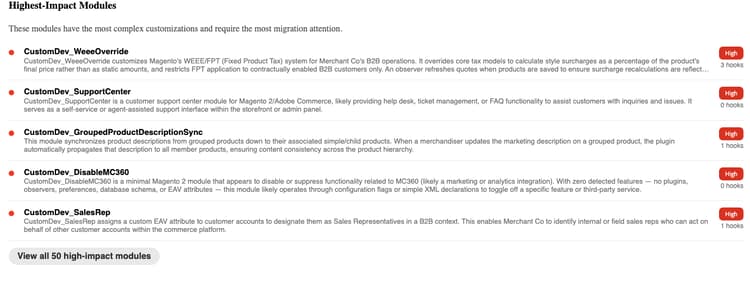
A curated list of the specific modules in your store requiring the most migration attention. These modules are often modules that interact with checkout, payments, or order management. Each high-impact module needs its own migration plan. This list is the best starting point for conversations with your technical team.
Storefront complexity
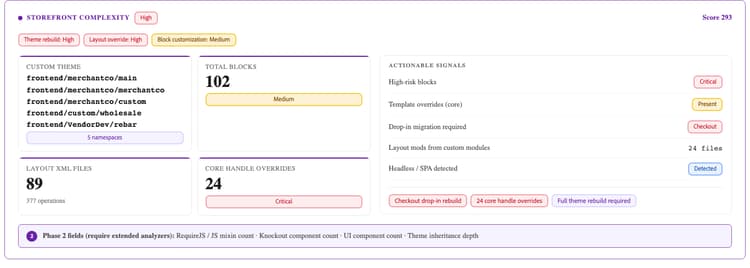
The Storefront Complexity section surfaces the effort required to migrate your store’s front-end presentation layer. This workstream is a distinct workstream from backend code migration, addressed by front-end developers and typically requiring separate planning conversations.
-
Custom theme - The namespace of your store’s custom theme (for example, BrandName_Theme). The presence of a custom theme means a full theme rebuild is required for Adobe Commerce as a Cloud Service. Every assessed store with a custom theme namespace must plan a dedicated front-end migration workstream.
-
Total blocks - The number of block and template (.phtml) files in your store. Blocks are the primary server-side rendering artifacts, each one represents a discrete migration task.
Migration drivers
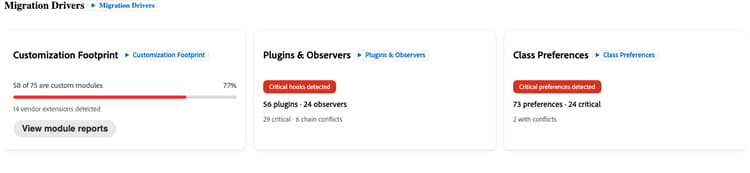
The Migration Drivers section displays the top factors driving your complexity rating.
Each driver appears with a High, Medium, or Low effort. Address the highest-rated drivers first when scoping and planning.
Data model
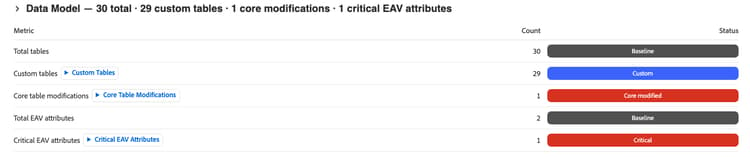
The Data Model section displays a count of custom tables, modifications to the Adobe Commerce core database tables, and critical Entity-Attribute-Value (EAV) attributes.
Core table modifications are the most difficult category to migrate, because they create dependencies on a specific platform schema version and have a high impact in the Complexity Score formula.
Customization breakdown
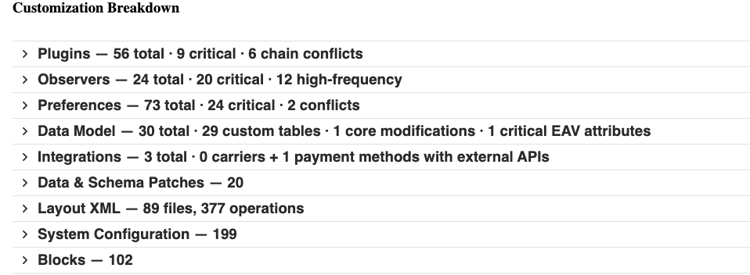
The Customization Breakdown section provides detailed metrics across every category of customization in your store.
Layout XML
The number of Layout XML files and their total operation count. Layout XML defines the structure of every page, including which blocks appear, the containers they appear in, and the page types they are under.
A high file count with many operations signals significant page structure customization that must be re-architected.
Core handle overrides
The number of places where your Layout XML overrides a core Adobe Commerce page handle (for example, checkout_cart_index or catalog_product_view). Core handle overrides are the highest-risk layout signal because they modify page structure at the platform level and require explicit rebuilding.
Blocks
The number of block and template (.phtml) files in your store. Blocks are the primary server-side rendering artifacts. Each block represents a discrete migration task.
High-risk blocks
Blocks that touch core render paths, such as checkout rendering, cart display, and similar front-end surfaces. Any high-risk blocks require individual migration assessment before scheduling.
Themes and email templates
The namespace of your store’s custom theme (for example, BrandName_Theme). The presence of a custom theme means a full theme rebuild is required. Every assessed store with a custom theme namespace must plan a dedicated front-end migration workstream.
Template overrides (core modified)
The number of core Adobe Commerce .phtml templates that have been overridden. Each core template override creates a dependency on a specific version of that template. Platform updates that change the template break the override silently.
Drop-in migration required
Adobe Commerce as a Cloud Service uses a modular drop-in component architecture for storefront surfaces including checkout, cart, and product detail. Customizations to these surfaces must be rebuilt as drop-in components. These customizations can cover a wide range of functionality, such as adding custom checkout steps, modifying cart display logic, or extending the product detail page.
The Drop-in migration required field indicates which storefront areas require drop-in rebuilds.
Module Reports tab
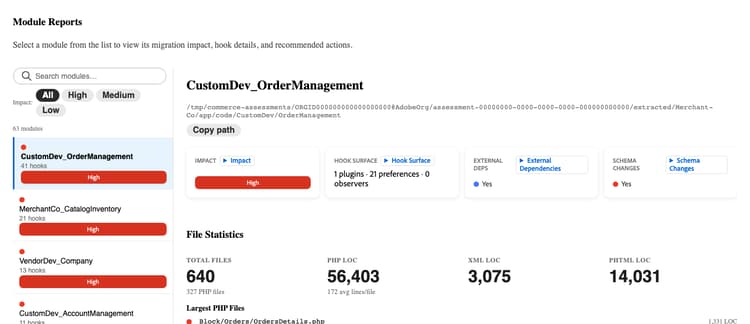
The Module Reports tab contains a dedicated entry for every custom module in your store. Share this information with your technical team.
For each module, the report displays:
Open a module’s breakdown to view its full detail. Modules with a Rebuild migration recommendation include an Open in Developer Agent button, which copies the module’s description directly into the Commerce Developer Agent so you can generate a blueprint for the replacement extension right away.
Workflow
-
Filter to High-impact modules first. These drive the most migration effort and cost.
-
For each custom module, determine answers to the following questions:
- Is this module still actively used?
- Could the module be replaced by a native Adobe Commerce as a Cloud Service feature?
- If the module must be rebuilt, what functionality does its replacement need to provide?
-
Identify custom modules that can be retired or replaced. Each one reduces migration scope before any code is written.
-
For each custom module with a Rebuild migration recommendation, you can either:
- Click Open in Developer Agent to generate a blueprint, or copy the module description using the Commerce Developer agent.
- Copy the description of each custom module with the Rebuild migration recommendation. These descriptions can be given directly to Adobe’s AI developer tools, refer to AI developer tools for Commerce extensibility for more information.
Reference: key terms
AI developer tools for Commerce extensibility
You can use the module descriptions in the Module Reports tab as prompts for Adobe’s AI developer tooling. The tooling assists you in building and deploying a replacement extension that is compatible with Adobe Commerce as a Cloud Service.
What the tools provide
Adobe’s AI developer tools for Commerce extensibility include two primary capabilities.
- Adobe Commerce App Builder MCP server - A Model Context Protocol (MCP) integration that connects AI coding assistants directly to Adobe Commerce documentation, APIs, and App Builder development patterns. Developers can describe what they want to build and the MCP server provides Commerce-aware code generation, architecture guidance, and deployment automation within the IDE.
- Agent skills - Pre-built AI skills covering common Commerce extensibility patterns, such as REST APIs, checkout extensions, storefront components, and event-driven integrations. Skills guide the AI through architecture, implementation, testing, and deployment steps specific to Adobe Commerce as a Cloud Service and App Builder.
Install AI tools
Refer to installing the AI developer tools for full instructions and specific IDE configurations.
Prerequisites: Node.js 22.x, npm 9.0.0 or higher, Adobe I/O CLI.
Install command:
aio commerce extensibility tools-setup
Create prompts from the assessment report
While the assessment gives you a blueprint for development, the AI tools allow your team to start building immediately, before a full migration plan is finalized.
- Open the Module Reports tab and find a High-impact module with a Rebuild recommendation.
- Read the module’s description, for example:
Manages custom shipping rate calculations based on customer account tier and order weight thresholds.
-
Click Open in Developer Agent to copy the description into the Commerce Developer Agent and generate a blueprint right away.
Alternatively, open your IDE, for example GitHub Copilot, Cursor, or Claude with the Commerce extensibility MCP server enabled, and use the module description to prompt the AI agent manually.
-
Review the scaffolded App Builder application and iterate with the agent to refine the implementation.
Next steps
- Open the Summary tab. Review Migration Complexity and Highest-Impact Modules, then check the Customization Breakdown subsections. If your store has a custom theme, high-risk blocks, or a Checkout Drop-in listed, plan a parallel front-end workstream alongside the backend migration.
- Share the Module Reports tab with your technical team or development partner. Ask them to flag any custom modules that are no longer actively used or that could be replaced by an Adobe Commerce as a Cloud Service feature.
- Start building your customizations. On the Module Reports tab, open any module breakdown and select Open in Developer Agent to begin scaffolding a compatible extension directly from that module’s assessment data.
- Schedule a walkthrough call with your Adobe account team. Adobe can review the findings with you, answer any questions about specific modules and storefront signals, and help you map the migration approach for your complexity profile.
Resources
-
Adobe Commerce as a Cloud Service
-
Extensibility
-
Storefront development